
AI Dictation: How AI Makes Voice Typing Actually Usable
Raw speech-to-text is full of filler words and run-on sentences. AI dictation adds a cleanup layer that turns spoken language into text you'd actually send.
Raw speech-to-text output sounds exactly like you talk. Which means it includes "um," "uh," "like," and "so basically" — plus run-on sentences, missing punctuation, and whatever half-formed thought you abandoned mid-sentence.
AI dictation is voice-to-text that adds a language model after the transcription step. The speech recognizer turns your voice into words; the language model turns those words into text you'd actually send.
Here's how the AI dictation pipeline transforms raw speech into polished text:
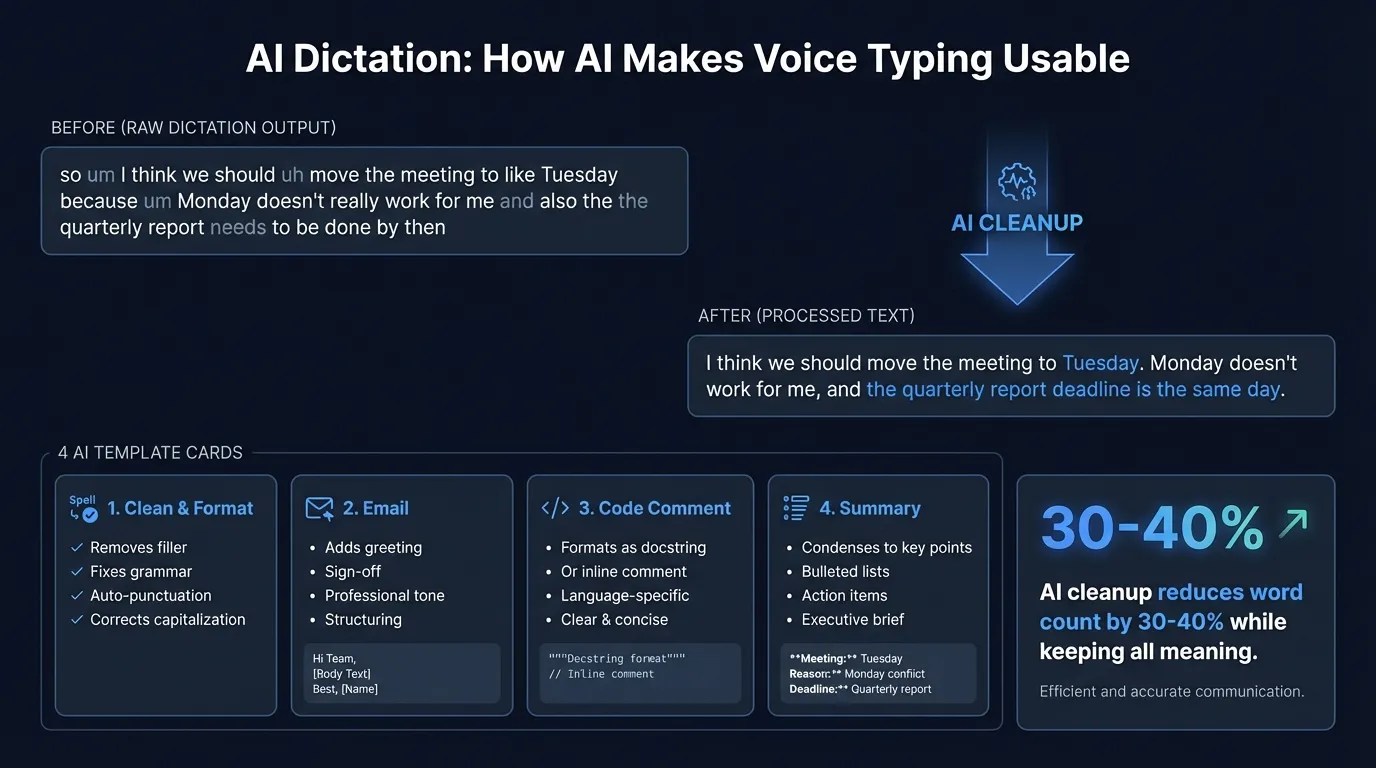
The gap between spoken and written language#
The difference between talking and writing is wider than most people expect.
When you speak, you backtrack. You trail off. You use sentence fragments and repeat yourself. Filler words aren't just verbal tics — they're cognitive pauses while you think of the next idea.
Here's a typical raw transcription from a quick voice note:
"so um I think we should uh move the meeting to like Tuesday because um Monday doesn't really work for me and also the the quarterly report needs to be done by then so yeah Tuesday works better"
A speech recognizer faithfully transcribes every word. That's accurate. It's also not suitable for sending to anyone.
AI post-processing is the cleanup layer that converts spoken language into written language:
"I think we should move the meeting to Tuesday. Monday doesn't work for me, and the quarterly report deadline is the same day."
Same information. A third fewer words. Sounds like something a person wrote.
How the pipeline works#
AI dictation runs two sequential models:
- Speech-to-text — converts audio to words (Whisper or Parakeet, in Hearsy's case)
- Language model — rewrites the words for the target context
The speech model handles pronunciation, accents, and acoustic variation. The language model handles grammar, style, and formatting. They're separate problems that benefit from specialized models.
The language model receives a prompt like: "Clean up this transcription. Remove filler words, fix punctuation, keep all the meaning." The raw transcription is passed as input. The model returns polished text.
This is why the model choice for the AI step matters less than the prompt. A small, fast local model with a well-designed prompt often outperforms a larger cloud model with a generic "fix my text" instruction.
AI templates: matching cleanup to context#
Not all dictation is the same. A voice note to yourself needs different treatment than a client email.
Templates are pre-configured prompts that tell the AI what kind of output to produce. Each applies different cleanup rules.
Clean & format#
General-purpose cleanup. Removes filler words, fixes sentence structure, adds punctuation. Doesn't change tone or add content.
Best for: Slack messages, notes, quick replies, any context where you want natural but clean output.
Email#
Formats output as a professional email: proper greeting and sign-off, correct paragraph breaks, business-appropriate language. The raw dictation can be completely casual — the template restructures it.
Dictated:
"hey sarah just wanted to check on the contract it's been two weeks and we
haven't heard back wondering if there's anything holding things up from your side"

Email template output:
Hi Sarah,

Just wanted to follow up on the contract. It's been two weeks since our last
conversation and we haven't heard back — is there anything on your end holding
things up?

Best,
[Name]
Best for: Client correspondence, follow-up emails, any voice note you want to turn into a professional message.
Code comment#
Formats output as a code comment — either a single-line inline comment or a full docstring. Adjusts for the tense and style appropriate to code documentation.
Dictated:
"this function takes a user ID and checks whether they have an active subscription
it returns true if they do and false if they don't or if the user doesn't exist"

Code comment output:
// Checks if a user has an active subscription.
// Returns true if active, false if inactive or user not found.
Best for: Documenting functions while you're in the file, writing commit messages, explaining complex logic out loud.
Summary#
Condenses long dictation to the essential points. Useful for voice brain-dumps that you want to turn into a structured list of action items or key takeaways.
[Two-minute voice note from a meeting]

Summary output:
- Move meeting to Tuesday
- Q3 report due Friday — blocked on finance approval
- Need Sarah to confirm headcount before Thursday
Best for: Meeting notes, long voice memos, research notes dictated while reading.
Continue reading
AI Transcription That Stays on Your Mac
Run Whisper and Parakeet locally with a native Mac app. No Python setup, no command line.
Local vs cloud AI for cleanup#
The language model step can run locally or via an API. The choice affects latency, privacy, and quality.
| Local (Qwen 2.5 3B) | Cloud (Claude, OpenAI) | |
|---|---|---|
| Added latency | 0.5–1 second | 1–3 seconds |
| Privacy | On-device, nothing transmitted | Text processed on external servers |
| Quality | Good for standard cleanup | Better for complex formatting |
| Cost | Included, no per-use charge | Requires API key, per-token billing |
| Offline | Works without internet | Requires internet connection |
Hearsy runs Qwen 2.5 3B via MLX for the local option. On Apple Silicon, this adds roughly half a second to a second after transcription completes. For most dictation tasks — removing filler words, fixing punctuation, reformatting as email — the local model handles it well.
The cloud models (Claude, OpenAI) handle edge cases better: unusual formatting requests, highly technical vocabulary, or templates with complex structure. If you're dictating in a specialized domain with specific output requirements, the quality difference is real.
For anything sensitive — medical notes, legal dictation, financial discussions — local is the right call. Cloud models see the text of what you said, even though transcription is local.
What AI cleanup actually changes#
Understanding what the AI modifies (and doesn't) avoids unexpected results.
Filler word removal: "um," "uh," "like," "you know," "basically," "so," "right?" at sentence boundaries. The model recognizes these as verbal markers, not semantic content.
Sentence segmentation: Long run-on dictation gets split into proper sentences and paragraphs. The model infers logical breaks from content, not just pauses.
Punctuation: Speech recognizers produce few or no punctuation marks. The AI layer adds periods, commas, question marks, and paragraph breaks based on meaning.
Tone adjustment: The Email template shifts informal language toward professional. "Hey, can you just do this thing?" becomes "Could you please [task]?"
What doesn't change: The information. AI cleanup shouldn't add ideas, change facts, or reorder arguments. A well-designed cleanup prompt instructs the model explicitly: "Keep all meaning. Don't add anything not in the original."
When AI cleanup makes sense#
AI cleanup is worth enabling when:
- You're dictating to external recipients — emails, messages, documents others will read
- You want a first draft, not raw output
- You dictate quickly and conversationally — the faster you speak, the more cleanup helps
It adds unnecessary friction when:
- You need text immediately after speaking and the extra half-second matters
- You're dictating into a structured form or field where reformatting would break the output
- The context is informal enough that raw output is fine — internal Slack messages, quick notes to yourself
Both modes are useful. The right choice depends on what you're writing and who's reading it.
The two-step workflow#
The reason AI dictation outperforms typing for many workflows isn't that voice is faster alone. It's that speaking produces a rough draft and AI cleanup produces something close to final — in one pass.
Typing forces you to edit as you write, which interrupts thinking. Dictating lets you speak continuously, then the AI handles the polish pass. The cognitive load is lower. The output is cleaner.
Apps like Hearsy run both steps locally: Parakeet or Whisper for transcription, Qwen 2.5 3B for cleanup. For most professional dictation scenarios — emails, Slack messages, documentation, code comments — you don't need cloud processing at any point.
If you want to understand what's happening under the hood in the transcription step, the Whisper vs Parakeet comparison covers how the two speech engines work and when each is the better choice. For a broader look at how local models compare to cloud transcription services, see AI transcription: local vs cloud.
Frequently asked questions#
What is AI dictation?#
AI dictation is voice-to-text that adds a language model cleanup step after transcription. The speech recognizer converts audio to words; the language model removes filler words, fixes punctuation and grammar, and reformats the text for the target context — email, code documentation, prose, or structured notes.
How does AI cleanup improve raw transcription?#
A language model receives the raw transcription and a task-specific prompt (remove fillers, format as email, summarize to bullet points). It returns polished text. For conversational dictation, word count typically drops 25-40% while preserving all the meaning — the information stays intact, the verbal scaffolding goes away.
What AI models process dictation locally?#
Qwen 2.5 3B via MLX runs entirely on Apple Silicon. It adds roughly 0.5-1 second after transcription and handles standard cleanup tasks — filler removal, punctuation, basic reformatting — without internet access. Cloud options (Claude, OpenAI) offer higher accuracy for complex formatting but require an API key and an internet connection.
Does AI cleanup add latency?#
Yes. The cleanup runs after you stop speaking, not during transcription. Local AI adds roughly 0.5-1 second. Cloud AI adds 1-3 seconds depending on network conditions. If you need raw transcription without any added delay, you can disable AI cleanup and use Hearsy's Parakeet mode for real-time transcription at around 200ms response latency.
Which template handles which use case?#
Clean & Format removes filler and fixes grammar without changing tone — use it for messages and notes. Email adds greeting, sign-off, and professional structure — use it for any correspondence. Code Comment formats as an inline comment or docstring — use it while coding. Summary condenses to key points — use it for voice brain-dumps and meeting notes.
Ready to Try Voice Dictation?
Hearsy is free to download. No signup, no credit card. Just install and start dictating.
Download Hearsy for MacmacOS 14+ · Apple Silicon · Free tier available
Related Articles
What Is OpenAI Whisper? A Complete Guide to Local AI Transcription
14 min read
Whisper vs Parakeet: Speed, Accuracy, and Language Support
10 min read
Whisper Large V3 vs V3 Turbo: Speed, Accuracy, Memory
10 min read
How to Run Whisper Locally on Mac (Without the Command Line)
8 min read
How to Convert Audio to Text on Mac: 5 Methods Compared
14 min read