
Best Whisper Apps for Mac in 2026: 7 Apps Compared
Seven Mac apps that use OpenAI's Whisper model compared — MacWhisper, Hearsy, SuperWhisper, Spokenly, VoiceInk, BetterDictation, and Aiko. Features, pricing, and which to use.
OpenAI released Whisper as an open-source model in September 2022 under the MIT license. Within a year, a dozen Mac apps had built on it — some for file transcription, others for real-time dictation, a few that do both. The quality gap between them is larger than you'd expect given that most use the same underlying model.
This guide covers seven Mac apps built on Whisper (and Whisper-adjacent models): MacWhisper, Aiko, SuperWhisper, Spokenly, VoiceInk, BetterDictation, and Hearsy. It separates file transcription apps from real-time dictation apps, explains where the differences actually come from, and recommends which to use for each use case.
Here's an overview of all seven apps and how they stack up:
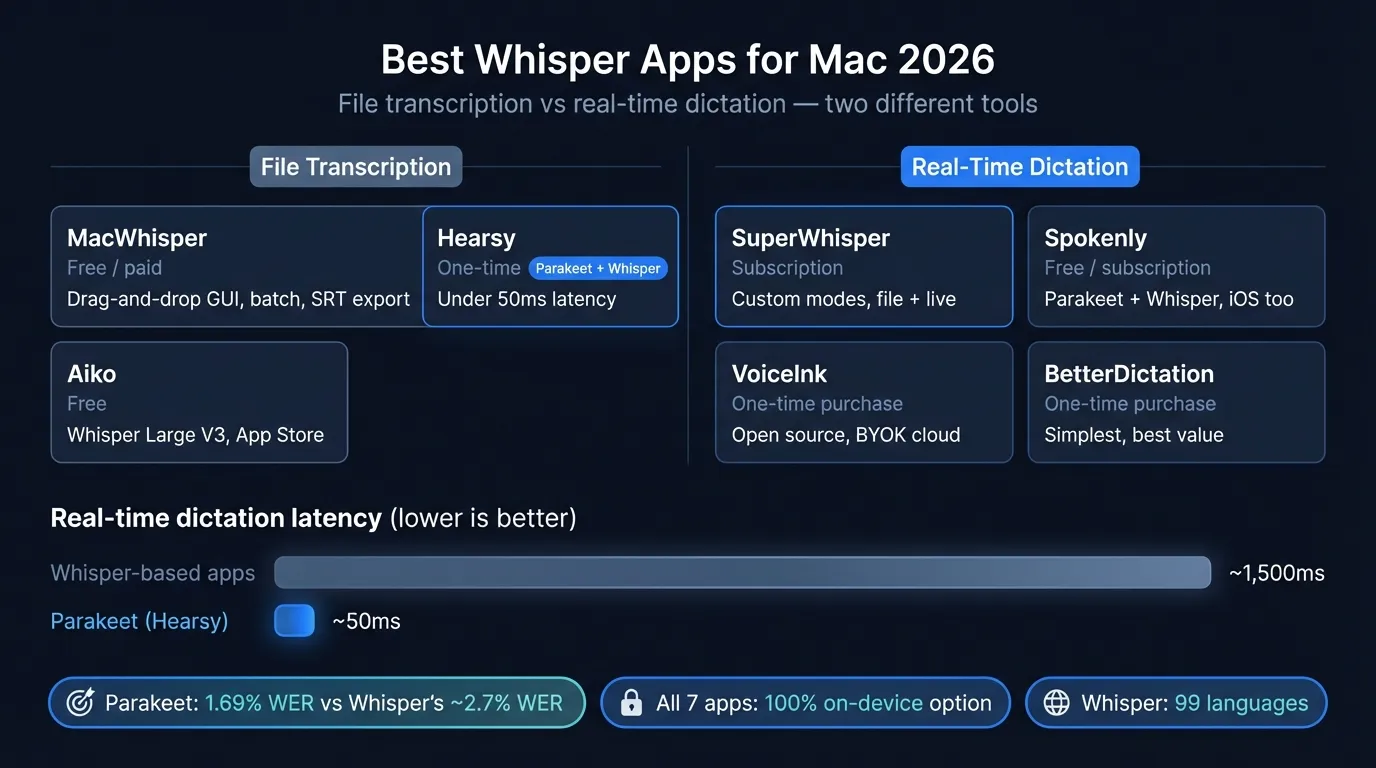
Quick comparison: all seven Whisper apps#
| App | Use case | Engine | Price | Key differentiator |
|---|---|---|---|---|
| MacWhisper | File transcription | Whisper | Free / $79.99 lifetime | Best GUI for file transcription |
| Aiko | File transcription | Whisper Large V3 | Free | Free Large V3 accuracy |
| SuperWhisper | Real-time + files | Whisper / Parakeet | $84.99/yr or $249 lifetime | Most customizable dictation modes |
| Spokenly | Real-time dictation | Whisper + Parakeet | Free local / $7.99/mo Pro | Local-only free tier, BYOK AI |
| VoiceInk | Real-time dictation | Whisper + cloud | $39 one-time | Open source, one-time pricing |
| BetterDictation | Real-time dictation | Whisper | $24–39 one-time | Best value dictation app |
| Hearsy | Real-time dictation | Parakeet + Whisper | One-time | Parakeet default + AI post-processing |
One important distinction before the details: file transcription and real-time dictation are different products solving different problems. File apps convert an existing audio recording to text. Dictation apps capture live speech and type directly into any Mac app in focus. This difference shapes everything about how each app is designed.
MacWhisper — best for file transcription with a GUI#
Best for: Regular file transcription without the terminal
MacWhisper is the most fully-featured GUI for Whisper file transcription on Mac. Drag in an audio or video file, select a model, click Transcribe. The transcript appears with timestamps; you can edit inline, search across transcripts, and export.
Free tier includes Whisper Tiny, Base, and Small models — no file count limits, no account required. Adequate for clear speech recordings: voice memos, podcast episodes with a decent microphone, meeting recordings in a quiet room.
Pro tier ($79.99 one-time, as of early 2026) unlocks Large V2, Large V3, and Large V3 Turbo — the models you want for difficult audio, strong accents, specialized vocabulary, or anything where accuracy matters. Pro also adds:
- Batch transcription — queue multiple files, walk away
- Speaker diarization — identifies who spoke when across a recording
- System audio recording — capture internal Mac audio (for meetings, webinars)
- Translation — transcribe non-English audio and translate to English
Supported formats: MP3, WAV, M4A, MP4, MOV, OGG, OPUS, and anything macOS can decode.
Export formats: TXT, CSV, PDF, SRT. The SRT export works directly as subtitle input for video editors.
Transcription speed: On an M2 MacBook Pro using Whisper Large V3 Turbo, a 30-minute recording takes roughly 30–60 seconds. Smaller models (Base, Small) are faster; Large V3 is slower but more accurate. See Whisper Large V3 vs V3 Turbo for the full benchmark.
Privacy: All processing is on-device. No audio leaves your Mac during transcription.
MacWhisper does one thing well: transcribe files. It doesn't do live dictation — if you want to speak and have text appear in your active app, MacWhisper isn't the tool. For file work, it's the most practical dedicated option.
Aiko — best free file transcription#
Best for: One-off transcription with maximum accuracy, no setup
Aiko is a free App Store app from Sindre Sorhus that uses Whisper Large V3 on macOS. Unlike MacWhisper's free tier, which uses smaller models, Aiko gives you the largest, most accurate Whisper model at no charge.
What you get for free: Whisper Large V3, 100+ languages, on-device processing, export to text. No account, no subscription, no command line.
What Large V3 means in practice: Approximately 2.7% word error rate on LibriSpeech test-clean — the same accuracy as the paid MacWhisper Pro tier using the same model.
The catch: Whisper Large V3 requires roughly 3.1 GB of unified memory. Aiko recommends 16 GB of RAM. On 8 GB Macs, model loading is slow and memory pressure is high — other apps will noticeably slow down during transcription.
Limitations: No model selection (Large V3 only, no fallback to a faster model), no batch processing, no SRT export, no speaker diarization. Aiko does one thing: drag in a file, get a transcript.
Aiko is the right choice when: you need free Large V3 accuracy, you use it occasionally, and you have a 16 GB Mac. For frequent use or batch processing, MacWhisper Pro is more practical despite the cost.
SuperWhisper — most customizable dictation#
Best for: Power users who want fine-grained control over voice modes and AI post-processing
SuperWhisper combines Whisper-based transcription with an extensive customization layer: pre-defined recording modes that adjust tone, formatting, and context based on where you're working.
Real-time dictation: Works system-wide — press a hotkey, speak, text appears in whatever app is active. Uses Whisper and Parakeet models depending on configuration; you can choose which model runs per mode.
File transcription: SuperWhisper also handles file imports — drag in an audio or video file and get a transcript. This makes it the only app that genuinely covers both use cases in one purchase.
Custom modes: The defining SuperWhisper feature. You can configure separate modes for email (formats as paragraphs), coding comments (formats as code comments), meeting notes (bullet points), Slack (conversational), and anything else. Each mode carries its own system prompt that shapes how the AI processes and formats the output.
Language support: 100+ languages and dialects; translation to English available.
Pricing (2026): SuperWhisper Pro is $8.49/month or $84.99/year; a $249 lifetime option is available. The free tier allows up to 15 minutes of recording using all Pro features — a reasonable trial window. At $249 lifetime, it sits at the premium end of dictation pricing.
Privacy: On-device transcription available (offline mode works without Wi-Fi). AI post-processing that uses cloud LLMs (GPT-4o, Claude) sends text — not audio — to external servers. You can disable cloud post-processing to keep everything local.
SuperWhisper's value proposition is customization depth. If you dictate across many different contexts and want mode-specific formatting, it's the most capable option. If you want simpler and faster, the mode system is more overhead than most users need.
Spokenly — local-first with BYOK AI#
Best for: Unlimited local dictation with optional AI enhancement on your own API keys
Spokenly uses both Whisper and Parakeet for real-time dictation, supports 100+ languages, and has a Local-Only mode that gives unlimited free dictation with no account or subscription. Downloaded models stay on your Mac; no audio leaves your device.
Pricing model: Local models (Whisper and Parakeet) are completely free with no usage caps. Spokenly Pro ($7.99/month) adds cloud AI models for higher accuracy, plus BYOK (bring-your-own-key) support for GPT-4 and Claude for AI text post-processing. If you only need on-device transcription, you never need a paid plan.
Parakeet support: Like Hearsy, Spokenly supports Parakeet TDT in addition to Whisper — the streaming architecture that produces text while you're still speaking. For English real-time dictation, this is meaningfully faster than Whisper's chunk-based processing.
Platform coverage: Spokenly has both a Mac app and an iOS keyboard, with the same API-key based account across both. If you dictate on iPhone and Mac, this is the only app in this list that covers both natively.
AI post-processing: With your own OpenAI or Anthropic API key, Spokenly can run GPT-4 or Claude on your transcription to fix grammar, reformat text, or apply custom prompts. You pay for API usage directly to OpenAI or Anthropic — Spokenly doesn't mark it up.
Spokenly is a strong option for users who want the privacy guarantee of local processing, don't want to pay monthly for AI features, and are comfortable managing their own API keys. The iOS coverage is a differentiator no other app in this list offers.
Continue reading
AI Transcription That Stays on Your Mac
Run Whisper and Parakeet locally with a native Mac app. No Python setup, no command line.
VoiceInk — open source, one-time purchase#
Best for: Privacy-conscious users who want an open-source option with one-time pricing
VoiceInk is an open-source macOS dictation app on GitHub, available as a one-time purchase from the App Store. It uses local Whisper models by default, with optional cloud backends (Groq, Deepgram, Cerebras, Gemini) via BYOK for users who want higher-speed cloud transcription.
Pricing: $39 personal license (one-time, up to two devices). A 7-day trial with full feature access is available before purchase.
Key features: Local Whisper transcription, intelligent app detection (applies pre-configured settings based on which app you're in), custom vocabulary (teach it names, technical terms, abbreviations), Push-to-Talk mode, and context awareness using your screen content to improve accuracy.
Open source: VoiceInk's code is publicly available on GitHub, which means you can audit exactly what the app does with your audio. For security-conscious users, this transparency is meaningful.
Cloud backends: Groq's Whisper endpoint is notably fast — effectively real-time with very low latency — and VoiceInk supports it directly if you have a Groq API key. This is useful on older or low-RAM Macs where local Large V3 is slow.
Privacy: Local processing by default; cloud backends are opt-in and use your own API keys (no VoiceInk intermediary server handling your audio).
VoiceInk occupies an interesting position: open source for transparency, one-time pricing for value, and optional cloud backends for flexibility. The $39 price is fair for what it provides. The trade-off versus Hearsy is that VoiceInk doesn't offer Parakeet as a local streaming engine — Whisper is the primary local model, with cloud options for speed.
BetterDictation — best value#
Best for: Simple, reliable Whisper dictation at the lowest price point
BetterDictation uses OpenAI's Whisper model on Apple's Neural Engine for offline dictation, with push-to-talk simplicity and 100+ language support system-wide across all Mac apps.
Pricing: $24 lifetime (base) or $39 lifetime (Pro, which adds AI post-processing features including stammer correction, automatic formatting, and grammar cleanup). No subscription option; both tiers are one-time purchases.
Design philosophy: BetterDictation is deliberately simple — push to talk, speak, done. No mode system, no elaborate configuration. The focus is on the core use case: press a key, dictate, have it appear correctly.
AI post-processing: The $39 Pro tier adds AI cleanup of your transcription — removing false starts, fixing grammar, auto-formatting based on context. This uses cloud AI (powered by the user's API key or a BetterDictation subscription add-on, depending on the feature).
Privacy: Local Whisper processing only. No audio leaves your Mac during transcription.
Who uses it: BetterDictation cites users at Disney, Amazon, and Goldman Sachs — suggesting enterprise adoption driven by the privacy guarantees of local processing combined with straightforward per-seat pricing.
If you want Whisper dictation with minimal configuration at the lowest price point, BetterDictation is hard to beat at $24. The trade-off is that it has the least flexibility of any app in this list — no file transcription, no Parakeet engine, limited customization.
Hearsy — best overall for real-time dictation#
Best for: Users who want the fastest real-time dictation on Mac, with optional Whisper fallback and AI enhancement
Hearsy approaches the Whisper app category differently. The default engine isn't Whisper — it's Parakeet TDT, NVIDIA's streaming transducer model, which processes audio differently from Whisper and produces text with under 50ms latency on Apple Silicon.
Why Parakeet changes the experience#
Whisper uses an encoder-decoder architecture. It processes audio in fixed 30-second chunks; the decoder generates text output after each chunk ends. For real-time dictation, this produces a perceivable delay — roughly 1–2 seconds after you pause before text appears.
Parakeet TDT is a streaming transducer. It processes audio frame-by-frame as it arrives, emitting tokens continuously. Text appears while you're still speaking, not after. The practical experience is closer to typing with your voice than waiting for a transcription.
On accuracy benchmarks, Parakeet TDT 0.6B v2 achieves 1.69% word error rate on LibriSpeech clean (NVIDIA, 2025), compared to Whisper Large V3's approximately 2.7% WER. For standard English speech, Parakeet is both faster and more accurate.
When Whisper is better#
Parakeet is English-only. For 99-language coverage — French, Spanish, German, Japanese, Mandarin, and 95 others — Hearsy switches to Whisper Large V3. One click in Settings → Speech Engine. The model loads once and stays resident; there's no reconfiguration needed between languages.
AI post-processing#
Hearsy includes optional AI enhancement that runs on your transcription after it's captured. This can reformat dictation into clean prose, fix filler words, apply custom prompts, or adjust formality. LLM options include a local Qwen model (fully on-device), Claude via your own API key, or OpenAI via your own API key.
When local enhancement is configured, your entire workflow — speech capture, transcription, text refinement — happens on your Mac. No audio, no text ever reaches an external server.
Pricing#
Hearsy is a one-time purchase with no subscription. This is relevant in a category where most capable apps charge $7–$9/month.
What Hearsy doesn't do#
File transcription. Hearsy is built for live dictation — press a hotkey, speak, text appears in your active app. If you need to transcribe an existing audio file (interview recording, meeting export, voice memo), use MacWhisper or Aiko alongside Hearsy. The two use cases are complementary.
The key distinction: file transcription vs real-time dictation#
Understanding the difference between these two categories helps you pick the right tool without overpaying.
File transcription apps process a recording you already have. You give them a file; they return text. The workflow is: Record elsewhere → save audio file → open transcription app → get transcript. MacWhisper and Aiko are file transcription apps.
Real-time dictation apps capture your voice and type directly into whatever Mac application you're currently using. The workflow is: Open any app → press hotkey → speak → text appears at cursor. Hearsy, SuperWhisper, Spokenly, VoiceInk, and BetterDictation are real-time dictation apps.
SuperWhisper handles both, which makes it the only single-app solution if you need both workflows. But "both" comes with trade-offs — the pricing is at the premium end, and the feature depth on each use case is less than the dedicated alternatives.
For most users: pick a dedicated file app (MacWhisper) and a dedicated dictation app (Hearsy), and you'll have a better experience than any single "does everything" tool.
Which Whisper app should you use?#
| If you need... | Use |
|---|---|
| File transcription GUI, regular use | MacWhisper (free tier or Pro) |
| Free Large V3 file transcription, 16 GB Mac | Aiko |
| Real-time dictation, fastest possible latency | Hearsy (Parakeet engine) |
| Real-time dictation, 99 languages | Hearsy (Whisper mode) or SuperWhisper |
| Both file transcription and real-time dictation | SuperWhisper |
| Local dictation with no monthly fee | Hearsy, VoiceInk, or BetterDictation |
| Lowest price point for Whisper dictation | BetterDictation ($24) |
| Open-source transparency | VoiceInk |
| Dictation on Mac + iPhone | Spokenly |
| Custom per-context dictation modes | SuperWhisper |
| BYOK for AI post-processing | Spokenly or VoiceInk |
How the underlying technology differs#
All these apps share Whisper as a foundation, but what varies is the runtime, the model selection, and whether the app adds streaming architecture on top.
Whisper as a file transcription model: Whisper was originally designed as an offline file transcription model — you feed it audio, it returns text. This is why it excels in MacWhisper and Aiko, which stay close to the model's native use case.
Adapting Whisper for real-time dictation: Turning an encoder-decoder file model into a real-time dictation engine requires compromises. Apps like SuperWhisper and BetterDictation solve this by processing audio in short segments (VAD — voice activity detection — triggers a Whisper run when you pause). This adds latency at the end of each phrase, which is inherent to Whisper's architecture. There's no way around it: the decoder can only generate text after the encoder finishes processing a chunk.
Parakeet as a purpose-built streaming engine: Parakeet TDT was designed from the ground up for streaming. The transducer architecture outputs tokens at each audio frame rather than waiting for a full chunk. This architectural difference — not optimization tricks — is why Parakeet's latency is an order of magnitude lower than Whisper-based dictation apps.
Apps that offer Parakeet (Hearsy, Spokenly, SuperWhisper on some model tiers) can use it for English and fall back to Whisper for everything else. This hybrid approach is the right architecture for real-time dictation in 2026.
Frequently asked questions#
What is the best Whisper app for Mac?#
For real-time dictation, Hearsy offers the best combination of speed (Parakeet TDT, under 50ms latency), accuracy (1.69% WER on LibriSpeech vs Whisper's ~2.7%), and a one-time purchase model. For file transcription, MacWhisper is the most complete option — drag-and-drop GUI, multiple export formats, batch processing, and speaker diarization. If you need both in one app, SuperWhisper is the only choice that handles both well, at a higher price point.
Is there a free Whisper app for Mac?#
Yes. Aiko (App Store) is free and uses Whisper Large V3 for file transcription with no time limits or file caps. MacWhisper's free tier uses Whisper Base and Small models — accurate enough for clear speech recordings. Spokenly offers unlimited free local dictation using downloaded Whisper and Parakeet models. For real-time dictation, most paid apps offer free trials.
Can a Whisper app replace Apple's built-in dictation?#
Yes. All real-time dictation apps in this guide work system-wide — they replace or supplement Apple's built-in dictation, which is limited by a 30-second recording cap on older macOS versions and variable accuracy on technical vocabulary. The main advantage of third-party Whisper apps is unrestricted dictation length, higher accuracy on domain-specific content, and on-device processing regardless of whether you have Apple Intelligence enabled.
Do Whisper apps require an internet connection?#
No. All seven apps offer on-device transcription that doesn't require internet access. MacWhisper, Aiko, Hearsy, and BetterDictation are entirely offline. SuperWhisper, Spokenly, and VoiceInk also offer optional cloud AI features, but these are opt-in and use your own API keys — the core transcription is always local.
Why does Parakeet matter if Whisper already works well?#
Whisper's latency for real-time dictation is 1–2 seconds per phrase on Apple Silicon — you speak, pause, and text appears after the pause. Parakeet's latency is under 50ms — text streams out while you're still speaking. For writing emails or documents, this difference changes the dictation experience from "transcription tool" to "voice typing." Parakeet is English-only, which is why Whisper remains useful as a fallback for other languages.
Which app has the best privacy for sensitive content?#
All seven apps can run entirely on-device with no network access during transcription. For the strongest privacy guarantees: MacWhisper and Aiko have no cloud option at all (file transcription only, local). Hearsy's local LLM option (Qwen, on-device) means even AI post-processing never leaves your Mac. VoiceInk's open-source codebase lets you audit exactly what happens to your audio.
For a deeper look at the accuracy difference between Whisper's model tiers, see Whisper Large V3 vs V3 Turbo. For a comparison of local versus cloud transcription services, see AI transcription: local vs cloud. For guidance on running Whisper directly from the command line, see how to run Whisper locally on Mac. For how to convert an existing audio file to text on Mac (all methods), see convert audio to text on Mac.
Ready to Try Voice Dictation?
Hearsy is free to download. No signup, no credit card. Just install and start dictating.
Download Hearsy for MacmacOS 14+ · Apple Silicon · Free tier available
Related Articles
What Is OpenAI Whisper? A Complete Guide to Local AI Transcription
14 min read
Whisper vs Parakeet: Speed, Accuracy, and Language Support
10 min read
Whisper Large V3 vs V3 Turbo: Speed, Accuracy, Memory
10 min read
How to Run Whisper Locally on Mac (Without the Command Line)
8 min read
How to Convert Audio to Text on Mac: 5 Methods Compared
14 min read