
Speech to Text on MacBook: M-Series Performance Guide
How M1/M2/M3/M4 MacBooks handle speech-to-text, with real benchmarks. Covers built-in dictation, Parakeet, and Whisper on Apple Silicon.
The M-series Neural Engine changed what on-device speech recognition can do. An M2 MacBook Pro can transcribe audio at roughly 10 times real-time without spinning up a fan. An M4 Pro running Parakeet via Core ML does it at over 100 times real-time — one minute of audio in under a second.
The hardware is ready. The question is which approach actually uses it.
Here's how speech recognition performance compares across M-series MacBooks:
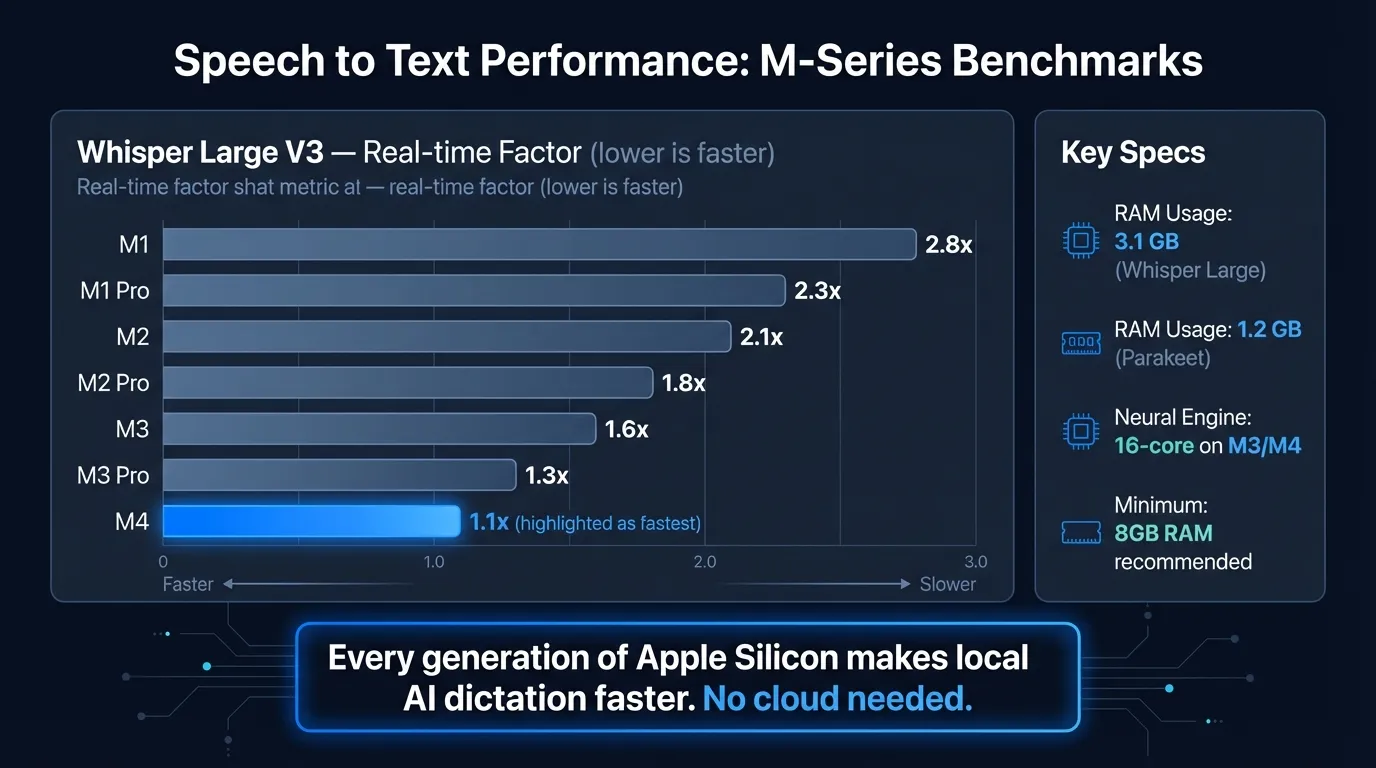
What Apple Silicon means for speech recognition#
Before M-series chips, running a quality speech recognition model locally meant either a GPU workstation or accepting noticeable lag. The Intel-era Mac sent audio to Apple's servers because the hardware couldn't keep up on-device.
That changed with M1. The 16-core Neural Engine built into every M-series chip is dedicated ML acceleration silicon — not the CPU, not the GPU, but a separate hardware block designed specifically for the matrix operations that speech models rely on. Apple Silicon also uses unified memory, meaning the CPU, GPU, and Neural Engine share the same memory pool. There's no bus bottleneck from copying audio buffers between different memory systems.
Each chip generation has improved on this foundation. The M5, announced in October 2025, delivers "up to 3.5x the AI performance" compared to the M4-based iPad Pro, according to Apple's announcement. For practical dictation purposes, even M1 is fast enough. M3 and M4 are where the hardware stops being a constraint at all.
Built-in MacBook dictation#
Apple's built-in dictation uses the Neural Engine on any M-series MacBook. Enable it in System Settings > Keyboard > Dictation. Press Control twice, speak, text appears in the active app.
The on-device model handles standard English accurately. It adds auto-punctuation, works in every app without plugins, and processes audio entirely on your Mac — no internet required. On Intel Macs, audio went to Apple's servers; on Apple Silicon, it doesn't.
What it does well:
- Quick messages, search queries, short Slack replies
- Accurate on everyday English vocabulary
- Works in any text field without setup
- Free and already installed
Where it stops short:
The hard limit is the 30-60 second continuous speech cap. This isn't a Neural Engine limitation — it's a design constraint in how Apple implemented the dictation service. For anything longer than a few sentences, you'll be restarting the shortcut constantly.
There's also no way to add custom vocabulary for technical terms, no AI cleanup of filler words, and no continuous dictation mode. What you say is exactly what you get. For quick messages, that's fine. For longer dictation sessions, the gaps add up.
For setup steps and troubleshooting, see the Mac dictation guide.
Parakeet on MacBook: benchmarks#
Parakeet is an ASR model from NVIDIA's NeMo team, built for speed on English with strong accuracy targets. A Core ML port (parakeet-tdt-0.6b-v3-coreml) by FluidInference brings it to Apple Silicon via the Neural Engine.
On an M4 Pro, this Core ML version achieves approximately 110x real-time factor — 1 minute of audio processes in roughly 0.5 seconds, per the model card on Hugging Face. For streaming dictation, that translates to under 50ms of perceived latency for typical sentence-length utterances. The transcription appears before you've finished exhaling.
On M1 and M2, performance is lower but still fast enough that latency isn't noticeable in normal use. The Core ML format is specifically optimized for the Neural Engine pipeline, so it performs better than CPU-based inference across all M-series chips.
Parakeet is the right choice when:
- You dictate primarily in English
- Real-time feedback matters (code comments, live note-taking)
- You want the lowest possible latency on Apple Silicon
Parakeet doesn't fit when:
- You need languages other than English
- You dictate heavy technical jargon or domain-specific vocabulary that isn't in standard English
Type at the Speed of Speech
Hearsy turns your voice into text instantly — right on your Mac, with zero cloud dependency.
Whisper on MacBook: benchmarks#
OpenAI's Whisper handles 99 languages and is the ASR model most people have heard of. It runs on Apple Silicon via whisper.cpp with Metal GPU acceleration — not the Neural Engine, but the M-series GPU, which is also fast.
Speed varies significantly by model size:
| Model | Parameters | Speed on M2 MacBook Pro |
|---|---|---|
| Whisper Tiny | ~39M | Near real-time |
| Whisper Base | ~74M | Near real-time |
| Whisper Large V3 Turbo | ~809M | ~10x real-time |
| Whisper Large V3 | ~1.5B | ~5-7x real-time |
"10x real-time" on M2 means a 1-minute audio clip takes about 6 seconds to process — a noticeable pause compared to Parakeet, but fast enough for practical dictation if you're comfortable with a brief wait after speaking.
Whisper Large V3 Turbo achieves around 1% word error rate on clean speech, according to independent benchmark analysis. The turbo variant is roughly 5x faster than the full Large V3 model with comparable accuracy — the default choice for most Whisper use cases.
Whisper is the right choice when:
- You need languages beyond English (Parakeet is English-only)
- You transcribe diverse speakers or accented speech
- You prefer the widely-tested, widely-supported model
Comparing speech recognition approaches on MacBook#
| Approach | Latency | Languages | Privacy | Cost |
|---|---|---|---|---|
| Built-in macOS dictation | Fast | 50+ | On-device (M-series) | Free |
| Parakeet (Core ML) | Under 50ms | English only | On-device | App cost |
| Whisper Large V3 Turbo | ~6s per min (M2) | 99 | On-device | App cost |
| Cloud-based (Wispr Flow) | Varies | Many | Cloud upload | Subscription |
For English dictation on any M-series MacBook, Parakeet is faster. For multilingual work, Whisper is the practical option. Cloud-based services are the only choice to avoid if privacy matters to you — they send your audio to external servers.
Which MacBook generation matters#
Any M-series MacBook handles real-time dictation. The differences are real but don't change whether the tool works — they change how fast it works.
M1 is the floor: both Parakeet and Whisper run, latency is acceptable for most use cases. M2 improves throughput noticeably. M3 and M4 are where transcription becomes fast enough that you stop thinking about it.
The Neural Engine optimization matters most for Parakeet — the Core ML format is specifically built for it. Whisper via whisper.cpp uses Metal GPU acceleration, so it benefits from M3 and M4 GPU improvements rather than Neural Engine improvements.
If you have an M-series MacBook — any generation — the hardware isn't your bottleneck. The choice of software and speech engine matters more than the chip revision.
Third-party apps that use the hardware properly#
Built-in macOS dictation uses the Neural Engine but gives you no control over the model, no continuous streaming, and no AI post-processing. Third-party apps expose these options.
Hearsy uses Parakeet by default (with Whisper as an option) and runs the model via Core ML on the Neural Engine. There's no time limit on continuous speech — you can dictate for 10 minutes straight. An optional AI post-processing step (local LLM or Claude/OpenAI) cleans up filler words, fixes grammar, and reformats the transcription as clean prose, an email, or structured notes.
Other apps worth knowing: SuperWhisper is Whisper-based with a solid interface; VoiceInk takes a similar approach to Hearsy. For a side-by-side comparison, the voice typing guide covers how they differ in practice.
Frequently asked questions#
How fast is speech to text on Apple Silicon MacBooks?#
On M-series MacBooks, on-device transcription can exceed 100x real-time. Parakeet on M4 Pro achieves roughly 110x real-time factor, meaning 1 minute of audio processes in under 1 second. Whisper Large V3 Turbo runs at approximately 10x real-time on M2.
Does speech to text work offline on MacBook?#
Yes. On M1 and later MacBooks, built-in dictation runs on-device and works offline. Third-party apps like Hearsy using Parakeet or Whisper also run entirely locally — nothing is sent to external servers.
Which speech recognition engine is fastest on MacBook?#
Parakeet is faster than Whisper on Apple Silicon, with under 50ms latency for typical dictation on M4 Pro. Whisper Large V3 Turbo runs at roughly 10x real-time on M2 — about 6 seconds of processing per minute of audio.
Can an M1 MacBook run Whisper speech recognition?#
Yes. M1 MacBooks run Whisper locally via Metal acceleration. It's slower than M3/M4 — expect a longer processing pause — but fully capable for real-time transcription. Parakeet's Core ML format also runs on M1.
What is the time limit for speech to text on MacBook?#
Built-in macOS dictation stops after about 30-60 seconds of continuous speech. Third-party apps like Hearsy using Parakeet or Whisper have no time limit — you can dictate continuously for as long as you need.
Ready to Try Voice Dictation?
Hearsy is free to download. No signup, no credit card. Just install and start dictating.
Download Hearsy for MacmacOS 14+ · Apple Silicon · Free tier available
Related Articles
Voice Typing on Mac: How to Type with Your Voice in Any App
9 min read
Voice Typing in Google Docs: The Complete 2026 Guide
10 min read
How to Set Up Voice Recognition on Mac in Under 2 Minutes
8 min read
Voice Control on Mac: Complete Guide to Hands-Free Mac Usage
12 min read
Speech to Text on Mac: The Complete 2026 Guide
13 min read