
Offline Dictation Software: How to Dictate Without an Internet Connection
Offline dictation software processes speech on-device with no internet required. Here's how on-device AI works, which Mac apps support it, and when you need it.
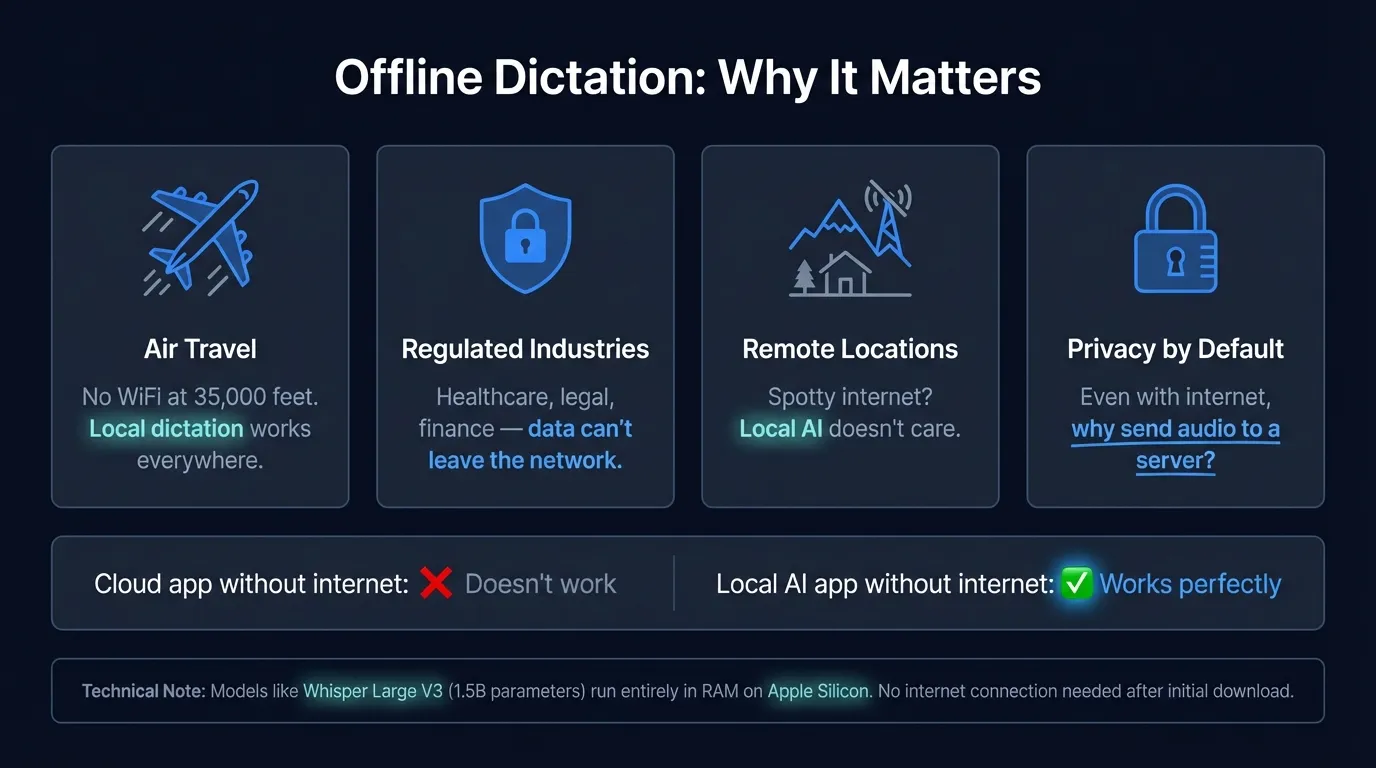
Cloud dictation stops working at 35,000 feet. On a flight, on a network that blocks external services, or in a building with poor connectivity, apps that route audio to remote servers fail entirely.
Offline dictation software processes speech on your device using a local AI model. No network request is made during transcription. Audio is captured, run through a model that lives in RAM, and converted to text — without touching the internet.
The distinction matters because most popular dictation apps depend on cloud connectivity by default. Google Docs Voice Typing, Dragon Anywhere, and most AI-enhanced dictation tools route audio to remote servers. When the connection drops, transcription stops.
This post covers how offline speech recognition works technically, which Mac apps support it, what accuracy you can expect, and the situations where offline capability makes the real difference.
Here's a quick overview of how offline dictation compares across apps and key factors:
How offline speech recognition works#
Traditional cloud speech recognition sends compressed audio to a remote server, runs a language model on that server's hardware, and returns a text string. The computation happens elsewhere. Your device just records and displays.
Offline speech recognition runs the same type of model locally. The core difference is where computation happens.
The models that make this practical are smaller than their cloud counterparts but optimized for inference efficiency. On Apple Silicon Macs, the Neural Engine — dedicated ML acceleration hardware built into M-series chips — handles inference that previously required a GPU-equipped server. A model that once needed data center hardware now runs at real-time speed on a laptop.
Two models power most offline dictation apps on Mac:
OpenAI Whisper is a general-purpose speech recognition model trained on 680,000 hours of multilingual audio. The Large V3 variant achieves 2.7% word error rate on the LibriSpeech clean benchmark (OpenAI, 2023). On an M2 MacBook Pro with Metal acceleration, Whisper Large V3 runs at approximately real-time speed. It supports 99 languages, which makes it the default for multilingual dictation.
NVIDIA Parakeet TDT 0.6B v2 is an English-only model optimized for speed. On the LibriSpeech clean benchmark, it achieves 1.69% word error rate (NVIDIA, 2025). Response time on Apple Silicon is under 50ms — text appears almost simultaneously with speech. For English dictation, Parakeet is faster than Whisper with equivalent accuracy on standard speech.
Both models run entirely in RAM. After the initial model download, no audio or data leaves your device during transcription.
Offline dictation on macOS: the built-in option#
macOS has built-in dictation that works offline — but only on certain hardware.
On Apple Silicon Macs (M1, M2, M3, and M4), macOS processes dictation on-device. When you press the dictation shortcut, audio is processed locally using Apple's on-device speech model. No data goes to Apple's servers. This works in airplane mode.
On Intel Macs, macOS routes dictation through Apple's servers. There's no offline fallback. If you're using an older Mac, built-in dictation requires an internet connection.
The limitation with macOS built-in dictation, regardless of chip: it's designed for short inputs. It stops listening after about 30 seconds of continuous speech. For anything longer than a quick note, it times out before you finish.
Offline dictation apps for Mac#
| App | Model | Offline | Continuous dictation | Price |
|---|---|---|---|---|
| Hearsy | Parakeet, Whisper | Yes | Yes | One-time |
| SuperWhisper | Whisper | Yes | Yes | Subscription |
| MacWhisper | Whisper | Yes | File transcription | One-time |
| macOS built-in | Apple model | Yes (Apple Silicon only) | No (30s limit) | Free |
| Wispr Flow | Cloud + local option | Partial | Yes | Subscription |
| Google Docs Voice Typing | Cloud | No | Yes | Free |
Hearsy uses Parakeet for English (under 50ms, 1.69% WER) or Whisper for multilingual support. Both models run locally and process audio entirely on-device. It provides continuous system-wide dictation — press a hotkey, speak as long as needed, and text pastes directly into the active app. Works fully in airplane mode.
SuperWhisper runs Whisper locally with a similar system-wide hotkey workflow. It supports multiple Whisper model sizes; larger models are slower but more accurate on difficult audio.
MacWhisper is optimized for transcribing audio files rather than real-time dictation. If you record meetings or interviews and want local transcription after the fact, it's the right tool. It's not designed for typing-while-speaking workflows.
Your Voice, Your Mac, Your Data
Hearsy processes everything on-device. Your voice never leaves your Mac — not even for a millisecond.
Accuracy: offline vs. cloud#
The accuracy gap between offline and cloud dictation closed significantly with the release of Whisper Large V3 in 2023 and Parakeet in 2024-2025.
For standard dictation — clear speech, moderate background noise, general vocabulary — local models now match cloud performance:
| Model | WER (LibriSpeech clean) | Type |
|---|---|---|
| Parakeet TDT 0.6B v2 | 1.69% | Local |
| Whisper Large V3 | 2.7% | Local |
| Google Speech-to-Text (standard) | ~3-5% (varies) | Cloud |
| Amazon Transcribe (standard) | ~3-6% (varies) | Cloud |
The remaining gap between local and cloud appears on difficult audio: heavy accents, overlapping speakers, domain-specific terminology, and poor recording conditions. Cloud services maintain larger training datasets and can apply more compute during inference, which gives them an edge specifically in these scenarios.
For most practical dictation — someone speaking clearly into a Mac microphone in a reasonably quiet room — offline models are accurate enough that you won't notice a difference.
When offline dictation actually matters#
Traveling. Airplane mode is the obvious case, but poor hotel Wi-Fi, international roaming with limited data, and conference networks that block third-party services all create unreliable connectivity. An offline app works regardless.
Air-gapped and restricted networks. Some environments prohibit traffic to external servers: government networks, secure research facilities, certain financial institutions, hospital networks with strict data policies. Cloud dictation apps don't work on these networks at all because they require outbound connections. Offline apps generate zero external network requests during transcription.
Sensitive content. Dictating anything you'd prefer not to transmit — medical information, legal strategy, confidential business content — is cleaner with a local app. The two properties overlap significantly: an app that doesn't transmit audio during transcription is also an app that keeps your voice data on-device. There's no server-side retention policy to manage, no audit trail to request, because no audio reaches a server in the first place. See voice data privacy for the full breakdown of what happens to cloud-processed audio.
Reliability. Cloud services have outages. When a provider's infrastructure goes down, every app that depends on it fails simultaneously. An offline app's reliability depends entirely on your local hardware.
How to verify an app is actually offline#
The most direct test: put your Mac in airplane mode and try to dictate. If it works, the app processes locally. If it fails or stalls, audio is being routed to a server.
For a more thorough check: use a network monitor like Little Snitch. This shows every outbound connection your Mac makes in real time. Run it while dictating. Zero outbound connections during transcription means genuine offline processing. Any network request during transcription means audio or data is leaving your device, regardless of how the app markets itself.
Some apps describe themselves as "private" or "local" while still making network requests during processing. The airplane mode test and network monitor verify the claim rather than relying on marketing copy.
Setting up offline dictation on Mac#
For Hearsy:
- Download and open the app
- Complete onboarding — this includes model downloads (Parakeet is around 500MB, Whisper Large is around 3GB)
- Grant microphone and accessibility permissions when prompted
- Set your preferred hotkey
Once the model downloads complete, the app works in airplane mode. No network connection is required for transcription.
For macOS built-in on Apple Silicon: go to System Settings → Keyboard → Dictation and turn it on. On M-series Macs, on-device processing is automatic.
Offline capability used to be a trade-off — slower models, lower accuracy, limited language support. That's no longer the case. Parakeet processes English in under 50ms at 1.69% WER. Whisper Large V3 covers 99 languages at real-time speed on current Apple Silicon. The on-device option is now competitive with cloud on every dimension that matters for standard dictation — and for anyone who needs to work without an internet connection, it's the only option.
For a broader look at local vs. cloud transcription trade-offs, see AI transcription: local vs. cloud. For privacy implications of cloud dictation specifically, see voice data privacy. For how offline dictation intersects with healthcare and legal compliance, see the HIPAA and GDPR voice dictation guide.
Frequently asked questions#
What is offline dictation software?#
Offline dictation software processes speech entirely on your device using a local AI model — no audio is transmitted to a server. Apps like Hearsy, SuperWhisper, and MacWhisper on Mac run Whisper or Parakeet locally in RAM. When you dictate, audio is captured, converted to text, and discarded without ever leaving your device. It works with no internet connection because the speech recognition model lives on your Mac, not on a remote server.
Does macOS dictation work offline?#
On Apple Silicon Macs (M1 and later), yes — macOS processes dictation on-device and works without internet. Intel Macs route dictation through Apple's servers and require an internet connection. Even on Apple Silicon, the built-in option stops listening after about 30 seconds, which makes it unsuitable for extended dictation. Third-party local apps don't have this limit.
What is the best offline dictation app for Mac?#
Hearsy, SuperWhisper, and MacWhisper all support full offline operation using Whisper or Parakeet models. Hearsy is designed for real-time continuous dictation — hotkey, speak, text appears at your cursor in any app — and works in airplane mode. SuperWhisper has a similar workflow. MacWhisper is better suited for transcribing existing audio files rather than live dictation.
Is offline dictation as accurate as cloud dictation?#
For standard dictation, yes. NVIDIA Parakeet TDT 0.6B v2 achieves 1.69% WER on the LibriSpeech clean benchmark (NVIDIA, 2025), and Whisper Large V3 achieves 2.7% WER (OpenAI, 2023). Cloud services have an accuracy advantage specifically on difficult audio: heavy accents, high background noise, and specialized terminology. For most real-world dictation conditions — clear speech in a reasonably quiet environment — local models produce equivalent results.
Can I use voice-to-text on a plane?#
Yes, with offline dictation software. Apps like Hearsy that run Whisper or Parakeet locally work in airplane mode, since no network connection is required after the initial model download. macOS built-in dictation also works offline on Apple Silicon Macs. Cloud-dependent apps — Google Docs Voice Typing, Dragon Anywhere, Wispr Flow without its local mode — require an active internet connection and won't work in airplane mode.
Ready to Try Voice Dictation?
Hearsy is free to download. No signup, no credit card. Just install and start dictating.
Download Hearsy for MacmacOS 14+ · Apple Silicon · Free tier available