
SuperWhisper vs Hearsy: Which Mac Dictation App Wins?
SuperWhisper and Hearsy both run Whisper locally on your Mac. Here's how they differ on speed, AI cleanup, pricing, and when each is the better choice.
SuperWhisper and Hearsy are both local Mac dictation apps built on Whisper. Neither sends audio to a cloud server during transcription. Both paste text system-wide in any app. The differences are in the transcription engine, the AI cleanup pipeline, and the pricing structure.
One disclosure: Hearsy is my product. I've tried to write this honestly, including cases where SuperWhisper is the better fit.
Here's how SuperWhisper and Hearsy stack up side by side:
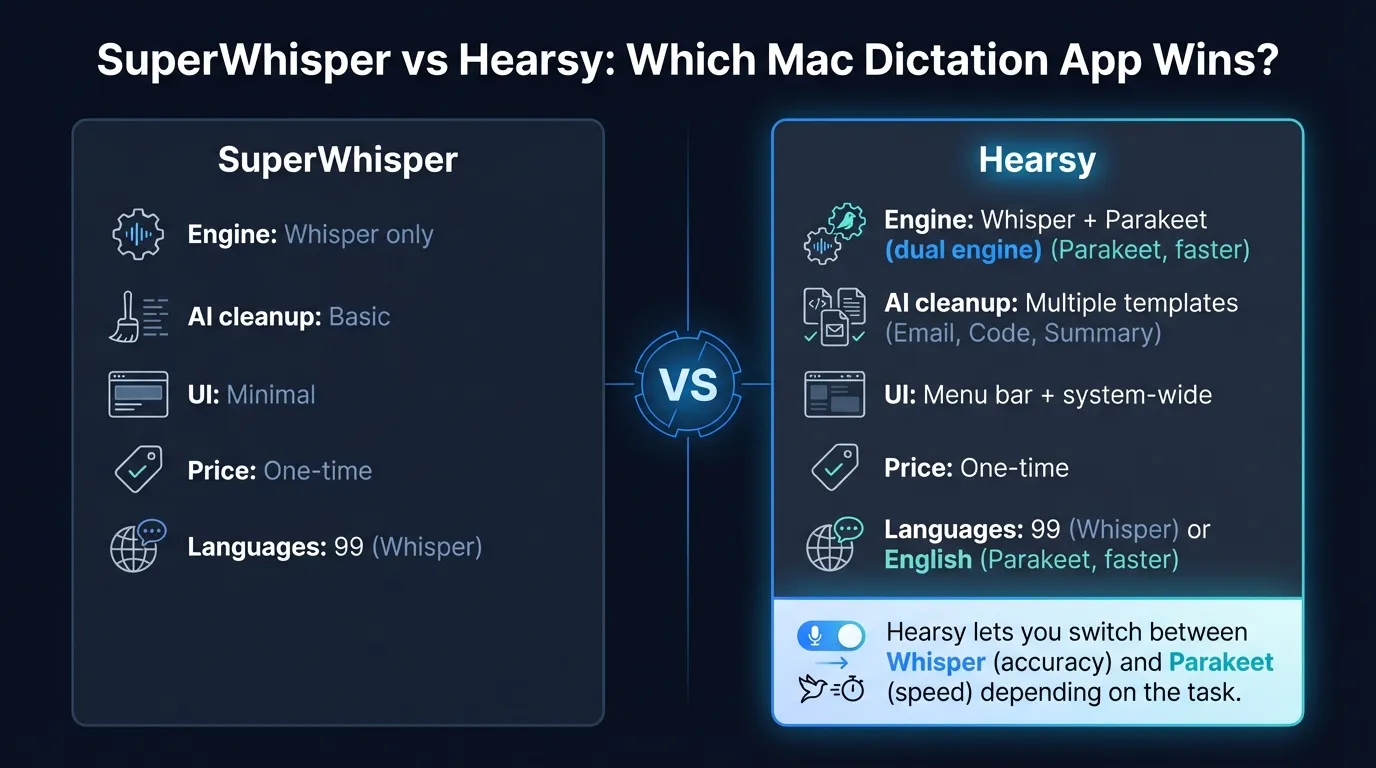
Quick comparison: For a side-by-side feature table, pricing breakdown, and FAQ, see our SuperWhisper vs Hearsy comparison page.
What SuperWhisper is#
SuperWhisper is a Mac (and iOS) dictation app launched in 2023 by developer Neil Chudleigh. Press a hotkey, speak, and text is pasted at your cursor — entirely on-device, via Whisper models running locally.
Version 2.0 added a redesigned interface and deeper customization: custom modes with user-defined prompts, search across recording history, keyboard-accessible model switching, and support for bringing your own API keys for cloud AI post-processing.
SuperWhisper supports 100+ languages and runs on macOS, iOS, and Windows.
What SuperWhisper is: A local dictation app that runs Whisper on-device. No audio leaves your machine during transcription. Free tier available; Pro and Lifetime options for full feature access.
What Hearsy is#
Hearsy is a menu-bar dictation app for macOS with two AI speech engines. Press a global hotkey from any app, speak, and text is pasted at your cursor. Like SuperWhisper, all transcription is local.
The two engines:
- Parakeet TDT (English) — under 50ms latency on Apple Silicon, 1.2 GB RAM
- Whisper Large V3 (99 languages) — 4.2% word error rate on LibriSpeech benchmarks, 3.1 GB RAM
The Parakeet engine is the main differentiator. It processes a typical dictation burst in under 50ms — fast enough that text appears before you've consciously registered the model finished. For multilingual dictation, both apps converge on Whisper Large V3 and perform comparably.
What Hearsy is: A local Mac dictation app with two transcription engines and pre-built AI cleanup templates. One-time purchase, no subscription.
Engine: Whisper-only vs dual engine#
Both apps run Whisper locally. The question is which size, and whether something faster is available.
SuperWhisper offers a range of Whisper model sizes. The free tier uses smaller, faster models — Tiny, Base, or Small. Pro unlocks Large V3, the most accurate option. The tradeoff is straightforward: larger model means better accuracy and slower processing. On Apple Silicon, Whisper Large V3 takes roughly 1–2 seconds for a typical sentence burst.
Hearsy offers Whisper Large V3 and Parakeet TDT. For English dictation, Parakeet is a meaningfully different experience — under 50ms end-to-end. That's not a slight improvement over Whisper's one second; it feels closer to typing feedback than "waiting for the model."
For multilingual dictation, the dual-engine advantage disappears. Both apps use Whisper Large V3 for non-English languages and perform at roughly the same accuracy and speed. If you regularly dictate in Spanish, French, Japanese, or anything other than English, the Parakeet advantage doesn't apply.
The Privacy-First Alternative
100% local processing. No subscription. One-time purchase. Works in every app on your Mac.
Speed#
On the same M-series Mac, here's what the latency difference looks like:
SuperWhisper with Whisper Large V3: Speak a sentence, release the hotkey, wait about a second, text appears. Accurate, local, reliable. For most dictation contexts, a one-second turnaround is fine.
Hearsy with Parakeet: Speak a sentence, release the hotkey, text is pasted before you've refocused on the screen. Under 50ms means the result is there essentially immediately.
Hearsy with Whisper Large V3: Same latency as SuperWhisper — 1–2 seconds. Both apps use the same underlying model.
The Parakeet difference matters most for high-volume dictation, short rapid bursts, or users who find any perceptible pause breaks their dictation rhythm. For occasional or moderate dictation, a one-second turnaround from SuperWhisper is unlikely to bother you.
AI cleanup#
Both apps go beyond raw transcription — they apply AI to clean up or reshape output.
SuperWhisper's approach: Custom Modes. You define a mode — a name, a prompt, a preferred AI model — and assign it to a keyboard shortcut. A "Slack message" mode might use Claude Haiku to strip filler words. A "meeting note" mode might use GPT-4 to produce bullet points. You bring your own API keys, giving full control over provider and model.
The tradeoff is setup time. Building useful modes requires writing prompts and configuring providers. For technical users who want precise control over formatting output, this is valuable. For users who want to install and start dictating immediately, it's friction.
Hearsy's approach: Pre-built templates. Four options — Clean & Format, Email, Code Comment, Summary — cover the most common dictation contexts. Cleanup runs via the local Qwen 2.5 model by default, so there's no API call and no per-use cost. You can optionally connect Claude or OpenAI for more capable cloud processing.
No prompt writing required. Pick a template, speak, and cleanup is applied automatically. Less flexible than SuperWhisper's custom modes, but operational without configuration.
Neither approach is strictly better. If you have specific formatting requirements — legal brief structure, a precise commit message convention, a brand voice style guide — SuperWhisper's custom prompts give you control that Hearsy's fixed templates can't match. For most users, the four templates cover what they actually need.
SuperWhisper vs MacWhisper#
This comparison comes up often — "superwhisper vs macwhisper" gets meaningful search volume from users comparing the two local Whisper apps on Mac.
The short answer: they do different things.
SuperWhisper is real-time dictation. Press a hotkey, speak, and text appears at your cursor in whatever app you're using. Designed for daily writing, messages, and documents.
MacWhisper is file-based transcription. Drag in an audio file — a recording, interview, podcast, or meeting — and MacWhisper runs Whisper on it to produce a timestamped transcript. Designed for batch processing of pre-recorded audio.
SuperWhisper doesn't replace MacWhisper for file transcription. MacWhisper doesn't replace SuperWhisper for real-time dictation. They use the same underlying model but solve different problems.
Hearsy is in the real-time dictation category alongside SuperWhisper. If you're comparing MacWhisper and SuperWhisper, the real question is whether you need batch transcription, real-time dictation, or both. For a full breakdown of the file-transcription comparison, see MacWhisper vs Hearsy.
For a comparison with Wispr Flow, the leading cloud-based Mac dictation app, see Wispr Flow vs Hearsy. For the full Mac dictation landscape, see best dictation software for Mac. For context on what makes local processing different from cloud, see AI transcription: local vs cloud.
Ready to Try Voice Dictation?
Hearsy is free to download. No signup, no credit card. Just install and start dictating.
Download Hearsy for MacmacOS 14+ · Apple Silicon · Free tier available
Related Articles
Otter AI Alternative: 5 Better Options for 2026
11 min read
Wispr Flow vs SuperWhisper vs Hearsy: 3-Way Mac Dictation Comparison
14 min read
Wispr Flow vs Hearsy: Privacy, Speed & Features Compared
8 min read
Willow Voice vs Hearsy: Cloud Subscription vs Local One-Time
8 min read
VoiceInk vs Hearsy: Mac Dictation Apps Compared
6 min read