
Wispr Flow vs SuperWhisper vs Hearsy: 3-Way Mac Dictation Comparison
Wispr Flow, SuperWhisper, and Hearsy are the three most-searched Mac dictation apps. Here's how they compare on privacy, speed, AI features, and pricing.
Wispr Flow, SuperWhisper, and Hearsy together account for over 32,000 monthly brand searches. They're the three most-searched Mac dictation apps in 2026, and they represent three fundamentally different approaches to the same problem.
If you're deep in the evaluation and want the full picture before deciding, here it is.
One disclosure upfront: Hearsy is my product. I've tried to write this comparison honestly, including cases where one of the other apps is the better fit.
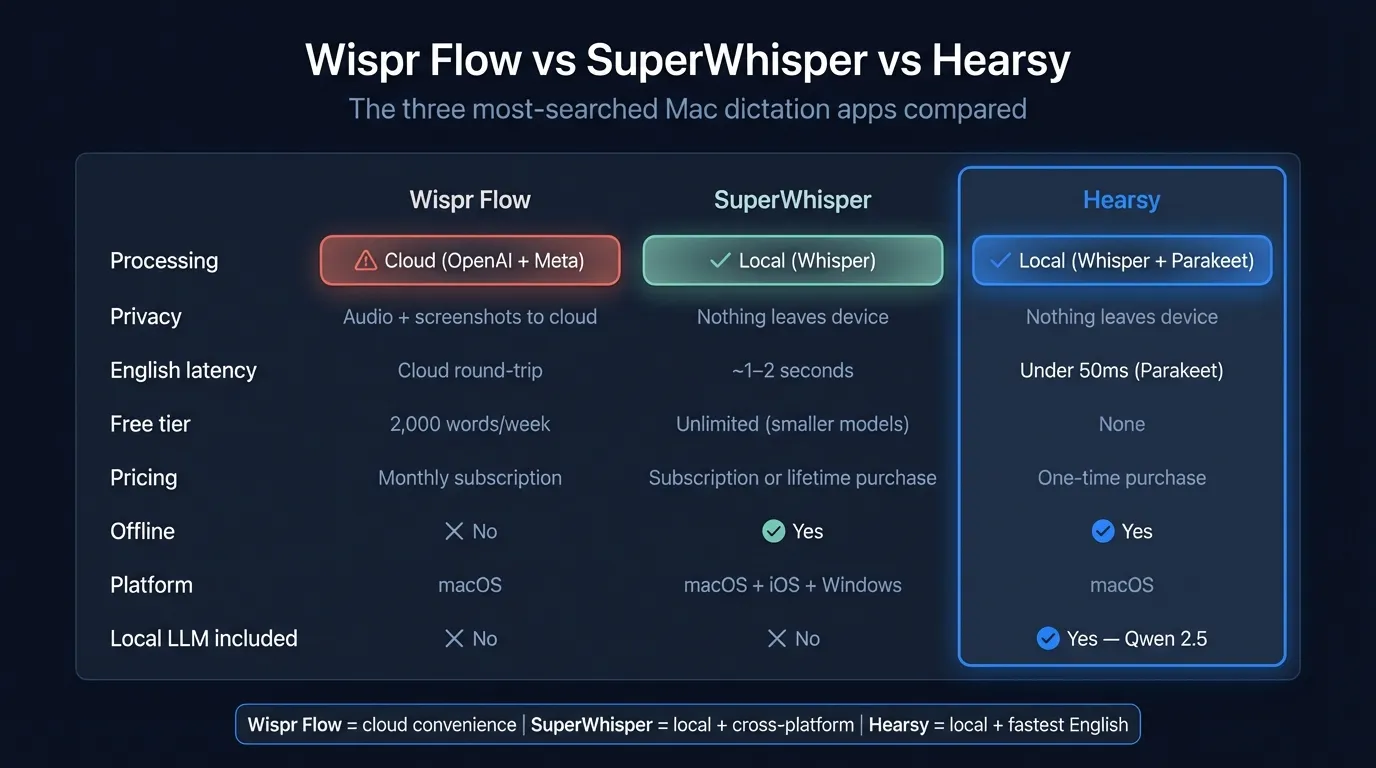
Here's how the three apps compare on architecture, privacy, speed, and pricing:
What each app is#
Wispr Flow is a cloud-based Mac dictation app. Press a hotkey from any app, speak, and text is processed on remote servers and returned to your cursor. The distinctive feature is automatic context awareness: Wispr Flow captures screenshots of your active window every few seconds and sends them alongside your audio to its cloud infrastructure. This lets it infer what you're doing and format output accordingly — dictating into Gmail produces email-style text, dictating into a code editor produces something more technical. Transcription runs through OpenAI and Meta's LLAMA 3.1 on Wispr's backend. As of March 2026, Wispr Flow has around 12,100 monthly brand searches — more than any other Mac dictation app.
SuperWhisper is a local Mac dictation app built on Whisper. Press a hotkey, speak, and Whisper models running on your Mac transcribe the audio. Nothing leaves your device during transcription. Version 2.0 added Custom Modes: user-defined prompts assigned to keyboard shortcuts, letting you configure precisely how each dictation context is handled. SuperWhisper runs on macOS, iOS, and Windows, and supports 100+ languages. Around 8,100 monthly brand searches as of early 2026.
Hearsy is a local Mac dictation app with two transcription engines. Like SuperWhisper, nothing leaves your device during transcription. Unlike SuperWhisper, Hearsy also offers the Parakeet TDT engine for English, which processes audio in under 50ms on Apple Silicon. For multilingual dictation, both apps use Whisper Large V3 and perform comparably. AI cleanup runs via a local Qwen 2.5 model by default — no API call, no network connection. macOS only.
At a glance#
| Feature | Wispr Flow | SuperWhisper | Hearsy |
|---|---|---|---|
| Processing | Cloud (OpenAI + Meta) | Local (Whisper) | Local (Whisper + Parakeet) |
| Privacy | Audio + screenshots to cloud | Nothing leaves device | Nothing leaves device |
| Offline | No | Yes | Yes |
| Free tier | 2,000 words/week | Unlimited (smaller models) | No |
| Pricing | $15/mo (~$12/mo annual) | Free / $8.49/mo / $84.99/yr / $249 lifetime | One-time purchase |
| English latency | Cloud round-trip | ~1–2 seconds | Under 50ms (Parakeet) |
| Languages | 50+ | 100+ | 99 (Whisper), English (Parakeet) |
| AI cleanup | Automatic (screenshot context) | Custom Modes (BYOK) | Templates + local Qwen 2.5 |
| Local LLM included | No | No | Yes (Qwen 2.5 via MLX) |
| Platform | macOS | macOS + iOS + Windows | macOS only |
| Memory | ~800MB | Varies by model | 1.2 GB (Parakeet), 3.1 GB (Whisper) |
Architecture: the fundamental split#
The most important distinction in this comparison isn't speed or price — it's architecture.
Wispr Flow is cloud-based. Every dictation session sends audio to Wispr's servers, where it's processed by OpenAI and Meta's LLAMA 3.1. Alongside audio, Wispr Flow captures screenshots of your active window at regular intervals to provide context. Both the audio and screen captures leave your device on every use.
Wispr Flow holds SOC 2 Type II certification across all plans including the free tier, and offers HIPAA compliance with a Business Associate Agreement for healthcare environments. Standard plans retain audio and transcripts for 30 days; Privacy Mode on paid plans offers zero data retention. This is a legitimate commercial service with real security practices — but the cloud architecture is structural, not a configuration option. Audio leaves your Mac. Screen content leaves your Mac.
SuperWhisper and Hearsy are both local. Both run Whisper models directly on your Mac. Neither sends audio to any server during transcription. You can verify this with a network monitor — no outbound connections occur during core transcription in either app.
The cloud/local distinction affects three practical things: privacy, offline availability, and latency. Wispr Flow requires internet and always carries network round-trip latency. SuperWhisper and Hearsy work without internet and process at the speed of local compute.
Speed#
Wispr Flow processes on cloud servers, so there's always a network round-trip. On a fast connection this is mostly invisible — Wispr Flow feels responsive in normal use. Where it shows is on slow hotel Wi-Fi, congested corporate networks, or anywhere with unreliable connectivity. The app also has reported startup times of 8–10 seconds and memory usage around 800MB.
SuperWhisper with Whisper Large V3: Speak a sentence, release the hotkey, wait about one second, text appears. That's the Whisper Large V3 baseline on Apple Silicon — accurate, local, and reliable for most dictation contexts. The free tier uses smaller models (Tiny, Base, Small) which are faster but less accurate.
Hearsy with Parakeet TDT: Under 50ms for English. That's not a marginal improvement over one second — it's a qualitatively different experience. Text appears before you've consciously noticed the model finished. Parakeet TDT runs on Apple Silicon's Neural Engine and processes a typical dictation burst in roughly the time it takes to refocus your eyes on the screen.
Hearsy with Whisper Large V3: Same as SuperWhisper — 1–2 seconds. Both apps use the same underlying model at the same size. For multilingual dictation where Parakeet doesn't apply, they're equivalent.
The Parakeet speed advantage is real but scoped. It only applies to English. If you regularly dictate in French, German, Japanese, or any other language, Hearsy falls back to Whisper Large V3, and the speed comparison becomes a wash.
The Privacy-First Alternative
100% local processing. No subscription. One-time purchase. Works in every app on your Mac.
Privacy#
What Wispr Flow captures#
When you use Wispr Flow, your audio is transmitted to cloud servers. Alongside it, Wispr Flow captures periodic screenshots of your active window and sends them too. Both are processed by OpenAI and Meta's LLAMA 3.1.
The screenshot capture is the less-discussed aspect. If you're dictating while a confidential document, a client spreadsheet, internal strategy material, or a legal brief is visible on screen, that content is periodically transmitted to cloud servers as part of normal app behavior. Privacy Mode limits data retention after processing but doesn't change where processing occurs. Processing still happens on Wispr's infrastructure using third-party AI providers.
Wispr Flow is not malicious or careless — SOC 2 Type II and HIPAA compliance are real certifications that require meaningful security practices. But the architecture means audio and screen content structurally leave your device on every use.
What SuperWhisper and Hearsy capture#
Nothing, during transcription. Both process audio locally in RAM. No audio, no screenshots, and no transcripts are transmitted.
The qualification: if you use cloud AI post-processing in either app, the cleaned text is sent to those APIs for that step only. SuperWhisper supports GPT-4, Claude, and other providers via your own API keys. Hearsy supports Claude and OpenAI optionally, but defaults to a local Qwen 2.5 model that runs entirely on your Mac with no API call. The audio itself never leaves your device in either case.
For regulated environments — healthcare, legal, financial services, government — the local architecture of SuperWhisper and Hearsy eliminates the compliance overhead. There's no cloud provider to vet, no BAA to negotiate, no network policy to satisfy. The data stays on the device.
AI cleanup and context awareness#
Wispr Flow: automatic context#
Wispr Flow's AI cleanup is automatic and implicit. The screenshot capture provides context about what you're doing. You don't tell it you're in Gmail — it can see that. You don't tell it you're writing a Slack message versus a formal document — it infers from the screen. For users who move between many different app contexts throughout the day, this automatic detection reduces friction.
The tradeoff is twofold: the context awareness requires sending screen content to cloud servers, and the automatic inference occasionally misreads context. There's no manual override if the AI formats output in a way you didn't intend.
SuperWhisper: custom modes#
SuperWhisper's cleanup is explicit and fully configurable. Custom Modes let you define a name, a system prompt, and a preferred AI model, then assign each mode to a keyboard shortcut. A "meeting notes" mode might use GPT-4 to produce structured bullet points. A "code comment" mode might strip filler words and reformat as inline documentation. A "legal brief" mode can apply specific structural requirements.
You bring your own API keys, giving full control over which model handles each mode. The tradeoff is setup time. Building useful Custom Modes requires writing prompts and configuring providers. For technical users who want precise control, this is genuinely valuable. For anyone who wants to install and start dictating immediately, it's friction. SuperWhisper doesn't include a bundled local LLM — all cleanup uses cloud APIs you provide.
Hearsy: pre-built templates plus local LLM#
Hearsy includes four pre-built templates — Clean & Format, Email, Code Comment, and Summary — covering the most common dictation contexts. No prompt writing required. By default, cleanup runs via the local Qwen 2.5 model through MLX, so there's no API call, no per-use cost, and the cleanup stays on your Mac.
The limitation is flexibility. Four templates cover most common needs, but if you have specific formatting requirements — a particular legal brief structure, a brand voice style guide, a custom commit message convention — SuperWhisper's custom prompts give you control that fixed templates can't match. Hearsy's approach trades flexibility for immediate usability.
Summary#
Wispr Flow: automatic, hands-off, no configuration needed — but requires cloud access and screen capture. SuperWhisper: fully customizable, cloud AI via BYOK — requires configuration, no local LLM included. Hearsy: pre-built templates with local LLM default — usable immediately, less flexible than custom prompts.
Pricing#
Wispr Flow:
- Free: 2,000 words per week (roughly 10–15 minutes of speech for an average speaker — usable for occasional dictation, limiting for daily use)
- Pro: $15/month billed monthly, approximately $12/month billed annually
- No lifetime or one-time option
At annual billing, two years of Wispr Flow Pro costs around $288.
SuperWhisper:
- Free: Unlimited use of smaller Whisper models (Tiny, Base, Small) — genuinely usable for clear speech in quiet environments, though accuracy is lower than Large V3
- Pro: $8.49/month, or $84.99/year (around $7.08/month)
- Lifetime: $249 one-time
The free tier is a real option for casual use. The Lifetime license is the one-time path for power users who want the full feature set without a subscription.
Hearsy:
- One-time purchase — no subscription, no feature gating, no usage caps
No free tier. Buy it and get both engines (Parakeet TDT + Whisper Large V3), all AI templates, and the local Qwen 2.5 model. No plan upgrade required, no word limits.
The math for daily users#
For anyone who dictates daily as part of their workflow:
- Wispr Flow Pro at annual billing: $144/year
- SuperWhisper Pro at annual billing: $84.99/year
- Hearsy: one payment, no compounding cost
The subscription math compounds indefinitely. For casual or occasional users, Wispr Flow's free tier (2,000 words/week) or SuperWhisper's free tier (unlimited smaller models) may be sufficient without paying anything. For daily users who need Large V3 accuracy, the subscription accumulates each year while Hearsy's cost stays fixed.
Platform coverage#
Wispr Flow: macOS only.
SuperWhisper: macOS, iOS, and Windows. If you need the same dictation workflow across platforms — Mac at your desk, iPhone on the go, a Windows PC at work — SuperWhisper is the only option here that covers it.
Hearsy: macOS only. No iOS, no Windows.
If you're macOS-only, all three apps are comparable on platform support. If you need iOS or Windows dictation, SuperWhisper is the only choice among these three.
Language support#
Wispr Flow: 50+ languages, processed via cloud.
SuperWhisper: 100+ languages via Whisper models.
Hearsy: 99 languages via Whisper Large V3, plus English via Parakeet TDT. For non-English dictation, Hearsy uses Whisper Large V3 at the same accuracy and speed as SuperWhisper. The speed difference between Hearsy and SuperWhisper only exists for English.
Which to choose#
Choose Wispr Flow if:
- You don't dictate sensitive or confidential information
- You want automatic, hands-off context formatting without selecting modes or templates manually
- The 2,000 words/week free tier is enough, or $12–15/month works for your budget
- Reliable internet access is available in your primary work environment
- You need HIPAA-compliant cloud dictation with a Business Associate Agreement
Choose SuperWhisper if:
- You want a free tier before paying anything
- You need iOS or Windows dictation alongside macOS
- You want full control over AI cleanup — custom prompts, custom models, multiple modes for different contexts
- One-second Whisper latency is fine for your dictation volume
- You prefer the Lifetime license option ($249 one-time with full features)
Choose Hearsy if:
- English is your primary dictation language and you want maximum speed (Parakeet, under 50ms)
- You prefer one-time pricing with no subscription tiers or feature gating
- You want AI cleanup that runs immediately without writing prompts — and runs locally by default with no API key required
- Privacy matters across the full pipeline: audio stays local, cleanup stays local, no cloud dependency
- macOS-only is fine for your setup
The clearest decision point: cloud vs local. Wispr Flow is the cloud option — more automatic context awareness, SOC 2/HIPAA certifications, and a free tier, at the cost of audio and screen content leaving your device. SuperWhisper and Hearsy are both local — nothing transmitted during transcription, offline support included, but no automatic context inference from screen capture. If privacy is the primary concern — regulated industry, confidential work, or simply preferring audio that never leaves your Mac — either SuperWhisper or Hearsy works equally well on that dimension. The choice between them comes down to free tier vs one-time pricing, custom AI modes vs pre-built templates, cross-platform support, and English speed at high volume.
For more depth on the Wispr Flow vs Hearsy comparison, including detailed notes on Privacy Mode and HIPAA compliance, see Wispr Flow vs Hearsy. For a deeper look at SuperWhisper vs Hearsy with engine benchmark details, see SuperWhisper vs Hearsy. For the full Mac dictation landscape including apps not covered here, see best dictation software for Mac.
Frequently asked questions#
Wispr Flow vs SuperWhisper: which is better?#
It depends on what you need. Wispr Flow is cloud-based and provides automatic context-aware formatting without any configuration, with a 2,000 words/week free tier. SuperWhisper is local — nothing leaves your Mac — and works offline with unlimited free use of smaller Whisper models. If privacy or offline access is a priority, SuperWhisper. If you want hands-off context awareness and don't mind audio being processed in the cloud, Wispr Flow.
Is SuperWhisper better than Wispr Flow for privacy?#
Yes. SuperWhisper processes audio entirely on your Mac using local Whisper models — nothing is transmitted during transcription. Wispr Flow sends audio and periodic screenshots of your active window to cloud servers, processed by OpenAI and Meta's infrastructure. Privacy Mode on Wispr Flow limits data retention after processing, but processing still occurs off-device on third-party infrastructure.
Which Mac dictation app is the fastest?#
Hearsy with Parakeet TDT is fastest for English — under 50ms on Apple Silicon. SuperWhisper with Whisper Large V3 and Hearsy with Whisper Large V3 are equivalent at approximately 1–2 seconds. Wispr Flow adds network round-trip latency on top of cloud processing time, which is typically imperceptible on fast connections but noticeable on slower or unreliable networks.
Does Wispr Flow work offline?#
No. Wispr Flow requires an internet connection — all transcription happens on cloud servers with no local processing fallback. SuperWhisper and Hearsy both work offline; neither requires internet for core transcription.
What is the cheapest option among these three?#
SuperWhisper has the most accessible free tier — unlimited dictation with smaller Whisper models, no signup required. Wispr Flow's free tier is more limited at 2,000 words per week. Hearsy has no free tier. For daily users who need full-accuracy transcription (Whisper Large V3), SuperWhisper Pro at $84.99/year is the cheapest subscription option; Hearsy's one-time purchase is cheaper than either subscription at the two-year mark and beyond.
Ready to Try Voice Dictation?
Hearsy is free to download. No signup, no credit card. Just install and start dictating.
Download Hearsy for MacmacOS 14+ · Apple Silicon · Free tier available
Related Articles
Otter AI Alternative: 5 Better Options for 2026
11 min read
Wispr Flow vs Hearsy: Privacy, Speed & Features Compared
8 min read
Willow Voice vs Hearsy: Cloud Subscription vs Local One-Time
8 min read
VoiceInk vs Hearsy: Mac Dictation Apps Compared
6 min read
Talon Voice vs Hearsy: Full Voice Control vs Fast Dictation
7 min read