
Willow Voice vs Hearsy: Cloud Subscription vs Local One-Time
Willow Voice is a YC-backed cloud dictation app at $12-15/month with 100+ languages and cross-platform support. Hearsy runs locally on your Mac for a one-time price. Here's how they compare on privacy, speed, and cost.
Willow Voice sends your audio to cloud servers for transcription by default. Hearsy processes everything on your Mac. That's the core difference, and for most people choosing between them, it's the decision.
One disclosure upfront: Hearsy is my product. Willow Voice ranks second for "dictation software for mac" with essentially no counter-content from us — so I've tried to write this comparison honestly, including where Willow Voice is genuinely the stronger choice.
Here's how Willow Voice and Hearsy compare on the key dimensions:
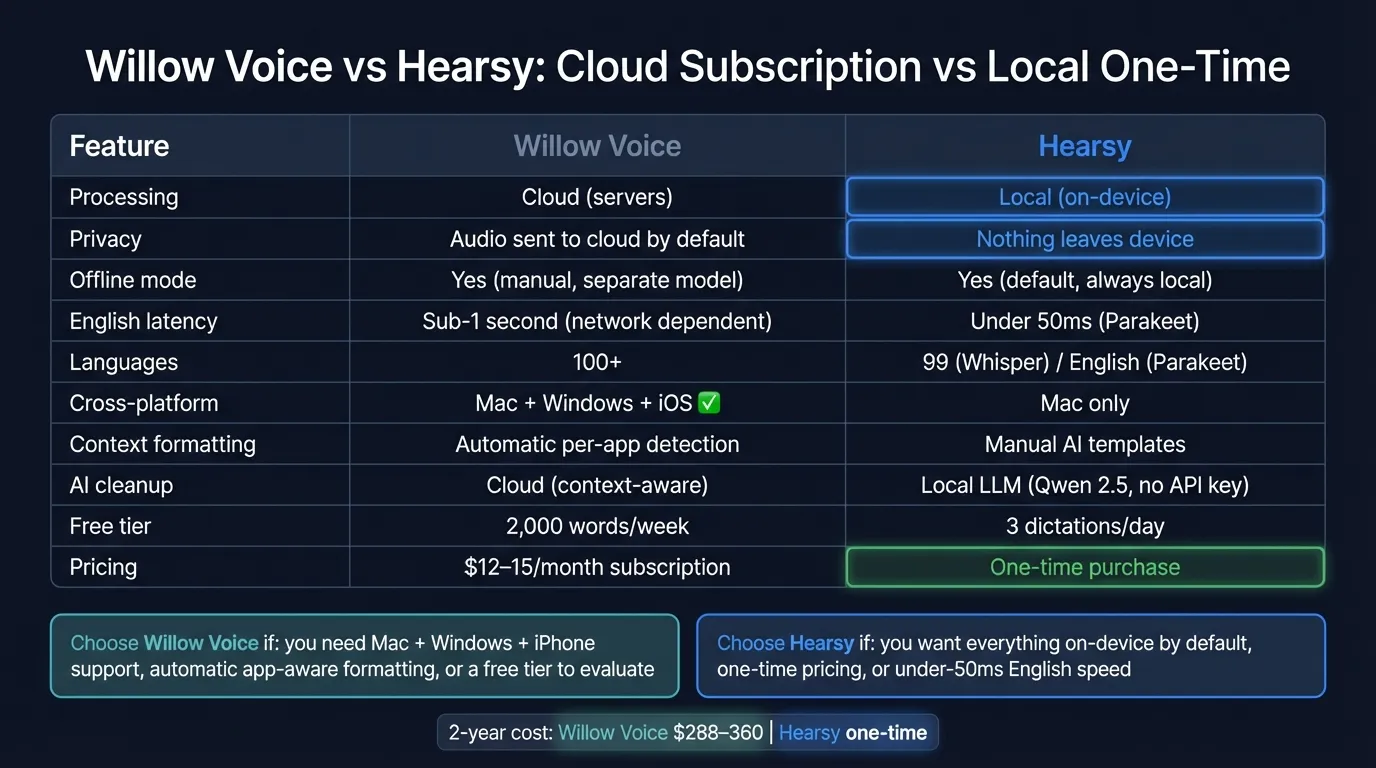
Quick comparison: For a side-by-side feature table, pricing breakdown, and FAQ, see our Willow Voice vs Hearsy comparison page.
What Willow Voice is#
Willow Voice is a YC-backed cloud dictation app for Mac, Windows, and iOS. Press the Fn key in any application, speak, and Willow transcribes your words and formats them based on context — emails get professional structure, Slack messages stay casual, code editors get technical formatting. The AI detects where you're typing and adapts automatically.
As of early 2026, Willow has a free tier of 2,000 words per week (approximately 10–15 minutes of speech) with a 5-minute session limit. Paid plans are $15/month (monthly billing) or $12/month billed annually. The iOS keyboard lets you switch between voice and text input without reverting to Apple's default keyboard — a feature no Mac-only dictation app can match.
Willow processes audio on cloud servers. No audio is stored on Willow's servers after processing — audio stays on-device for re-transcription purposes. Transcript content is stored locally, not on Willow's servers. In Private Mode (the default), no dictated text is collected. The optional "Help Willow Improve" mode anonymizes text for training but does not collect audio.
Willow holds SOC 2 compliance and supports HIPAA for enterprise customers with a signed agreement.
What Willow Voice is: A cross-platform cloud dictation app with context-aware per-app formatting, 100+ languages, and SOC 2 compliance. Free tier available; paid plans at $12-15/month.
What Hearsy is#
Hearsy is a macOS menu-bar dictation app that runs entirely on your Mac. Press a global hotkey from any app, speak, and transcribed text is pasted at your cursor. No internet connection is used during transcription. Audio is processed in local RAM by one of two AI engines:
- Parakeet TDT (English) — under 50ms latency on Apple Silicon
- Whisper Large V3 (99 languages) — 4.2% word error rate on LibriSpeech benchmarks
AI post-processing runs locally via Qwen 2.5 3B (via MLX) by default. Applying a template — Clean & Format, Email, Code Comment, Summary — triggers the local LLM. No API key required, no cloud call, no network activity. You can configure Claude or OpenAI as the cleanup provider if you prefer cloud model quality, but that's opt-in: the full AI pipeline works offline from the moment you install the app.
Hearsy is a one-time purchase. macOS only.
What Hearsy is: A local Mac dictation app with Parakeet and Whisper engines, on-device AI cleanup via Qwen 2.5 3B, and structured formatting templates. One-time price. Nothing leaves your Mac during transcription.
Privacy: what actually happens to your audio#
This is the question underneath most "willow voice privacy" and "willow voice safe" searches.
Willow Voice's data handling:
Willow Voice captures audio locally, sends it to cloud servers for processing, and returns the transcribed text. Audio is not stored on Willow's servers — the audio stays on-device for potential re-transcription, and only the processing happens in the cloud. Transcripts are stored locally on your device.
In Private Mode (the default), no dictated text is collected by Willow. The optional training mode anonymizes text — no audio is shared. Data in transit uses TLS encryption; data at rest is encrypted. SOC 2 compliance covers all plans including the free tier.
The privacy posture is reasonable for most general use. Willow isn't selling your data or exposing it carelessly. But audio processing does require sending audio to cloud infrastructure, and that's a structural fact about the product — not a caveat hidden in fine print.
Hearsy's data handling:
There is no data handling policy to evaluate because no data is transmitted. Transcription runs in local RAM using models downloaded to your Mac. You can verify this with Little Snitch or any network monitor: Hearsy makes no outbound connections during transcription.
Local AI cleanup works the same way — Qwen 2.5 runs on your Mac, no network call. The only time Hearsy talks to a server is if you explicitly configure Claude or OpenAI for the cleanup step, and even then only the text of your cleanup request is sent, not your original audio.
Who this matters for: For everyday dictation — emails, Slack messages, writing notes — Willow Voice's cloud architecture is probably fine. For anyone dictating medical records, legal documents, business-confidential materials, or content covered by regulated industries, the structural difference between cloud processing and local processing is worth thinking through explicitly.
The Privacy-First Alternative
100% local processing. No subscription. One-time purchase. Works in every app on your Mac.
Speed#
Willow Voice: Sub-1 second cloud latency with sub-200ms processing time claimed. In practice, speed depends on your network. On a fast connection, text appears nearly instantly and feels responsive. On hotel Wi-Fi, a congested corporate network, or with spotty mobile data, latency increases. There's no local processing fallback at cloud speed — the offline mode uses a local model that may perform differently from the cloud version.
Hearsy: Parakeet TDT processes English audio in under 50ms on Apple Silicon. Local RAM-to-text with no network round-trip. Whisper Large V3 in Hearsy takes around 1–2 seconds for a typical paragraph, but that's entirely local — consistent regardless of network conditions.
The fundamental constraint for cloud transcription is the physics of network communication. No cloud service can match local processing on minimum latency, because the signal still has to travel to a server and back. On a stable connection, Willow Voice is fast enough for comfortable daily use. The gap appears in edge cases: travel, poor connectivity, or situations where you need guaranteed low latency.
Context awareness vs AI templates#
This is where Willow Voice makes its clearest competitive argument — and where the choice depends on your workflow.
Willow Voice's approach: Context detection is automatic. Willow identifies what app you're typing in and adjusts formatting accordingly. You don't configure anything — it infers context from the active window. Dictating into an email client produces email-formatted output; dictating into a code editor produces something more technical. Custom vocabulary terms and per-category writing styles (work, messaging, email) allow further personalization.
Hearsy's approach: Context is explicit. Before dictating, you select a template: Clean & Format, Email, Code Comment, or Summary. The local Qwen 2.5 model applies that processing. You choose what happens, and it happens on your Mac. No automatic detection, but no ambiguity either.
Neither is strictly better. Willow's automatic context detection reduces friction for users who move rapidly between many apps. Hearsy's explicit templates are more predictable — you know exactly what processing will be applied, and it all stays on device.
Pricing: subscription vs one-time#
Willow Voice:
- Free: 2,000 words/week (approx. 10–15 min speech), 5-minute session limit
- Individual Monthly: $15/month
- Individual Annual: $12/month ($144/year)
- Team: $12/user/month, 3-seat minimum
Over two years, Willow Voice costs $288–$360 on an individual plan. Over five years, $720–$900.
Hearsy: One-time purchase. No subscription, no per-month charge, no word limits.
The subscription math matters for longer-term users. If you plan to use a dictation app for more than a year or two, the compounding subscription cost becomes meaningful. The free tier at 2,000 words/week is genuinely useful for evaluating Willow Voice — roughly 10–15 minutes of spoken content per week — though at heavy dictation volumes you'll hit the limit quickly.
Cross-platform: Mac, Windows, iOS vs Mac-only#
Willow Voice runs on Mac, Windows, and iOS. The iOS voice keyboard lets you input text on iPhone without switching back to Apple's standard keyboard. If you split time between macOS and Windows, or want iPhone dictation with the same processing pipeline as your Mac, Willow Voice covers all three.
Hearsy is Mac-only. If you need cross-platform dictation, Hearsy doesn't solve that problem. This is a real limitation and one worth being straightforward about.
Who should choose Willow Voice#
- You need Mac, Windows, and iPhone — Willow Voice is the only tool in this comparison that covers all three
- You want automatic, per-app context formatting without configuring templates
- You want a free tier to evaluate before committing ($0 for 2,000 words/week)
- You need enterprise features: SOC 2 compliance, HIPAA readiness, team management with shared dictionaries
Who should choose Hearsy#
- You dictate sensitive content — medical, legal, financial, or business-confidential material — and want transcription to stay on your Mac by default, not as a mode to manually enable
- You prefer one-time pricing over a recurring subscription ($144–180/year)
- You want the fastest possible English dictation: Parakeet processes in under 50ms without a network round-trip
- You want fully local AI cleanup — contextual rewriting, email formatting, code comments — with no API key and no internet connection required
- You need reliable offline dictation without configuring a separate offline mode
For more on local Mac dictation options, see best dictation software for Mac. For how local and cloud transcription differ technically, see AI transcription: local vs cloud. For a deeper look at voice data privacy, see the voice data privacy guide. For another cloud vs local comparison, see Wispr Flow vs Hearsy.
Ready to Try Voice Dictation?
Hearsy is free to download. No signup, no credit card. Just install and start dictating.
Download Hearsy for MacmacOS 14+ · Apple Silicon · Free tier available
Related Articles
Otter AI Alternative: 5 Better Options for 2026
11 min read
Wispr Flow vs SuperWhisper vs Hearsy: 3-Way Mac Dictation Comparison
14 min read
Wispr Flow vs Hearsy: Privacy, Speed & Features Compared
8 min read
VoiceInk vs Hearsy: Mac Dictation Apps Compared
6 min read
Talon Voice vs Hearsy: Full Voice Control vs Fast Dictation
7 min read