
Wispr Flow vs Hearsy: Privacy, Speed & Features Compared
Wispr Flow is cloud-based, $15/month, and captures your screen. Hearsy is local, one-time, and never sends audio anywhere. Here's how they compare.
Wispr Flow is cloud-based. Every word you dictate is processed on remote servers — and periodically, so is a screenshot of your active window. Hearsy is local: audio never leaves your Mac. That's the core difference, and whether it matters depends entirely on what you're dictating and who might see it.
One disclosure upfront: Hearsy is our product. I've tried to write this comparison honestly — including cases where Wispr Flow is genuinely the better fit.
Here's how Wispr Flow and Hearsy compare on the key dimensions:
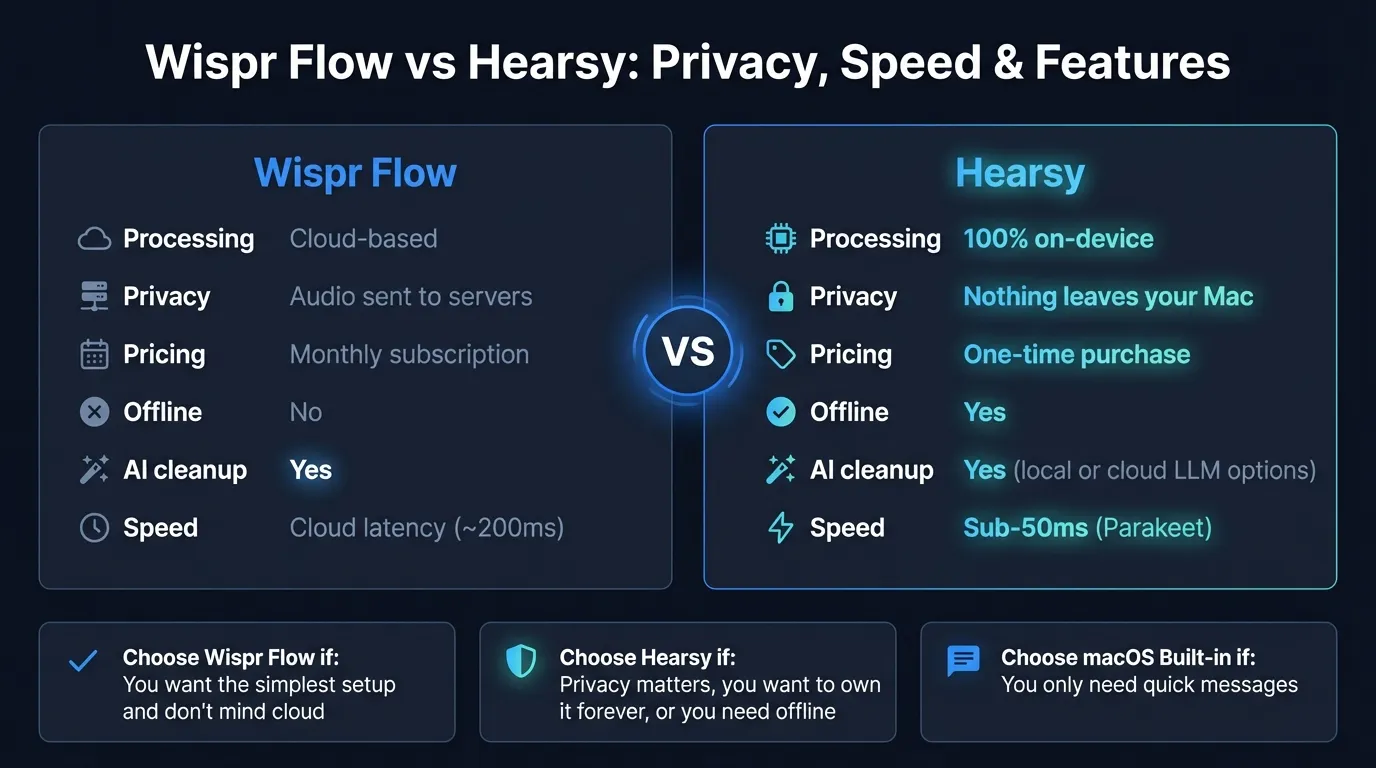
Quick comparison: For a side-by-side feature table, pricing breakdown, and FAQ, see our Wispr Flow vs Hearsy comparison page.
What Wispr Flow is#
Wispr Flow is a Mac dictation app that sends audio and screen context to cloud servers for processing. You press a hotkey from any app, speak, and text appears at your cursor. The distinctive feature is automatic context awareness: Wispr Flow captures screenshots of your active window every few seconds and sends them to its cloud infrastructure alongside your audio. This allows it to detect what you're doing and format output accordingly — dictating into Gmail produces email-style text, dictating into a code editor produces something more technical.
Processing runs through third-party AI providers. Wispr has confirmed it uses OpenAI and Meta's LLAMA 3.1 for transcription and formatting.
Wispr Flow has grown fast. It pulls around 12,100 monthly brand searches in early 2026, more than any other Mac dictation app — more than SuperWhisper (8,100/mo), MacWhisper (5,400/mo), or Dragon NaturallySpeaking (6,600/mo, despite being discontinued on Mac). It's VC-backed, well-designed, and actively developed.
What Wispr Flow is: A cloud-based Mac dictation app that captures audio and screen context, processes both on remote servers, and returns context-formatted text. Requires internet. No offline mode.
What Hearsy is#
Hearsy is a menu-bar dictation app that runs entirely on your Mac. Press a global hotkey from any app, speak, and transcribed text is pasted at your cursor. No internet connection is used during transcription. Audio is processed in local RAM by one of two AI engines:
- Parakeet TDT (English) — under 50ms latency on Apple Silicon
- Whisper Large V3 (99 languages) — 4.2% word error rate on LibriSpeech benchmarks
AI post-processing uses a local language model (Qwen 2.5 via MLX) by default. That also runs on your Mac. If you opt into Claude or OpenAI for cleanup, that step uses the respective API — but transcription itself stays local either way.
What Hearsy is: A local Mac dictation app that runs AI speech models on your device. No audio leaves your Mac during transcription. Works offline. One-time purchase.
Privacy: what actually happens to your audio#
This is the question most people are really asking when they search "is wispr flow safe" or "wispr flow privacy."
Wispr Flow's data handling:
When you dictate with Wispr Flow, your audio is transmitted to Wispr's cloud servers. Alongside it, Wispr Flow captures screenshots of your active window every few seconds to provide context to the AI. Both audio and screenshots are processed using third-party AI providers — OpenAI and Meta's LLAMA 3.1, based on what Wispr has published.
On standard plans, audio and transcripts are retained for 30 days before automatic deletion. Privacy Mode, available on paid plans, offers zero data retention: data is processed and immediately discarded without storage.
Wispr Flow holds SOC 2 Type II certification across all plans including the free tier, and offers HIPAA compliance for healthcare environments (with a Business Associate Agreement). The company states that dictation data is never sold or shared with third parties.
What this actually means:
Wispr Flow is a legitimate commercial service with real security certifications. It's not harvesting your data for advertising or sharing it carelessly. But audio from your dictation sessions does leave your device and gets processed on third-party cloud infrastructure — OpenAI's servers, Meta's servers. That's a structural fact about the product, not a criticism.
The screenshot capture is the less-discussed part. If you're dictating while sensitive information is on screen — a client document, a spreadsheet with financial data, a legal brief, internal strategy materials — that screen content is periodically sent to cloud servers as context. Privacy Mode can limit data retention, but processing still occurs.
For most personal use — drafting emails, writing notes, composing Slack messages about everyday topics — Wispr Flow's privacy posture is probably fine. For anyone handling information they'd consider genuinely sensitive, the cloud architecture is a genuine concern.
Hearsy's data handling:
There is no data handling policy to evaluate, because nothing is transmitted. Transcription runs in local RAM using a model downloaded to your Mac. You can verify this with Little Snitch or any network monitor: Hearsy makes no outbound connections during transcription.
The local AI cleanup (Qwen 2.5 via MLX) works the same way — it runs on your Mac, no network call. The only time Hearsy talks to a server is if you explicitly configure it to use Claude or OpenAI for the cleanup step — and even then, only the text cleanup request is sent, not your original audio.
The Privacy-First Alternative
100% local processing. No subscription. One-time purchase. Works in every app on your Mac.
Speed#
Wispr Flow: Cloud-based transcription means there's always a network round-trip. On a fast connection, this is mostly imperceptible — Wispr Flow feels responsive in normal use. Where it shows up is in edge cases: slow hotel Wi-Fi, congested corporate networks, travel to areas with poor connectivity, or dictating on an airplane.
Hearsy: Parakeet TDT processes English audio in under 50ms on Apple Silicon. That's local RAM-to-text — there's no network round-trip because there's no network. No cloud service can beat local processing on latency, because the physics of network communication set a hard floor.
Whisper Large V3 in Hearsy takes around 1–2 seconds for a typical sentence or paragraph. Slower than Parakeet, but still local and more accurate on technical vocabulary and non-English languages.
Startup time is worth mentioning. Wispr Flow has reported startup times of 8–10 seconds and memory usage around 800MB. Hearsy loads faster — the Parakeet model (1.2 GB RAM) starts quickly. Whisper Large V3 requires more RAM (~3.1 GB) and takes slightly longer to load the first time, but the app itself starts fast.
For daily-driver use, neither startup time difference will change your life. But if you're used to press-hotkey-and-speak responsiveness, 8–10 seconds of app startup on a restart is noticeable.
Context awareness vs AI templates#
This is where Wispr Flow makes its clearest competitive argument.
Wispr Flow's approach: Context is automatic. It captures screenshots of your active window and passes that context to the AI, which adapts output accordingly. You don't tell it you're writing an email — it can see you're in Gmail. You don't tell it you're in a Slack DM versus a formal document — it can infer from the screen. For users who move between many different apps and contexts, this automatic detection reduces friction.
Hearsy's approach: Context is explicit. You choose from AI templates before dictating: Clean & Format, Email, Code Comment, Summary. The cleanup runs via the local Qwen 2.5 model by default. You have to choose the right template, but you also have precise control over which processing is applied.
Neither is strictly better. Wispr Flow's automatic detection is genuinely convenient. Hearsy's manual templates are more predictable — you know exactly what post-processing will happen, and it all stays on your Mac.
One practical implication of the screen capture: if you regularly have sensitive content on screen while dictating, Wispr Flow's context capture means that screen content is periodically transmitted to cloud servers as part of normal operation. This is separate from the audio privacy question. If you work in an environment where screen content is regulated (healthcare, finance, legal, government), this is worth factoring in explicitly.
Wispr Flow vs SuperWhisper#
This comparison gets its own search volume — around 170 searches per month for "wispr flow vs superwhisper." The short version: Wispr Flow and SuperWhisper are architecturally opposite.
Wispr Flow is cloud-based. SuperWhisper is local, built on Whisper, and runs entirely on your Mac. In that sense, SuperWhisper is architecturally closer to Hearsy than to Wispr Flow. Both SuperWhisper and Hearsy represent the local-processing option in the Mac dictation space; Wispr Flow represents the cloud-processing option.
If you're choosing between Wispr Flow and SuperWhisper, the decision is primarily about cloud vs. local, not about which local app to pick. If you want local: either SuperWhisper or Hearsy. The differences between those two — Hearsy adds the Parakeet engine for faster English processing and local AI cleanup templates; SuperWhisper has a free tier and more established community — are secondary compared to the cloud vs. local question.
For more on local Mac dictation options, see the best dictation software for Mac guide. For a deeper look at how local and cloud transcription compare technically, see the AI transcription: local vs cloud guide. For privacy implications of sending voice data to cloud services, see the voice data privacy guide.
Ready to Try Voice Dictation?
Hearsy is free to download. No signup, no credit card. Just install and start dictating.
Download Hearsy for MacmacOS 14+ · Apple Silicon · Free tier available
Related Articles
Otter AI Alternative: 5 Better Options for 2026
11 min read
Wispr Flow vs SuperWhisper vs Hearsy: 3-Way Mac Dictation Comparison
14 min read
Willow Voice vs Hearsy: Cloud Subscription vs Local One-Time
8 min read
VoiceInk vs Hearsy: Mac Dictation Apps Compared
6 min read
Talon Voice vs Hearsy: Full Voice Control vs Fast Dictation
7 min read