
Talk to Type Software: The Best Apps for Voice Typing in 2026
A beginner-friendly guide to talk-to-type software for Mac. Compare the best apps for voice typing, what they cost, and which one fits your needs.
Talk-to-type software does exactly what the name says: you talk, it types. You press a hotkey, speak your email, message, or document, and the words appear wherever your cursor is. No typing required.
If you've searched for "talk to type software" rather than "dictation software" or "speech to text," you're probably not looking for technical specs. You want to know what works, what it costs, and whether it's actually worth using. This guide covers that.
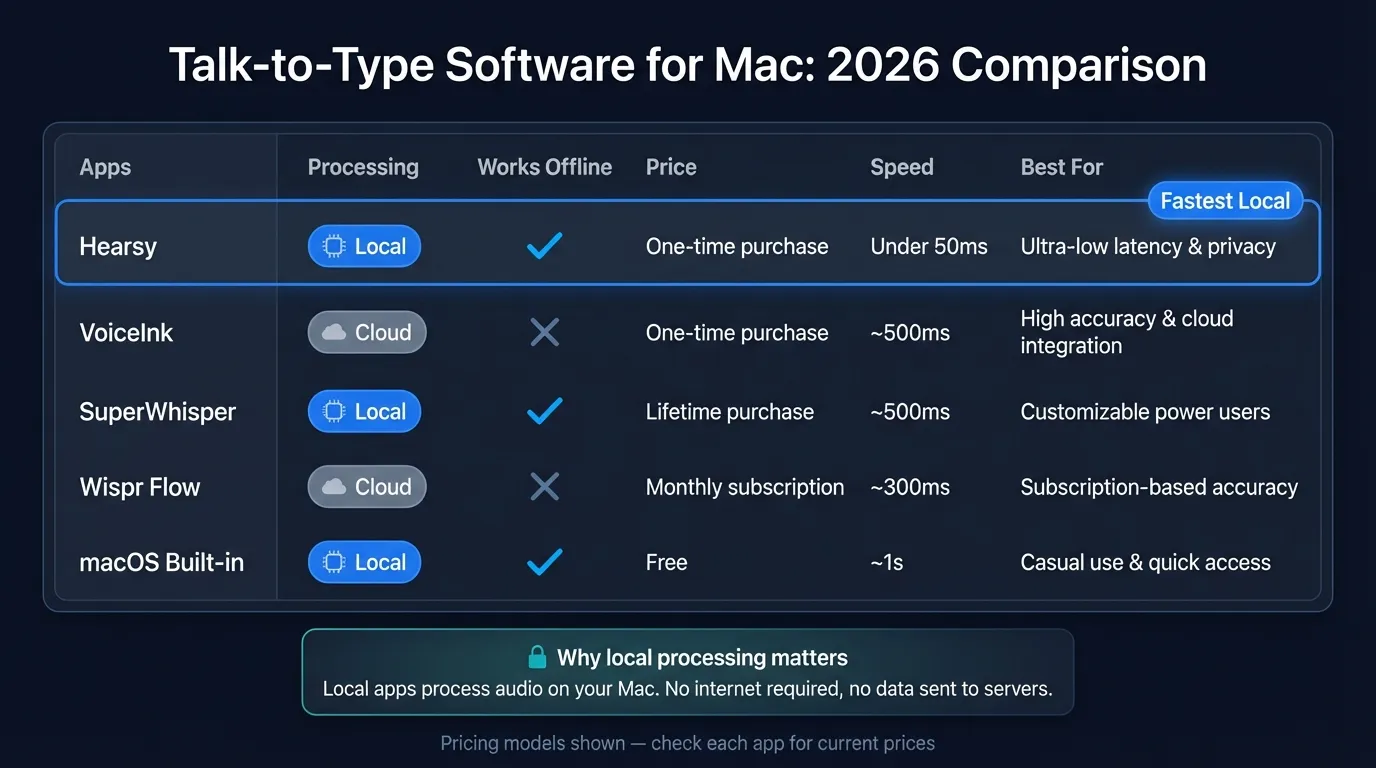
Here's how the main talk-to-type options compare at a glance:
How talk-to-type software works#
The basic mechanics are the same across all apps:
- You press a hotkey (usually configurable)
- The app records audio from your microphone
- An AI model converts the audio to text
- The text gets pasted or typed into whatever app is in focus
Where apps differ is in where that AI model runs.
Local apps run the AI model on your Mac. Audio never leaves your device. These apps work offline and don't require a subscription because there's no server infrastructure to pay for.
Cloud apps send audio to external servers, which run the transcription and send results back. This requires an internet connection for every use and usually means ongoing subscription pricing.
In 2022, cloud apps had a real accuracy advantage because the models running on consumer laptops weren't very good. That advantage is gone. Apps running OpenAI Whisper Large V3 locally on Apple Silicon achieve under 2% word error rate on clear speech — the same models cloud services use, running on your laptop.
The main talk-to-type options for Mac#
| App | Processing | Offline | Price | Best for |
|---|---|---|---|---|
| macOS built-in | Local (Apple ASR) | Yes | Free | Quick phrases |
| Hearsy | Local (Parakeet + Whisper) | Yes | $29 one-time | Speed + privacy |
| VoiceInk | Local (Whisper) | Yes | $39 one-time | Simplicity |
| SuperWhisper | Local (Whisper) | Yes | $249 lifetime / ~$5/mo | Power users |
| Wispr Flow | Cloud (OpenAI) | No | $15/month | AI-enhanced writing |
(Pricing as of March 2026)
macOS built-in dictation#
macOS has had built-in dictation since Mountain Lion, but the Apple Silicon version is meaningfully better than what shipped earlier. On an M-series Mac, dictation runs locally using Apple's own ASR model.
It's free, requires no installation, and works in every app on your Mac. For quick messages, Slack replies, and short emails, it's good enough that many users don't need anything else.
Where it falls short: the experience isn't designed for extended dictation. There's no global hotkey with visual feedback, no easy way to review and re-dictate a phrase, and no AI cleanup for filler words or formatting. For anything longer than a few sentences — a full email, a document section, meeting notes — dedicated apps work better.
Local talk-to-type apps#
Hearsy#
Hearsy uses two AI models: NVIDIA Parakeet for English (which processes audio in under 50ms on Apple Silicon) and OpenAI Whisper for other languages or maximum accuracy. You configure one as your default and switch with a hotkey.
The speed difference with Parakeet is noticeable. Most Whisper-based apps have a short pause after you stop speaking while the model processes. Parakeet responds while you're still finishing a sentence.
Hearsy also has optional AI post-processing: it can remove filler words, clean up sentence structure, or reformat dictation as an email. This runs locally using Qwen 2.5 via MLX, or through a Claude or OpenAI API key if you prefer. Either way, audio processing is on-device.
Price: $29 one-time, no subscription.
VoiceInk#
VoiceInk is a well-regarded Whisper-based app with a clean interface. Press the hotkey, speak, done. The $39 one-time price is competitive, and it works system-wide in any app.
For users who want something simple without configuring multiple engine options, VoiceInk is a good pick. It doesn't have Parakeet's speed or Hearsy's AI enhancement options, but the core dictation experience is reliable.
SuperWhisper#
SuperWhisper targets power users with a "modes" system — you can create different dictation profiles with different AI instructions. A "code mode" might format dictation differently than a "notes mode." The app supports both Mac and iPhone.
The trade-off is price: $249 for lifetime access or a monthly subscription starting around $5/month. If you want highly customizable AI workflows attached to dictation, SuperWhisper's mode system is the most developed option among local apps. For straightforward talk-to-type use, it's probably more than you need.
The Dictation App Built for Mac
No subscriptions. No cloud. Just fast, accurate voice dictation that works in every app.
Cloud-based talk-to-type#
Wispr Flow#
Wispr Flow is the most popular cloud dictation app for Mac. The distinguishing feature is adaptive output: the app trains on your writing style and adjusts its output to match. Dictate in your natural speaking voice and the transcription comes out sounding like you write, not like a transcript.
This is a real advantage if you're dictating long-form content. The downside is everything goes to their servers — Wispr Flow requires an internet connection, and your audio is processed externally.
Price: $15/month (or $144/year). There's a free tier with 2,000 words per week, which is enough to evaluate whether the writing style adaptation is useful for your workflow.
Which talk-to-type software should you use?#
You want free and already have an Apple Silicon Mac: macOS built-in dictation is fine for short messages. No installation required.
You want the fastest possible response: Hearsy's Parakeet engine is the fastest option currently available for English on Apple Silicon — under 50ms. Good for high-volume dictation where you notice the delay.
You care about privacy: Any local app (Hearsy, VoiceInk, SuperWhisper) means audio never leaves your device. You can verify this with a network monitor like Little Snitch — a local dictation app makes no outbound connections while transcribing.
You dictate in languages other than English: Whisper-based apps cover 99 languages. Hearsy's Parakeet engine is English-only; Whisper mode covers everything else. Wispr Flow also handles multiple languages.
You want AI to clean up your writing style: Wispr Flow's adaptive output is the most developed option here. Hearsy's local AI post-processing covers grammar and filler word removal but doesn't adapt to your personal style the same way.
You dictate occasionally and don't want another subscription: VoiceInk or Hearsy at a one-time price. For occasional use, paying $15/month for a cloud app doesn't make sense when one-time options deliver the same core functionality.
The accuracy question#
New users often worry about accuracy. The honest answer: modern talk-to-type software is accurate enough for professional use with clear speech in a quiet environment. Most users correct fewer than 2-3 words per page.
Where accuracy degrades:
- Background noise (coffee shops, open offices)
- Technical terminology specific to a field (medical, legal, engineering)
- Heavy accents combined with non-standard vocabulary
- Quiet speaking or mumbling
For specialized terminology, apps that let you configure a system prompt or vocabulary additions (SuperWhisper's modes, Hearsy's enhancement prompts) can compensate.
OpenAI Whisper Large V3 achieves 1.6% word error rate on the LibriSpeech clean benchmark and 3.1% WER on harder audio (OpenAI, 2023). Parakeet achieves comparable results on English-only speech with much lower latency. For most users, accuracy is not the limiting factor in deciding whether to use talk-to-type software.
Getting started#
Most talk-to-type apps follow the same setup pattern:
- Download and install the app
- Grant microphone permission
- Grant Accessibility permission (needed to paste text into other apps)
- Set your preferred hotkey
- Place your cursor somewhere, press the hotkey, speak
Accessibility permission is required because these apps simulate keyboard input to paste transcribed text. Without it, dictation works but text won't appear automatically — you'd need to paste manually.
On macOS, granting Accessibility goes to System Settings > Privacy & Security > Accessibility. Add your dictation app and toggle it on.
The core appeal of talk-to-type software is the same regardless of which app you choose: speaking is faster than typing for most people. Average speaking speed is around 130 words per minute; average typing speed is 40-80 words per minute. For any task where you're producing substantial text, the speed difference adds up.
For a broader comparison of dictation apps, see the best dictation software for Mac guide. For privacy considerations when choosing between cloud and local options, the voice data privacy guide covers what happens to audio in each model. If you're migrating from Dragon NaturallySpeaking, the Dragon alternatives guide walks through the transition.
Frequently asked questions#
What is talk-to-type software?#
Talk-to-type software converts spoken words into text in real time. You press a hotkey, speak, and text appears wherever your cursor is — in any app on your Mac. Modern apps use AI speech recognition models (OpenAI Whisper, NVIDIA Parakeet) that run either locally on your device or on cloud servers, depending on the app.
What is the best talk-to-type software for Mac in 2026?#
For most users, Hearsy ($29 one-time) or VoiceInk ($39 one-time) cover the core need: fast, accurate, local dictation with no ongoing subscription. If writing style adaptation matters (Wispr Flow at $15/month) or advanced mode workflows (SuperWhisper at $249 lifetime), those are worth evaluating. macOS built-in dictation is free and sufficient for short messages.
Does macOS have built-in talk-to-type?#
Yes. macOS dictation is built in and works in every app. On Apple Silicon Macs, it runs locally using Apple's ASR model. It's good for quick phrases and short messages. For extended dictation sessions or AI-enhanced output, third-party apps offer a better experience.
Is talk-to-type software accurate enough for professional writing?#
For clear speech in a quiet environment, yes. OpenAI Whisper Large V3 achieves 1.6% word error rate on the LibriSpeech clean benchmark (OpenAI, 2023). Most users correct a handful of words per page, which is faster than typing the whole document. Accuracy drops in noisy environments or with specialized technical vocabulary.
Does talk-to-type software work offline?#
Local apps — Hearsy, VoiceInk, SuperWhisper — work offline because the AI model runs on your Mac. Cloud apps — Wispr Flow — require an internet connection for every transcription session. If you dictate on planes or in areas with unreliable connectivity, a local app is the right choice.
Ready to Try Voice Dictation?
Hearsy is free to download. No signup, no credit card. Just install and start dictating.
Download Hearsy for MacmacOS 14+ · Apple Silicon · Free tier available
Related Articles
Best Dictation Software for Mac in 2026: Honest Comparison
19 min read
Voice Recognition Software in 2026: From Dragon to AI-Native Apps
11 min read
Voice Dictation Software: What to Look For in 2026
12 min read
Medical Dictation Software for Mac: Dragon Alternatives for Doctors in 2026
14 min read
Best Legal Dictation Software in 2026: Honest Comparison
16 min read