
Dragon NaturallySpeaking Alternative for Mac: The Best Options in 2026
Dragon abandoned Mac in 2018. Here are the best Dragon NaturallySpeaking alternatives for Mac in 2026 — local, private, and built for Apple Silicon.
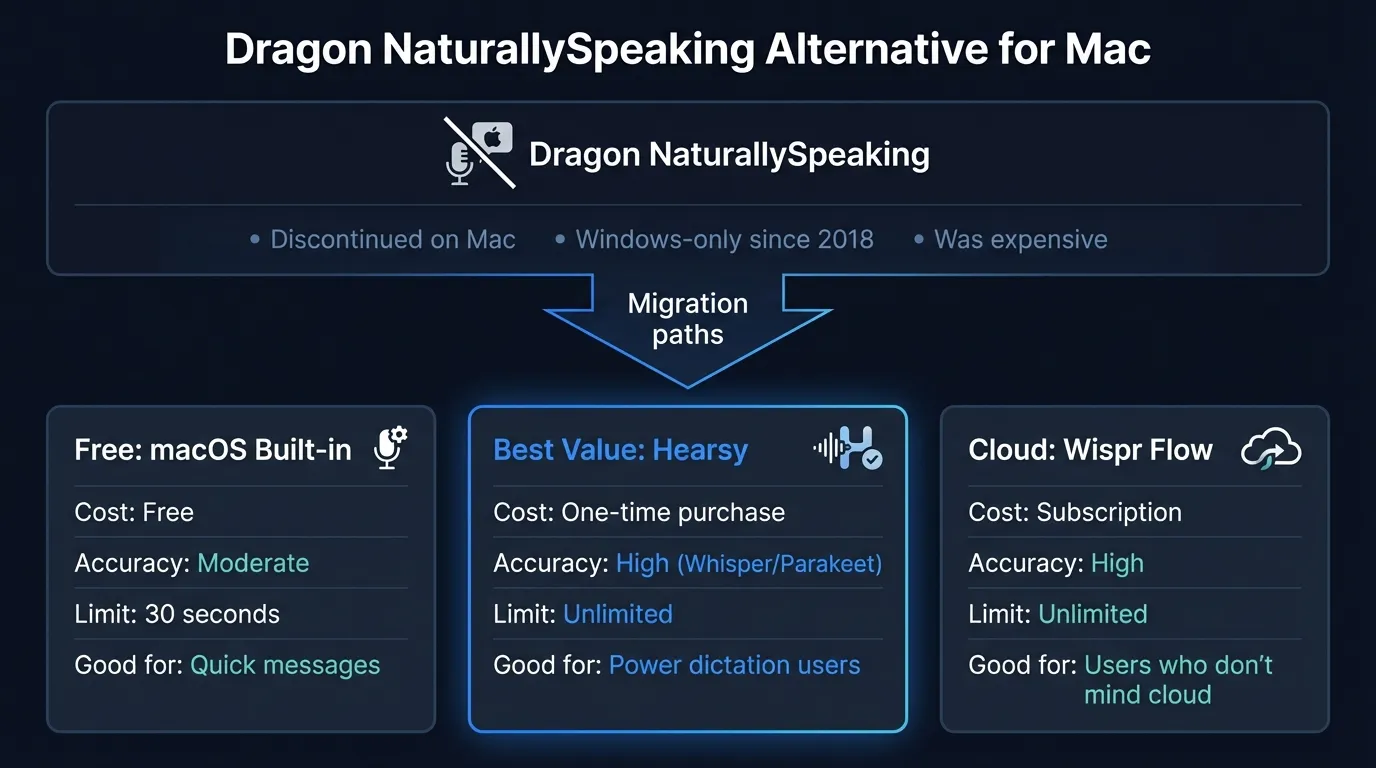
Dragon NaturallySpeaking was the gold standard for power dictation for two decades. Mac users relied on it for legal briefs, medical notes, long-form writing, and hands-free computing. Then in October 2018, Nuance pulled the plug: Dragon Professional Individual for Mac 6.0 was discontinued, leaving a gap that no one has fully filled in the same way.
If you're still searching for a true Dragon replacement on Mac — or you're new to power dictation and wondering what the options are — this guide covers the best alternatives available in 2026.
One disclosure: Hearsy is our product. We've tried to write this comparison honestly, including cases where a different tool is a better fit.
Here's how the best Dragon NaturallySpeaking alternatives for Mac compare:
What happened to Dragon for Mac#
Dragon's Mac history stretches back to the early 2000s under the MacSpeech Dictate brand. Nuance acquired MacSpeech in 2010, eventually releasing Dragon Dictate for Mac and later Dragon Professional Individual for Mac, with version 6.0 as the final release.
On October 22, 2018, Nuance announced end-of-life for Dragon Professional Individual for Mac 6.0. Dragon Medical for Mac had been discontinued a few months earlier, in August 2018. Nuance cited the difficulty of maintaining feature parity with the Windows version as the reason.
The timing was particularly frustrating for Mac users: Nuance discontinued Mac support just as Apple Silicon was becoming the standard, a transition that would have required a complete rewrite of Dragon's audio processing stack.
Existing perpetual license holders could keep using version 6.0, but no new updates, no Catalina support, no M-chip compatibility. For practical purposes, Dragon for Mac is dead.
Nuance was later acquired by Microsoft in 2022, which owns Dragon's future direction — squarely focused on Windows and enterprise cloud products, not Mac desktop software.
What Dragon did well (and what Mac apps need to match)#
To find a real replacement, it helps to be specific about what Dragon actually offered:
System-wide dictation. Dragon worked in any application — word processors, email, browsers, terminals. You didn't need app-specific integrations.
Vocabulary customization. Dragon let you add custom words, names, and domain-specific terminology. Medical, legal, and technical users built substantial personal vocabularies that dramatically improved accuracy.
Voice commands. Beyond transcription, Dragon supported voice commands: "Select last sentence," "Undo that," "Press Enter." This made it possible to navigate and edit documents almost entirely by voice.
Continuous learning. Dragon adapted to your voice, accent, and speech patterns over time.
Unlimited dictation sessions. No arbitrary time limits on how long you could dictate.
No Mac app in 2026 replicates all of Dragon's voice commands and vocabulary learning exactly. But for the core use case — high-accuracy, unlimited, system-wide dictation — modern AI apps running on Apple Silicon are genuinely competitive.
The 4 best Dragon NaturallySpeaking alternatives for Mac#
1. Hearsy — Best for local, AI-enhanced dictation#
Best for: Former Dragon users who want unlimited dictation, local processing, and AI post-processing without a cloud subscription.
Hearsy is a menu-bar dictation app for Mac built on two AI speech engines. The Parakeet TDT engine (English) processes audio in under 50ms on Apple Silicon — faster than Dragon felt in practice. The Whisper Large V3 engine handles 99 languages with near-Dragon accuracy (4.2% word error rate on LibriSpeech benchmarks, versus Dragon's reported ~3-5% in ideal conditions).
Both engines run entirely on your Mac. No audio leaves your device.
What closes the gap with Dragon for many users: AI post-processing templates. Dictate a rough draft, and an AI cleanup step removes filler words, fixes punctuation, and formats the text for your context — email, code comment, summary, or clean prose. Former Dragon users who relied on Dragon's accuracy to avoid heavy editing often find that Hearsy's raw transcription plus AI cleanup produces better final output.
What it doesn't replicate from Dragon: Hearsy doesn't have Dragon-style voice navigation commands ("Select that," "Scratch that"). It's a dictation-to-text tool, not a full voice control system. For voice navigation of macOS, the built-in Voice Control (distinct from Dictation) is still the right answer.
Pricing: One-time purchase.
2. SuperWhisper — Best for power users who want maximum Whisper control#
Best for: Technical users who want granular control over Whisper model selection and custom prompt templates.
SuperWhisper has a strong following among developers and content creators. It runs Whisper locally (up to Large V3), supports 100+ languages, and processes audio entirely on-device. The app has extensive customization: custom AI prompts per mode, keyboard shortcuts, multiple recording modes including push-to-talk and toggle.
The free tier is substantive — unlimited use of smaller Whisper models, genuinely useful for moderate dictation volume.
Compared to Dragon: SuperWhisper is a direct dictation replacement for Dragon's core transcription function. It's fast on Apple Silicon (around 1-2 seconds for most dictation bursts with Large V3), accurate, and works system-wide. It doesn't have Dragon's voice navigation commands.
Compared to Hearsy: SuperWhisper uses Whisper only. Hearsy offers both Whisper and the faster Parakeet engine (English). SuperWhisper's lifetime pricing ($249) is higher than alternatives for equivalent local functionality.
Pricing: Free tier (smaller models, unlimited); Pro $8.49/month or $84.99/year; Lifetime $249.
3. VoiceInk — Best budget one-time Dragon replacement#
Best for: Users who want a capable, private Dragon replacement at the lowest one-time cost.
VoiceInk is a $39 one-time purchase built on Whisper, open-source on GitHub, and processed entirely on-device. It works system-wide in any Mac text field — push-to-talk and always-on modes — and includes Power Mode, which reads surrounding text context to improve accuracy on technical content.
At $39 one-time versus Dragon's ~$300 (when it was available), VoiceInk offers an accessible entry point for users leaving Dragon.
What it doesn't replicate: No Dragon-style voice commands, no continuous learning. The AI cleanup is more limited than Hearsy's multi-template post-processing. For straightforward transcription without advanced post-processing, VoiceInk delivers well at minimal cost.
Trial: Free trial available; macOS 14.0 or later required.
Pricing: $39 one-time.
4. macOS Voice Control — For Dragon's navigation features (not dictation)#
Best for: Users who specifically need Dragon's voice navigation commands, not just transcription.
This one is different from the rest. macOS built-in Dictation (the basic voice-to-text) has a 30-60 second cap and sends audio to Apple's servers. That's not a Dragon replacement.
But macOS Voice Control — a separate accessibility feature in System Settings → Accessibility → Voice Control — is something different. It handles spoken navigation commands like "click OK," "scroll down," "select previous word," and custom voice commands you define. It's the closest macOS equivalent to Dragon's navigation layer.
Voice Control and a dedicated dictation app (like Hearsy or SuperWhisper) can coexist. Many former Dragon users run both: Voice Control for navigation, Hearsy for transcription.
The catch: macOS Voice Control's transcription quality for long-form dictation is weaker than dedicated apps. Use it for navigation commands; use a dedicated app for dictation.
Pricing: Free, built into macOS.
The Privacy-First Alternative
100% local processing. No subscription. One-time purchase. Works in every app on your Mac.
At a glance#
| App | Local | System-wide | Voice commands | AI cleanup | Price |
|---|---|---|---|---|---|
| Dragon (Windows) | Yes | Yes | Yes | No | ~$300 one-time (Windows only) |
| Hearsy | Yes | Yes | No | Yes (templates) | One-time |
| SuperWhisper | Yes | Yes | No | Basic | Free tier; $249 lifetime |
| VoiceInk | Yes | Yes | No | Basic | $39 one-time |
| macOS Voice Control | Yes | Yes | Yes | No | Free |
| macOS Built-in Dictation | Partial (cloud) | Yes | No | No | Free |
The accuracy question#
A common worry: will any of these match Dragon's accuracy?
Dragon's reputation for accuracy came partly from its continuous learning — it adapted to your voice over time. Modern Whisper-based apps don't learn from you, but they start from a stronger baseline. Whisper Large V3 achieves a 4.2% word error rate on standard English benchmarks, compared to the 3-5% Dragon typically reported in controlled conditions. The gap in raw accuracy is small.
In practice, accuracy differences tend to be largest on:
-
Proper nouns and custom vocabulary: Dragon's custom word lists were genuinely useful. Hearsy and SuperWhisper don't have explicit vocabulary customization, but they use large-vocabulary models that handle most names and terminology reasonably well. Technical or medical users who added extensive custom vocabulary to Dragon will notice this most.
-
Non-standard speech: If you have a strong accent, speak quickly, or have speech characteristics that differ from standard American English, Dragon's adaptation over time was valuable. Whisper Large V3 handles varied accents better than smaller models, but it doesn't adapt to you specifically.
-
Punctuation: Dragon let you say "comma" and "period" to insert punctuation. Modern AI apps handle this differently — most use AI post-processing to infer punctuation from natural speech patterns, which works well for prose but may miss explicit punctuation intent.
For most users, the accuracy of a modern Whisper-based app is within rounding error of Dragon. For specialized users — medical dictation, legal briefs, highly technical content — it's worth doing a trial with your actual content before committing.
Privacy: a meaningful improvement over Dragon#
Dragon was a local app — audio processed on your machine, no cloud required. That was a key reason medical and legal professionals trusted it.
Hearsy, SuperWhisper, and VoiceInk maintain that same local-processing model. Audio stays on your Mac. You can verify this with a network monitor like Little Snitch: these apps make no outbound connections during transcription.
The current wave of cloud-based dictation apps (Wispr Flow, Otter AI, Google Docs Voice Typing) don't meet this standard. If local processing was why you trusted Dragon, the local Mac apps listed above preserve that.
Can you still run Dragon on a Mac?#
Technically, Dragon Professional for Windows runs on a Mac through virtualization (Parallels Desktop or VMware Fusion). This works on Intel Macs running x86 Windows. On M-series Macs running ARM Windows, compatibility is limited — Dragon's Windows version wasn't designed for ARM, and many users report issues.
Even on Intel Macs, the virtualization overhead affects performance, and you're running a Windows environment just for one app. Most users who evaluate this path end up choosing a native Mac app instead.
Which to choose#
You want the closest overall Dragon replacement for daily dictation: Hearsy. Local processing, unlimited sessions, AI post-processing templates, Parakeet for English speed or Whisper for multilingual accuracy, one-time pricing.
You want maximum control over Whisper models and don't need AI post-processing: SuperWhisper. Extensive model selection, custom prompts, generous free tier.
You want the cheapest capable Dragon replacement: VoiceInk at $39 one-time.
You specifically need Dragon's voice navigation commands on Mac: macOS Voice Control (free) handles most navigation commands. Pair it with a dedicated dictation app for transcription.
You want Dragon on Mac no matter what: The only realistic path is Parallels + Dragon for Windows on an Intel Mac. Budget for licensing complexity and reduced performance versus native.
For more on Mac dictation options, see the best dictation software for Mac guide. For privacy-focused local processing specifically, see voice data privacy and local AI.
Frequently asked questions#
Is Dragon NaturallySpeaking available for Mac?#
No. Nuance discontinued Dragon Professional Individual for Mac in October 2018. The last Mac version was Dragon for Mac 6.0. Since then, there has been no native Dragon product for macOS. Dragon Professional (Windows) is still sold and supported by Nuance — but Windows only.
What is the best Dragon NaturallySpeaking alternative for Mac?#
For power users who want local processing and unlimited dictation, Hearsy and SuperWhisper are the closest replacements — both run entirely on your Mac, support system-wide dictation, and work offline. VoiceInk is the most affordable one-time option at $39. For voice navigation commands specifically (rather than dictation), macOS Voice Control is free and handles most of what Dragon's navigation layer did.
Can I run Dragon NaturallySpeaking on a Mac?#
Dragon NaturallySpeaking is Windows-only. You can run it on Intel Macs using Parallels Desktop or VMware Fusion, but M-series Macs running ARM Windows have limited compatibility. Most users find native Mac apps a better experience than running Dragon through virtualization.
Why did Nuance discontinue Dragon for Mac?#
Nuance cited difficulty maintaining feature parity with the Windows version. Dragon for Mac 6.0 was end-of-lifed October 22, 2018, and Dragon Medical for Mac was discontinued in August 2018. Nuance was later acquired by Microsoft in 2022. There is no indication of a future Mac version.
Do any Mac dictation apps have Dragon-style custom vocabulary?#
Not in the same way Dragon did. Dragon let you build extensive custom word lists that the recognition engine used in real time. Current Mac apps using Whisper and Parakeet don't have a vocabulary customization layer — they use large pre-trained models that handle most terminology well, but can't be explicitly trained on your specific vocabulary. Medical and legal users who built deep custom Dragon vocabularies will notice this most acutely.
Ready to Try Voice Dictation?
Hearsy is free to download. No signup, no credit card. Just install and start dictating.
Download Hearsy for MacmacOS 14+ · Apple Silicon · Free tier available
Related Articles
Otter AI Alternative: 5 Better Options for 2026
11 min read
Wispr Flow vs SuperWhisper vs Hearsy: 3-Way Mac Dictation Comparison
14 min read
Wispr Flow vs Hearsy: Privacy, Speed & Features Compared
8 min read
Willow Voice vs Hearsy: Cloud Subscription vs Local One-Time
8 min read
VoiceInk vs Hearsy: Mac Dictation Apps Compared
6 min read