
Aqua Voice vs Hearsy: Cloud Dictation vs Local Privacy
Aqua Voice is cloud-based at $10/month. Hearsy runs locally on your Mac, one-time purchase. Compare privacy, speed, and features to find the right fit.
Aqua Voice is cloud-based. Audio is sent to remote servers for transcription and AI processing. Hearsy runs entirely on your Mac — nothing leaves your device during dictation. That's the core difference, and whether it matters depends on what you're dictating.
One disclosure upfront: Hearsy is our product. I've tried to write this comparison honestly — including cases where Aqua Voice is genuinely the better fit.
Here's how Aqua Voice and Hearsy compare on the key dimensions:
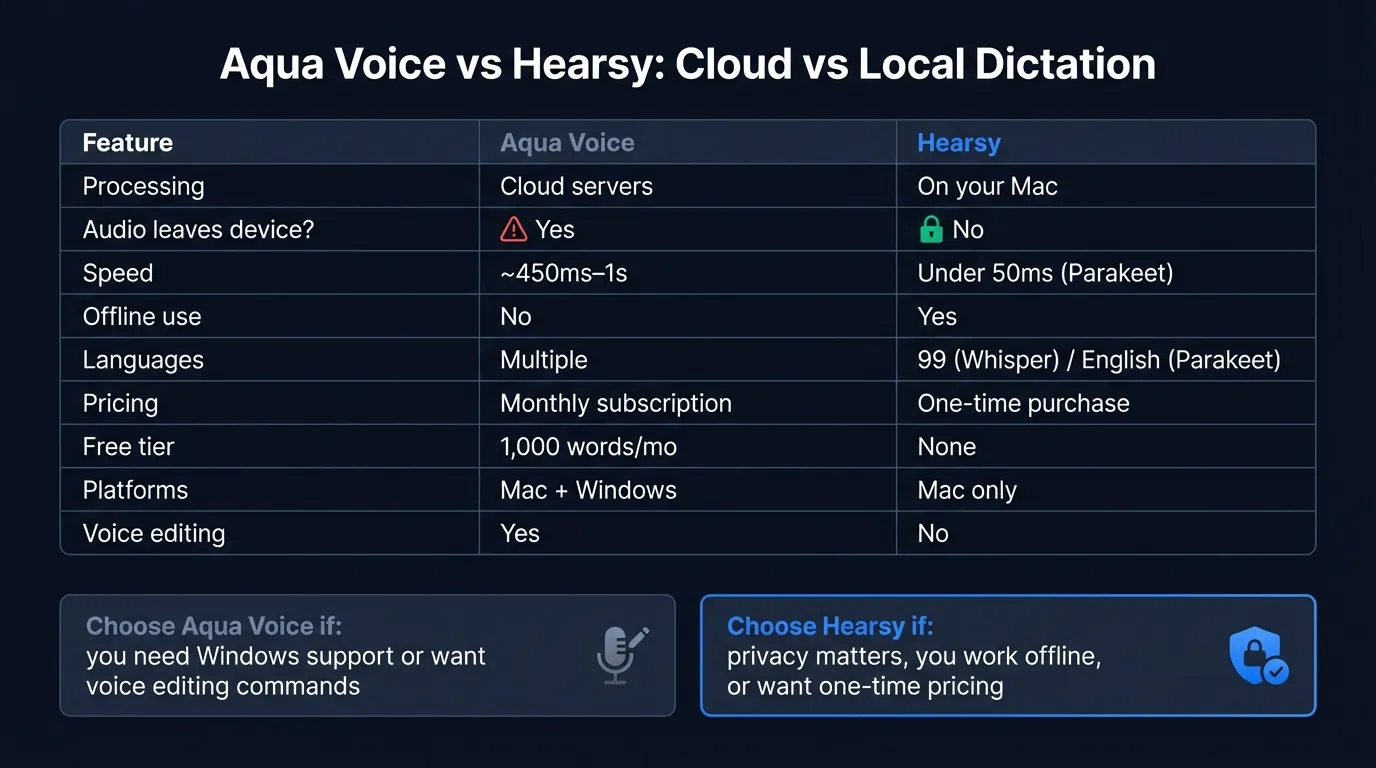
Quick comparison: For a side-by-side feature table, pricing breakdown, and FAQ, see our Aqua Voice vs Hearsy comparison page.
What Aqua Voice is#
Aqua Voice is a dictation app for Mac and Windows that sends audio to cloud servers for transcription. Activate it with a hotkey — Fn by default — from any app, speak, and transcribed text appears at your cursor.
The app has gained real traction. It won a 2025 Product Hunt Orbit Award (Readability Award for AI Dictation), was featured by 9to5Mac, and has grown from around 170 to roughly 1,000 monthly brand searches over 12 months. It's a legitimate product with thoughtful design.
In 9to5Mac's accuracy test, the reviewer dictated Steve Jobs' Stanford commencement speech into both Apple's built-in dictation and Aqua Voice. Apple's built-in produced 17 errors. Aqua Voice produced 1. That's the kind of accuracy gap that makes cloud processing compelling — the servers have more compute to throw at the problem.
The processing model is cloud-only, and Aqua Voice has been transparent about why: running both ASR (automatic speech recognition) and a language model locally at their target speeds isn't feasible with current on-device hardware for their approach. That's an honest answer.
One distinction worth noting: screen context for formatting awareness is processed locally — screen content doesn't leave your device. Your audio does. The privacy question for Aqua Voice is specifically about audio, not screen content.
What Aqua Voice is: A cloud-based dictation app that processes audio on remote servers with context awareness handled locally. Fast and accurate. Requires internet. Available on Mac and Windows.
What Hearsy is#
Hearsy is a menu-bar dictation app that runs entirely on your Mac. Press a global hotkey from any app, speak, and transcribed text is pasted at your cursor. No internet connection is used during transcription. Audio is processed in local RAM by one of two AI engines:
- Parakeet TDT (English) — under 50ms latency on Apple Silicon
- Whisper Large V3 (99 languages) — 4.2% word error rate on LibriSpeech benchmarks
AI post-processing uses a local language model (Qwen 2.5 via MLX) by default. If you configure Claude or OpenAI for the cleanup step, that request goes to the respective API — but transcription itself stays local either way. You can verify this with Little Snitch: no outbound connections during transcription.
What Hearsy is: A local Mac dictation app that runs AI speech models on your device. Nothing is transmitted during transcription. Works offline. One-time purchase. macOS only.
Privacy: what actually happens to your audio#
This is the real question behind most "aqua voice review" searches.
Aqua Voice's data handling:
When you dictate with Aqua Voice, your audio is sent to Aqua's cloud servers over TLS-encrypted HTTPS and WebSocket connections. The company states that transcribed text is not stored by default — unless you enable device synchronization, in which case transcript data is retained in their system.
Aqua Voice offers a Privacy Mode that prevents data from being used for product improvement. Without Privacy Mode enabled, session metadata — timestamps, device type, performance metrics — may be collected even when transcripts aren't retained.
The screen context feature works differently: to help the AI format output correctly, Aqua Voice reads your screen, but that screen content is processed locally. Only audio leaves your device. This is a meaningful distinction compared to Wispr Flow, which sends screenshots to cloud servers.
To be clear about what this means in practice: Aqua Voice's privacy posture is reasonable for general use. They've explained their architecture honestly and published their policy. But audio does leave your device and get processed on their infrastructure. For anyone dictating medical notes, legal content, confidential business information, or personal financial details, that's a real consideration — not because Aqua Voice is untrustworthy, but because of the structural fact that audio travels over a network to servers you don't control.
Hearsy's data handling:
There's no data handling policy to evaluate for transcription, because nothing is transmitted. Audio is processed in local RAM using a model that runs entirely on your Mac. If you want to verify this, run Hearsy while monitoring network traffic with Little Snitch or a similar tool: no outbound connections during transcription.
The local AI cleanup (Qwen 2.5 via MLX) runs the same way — on your Mac, no network call. The only time Hearsy contacts a server is if you explicitly configure it to use Claude or OpenAI for the cleanup step, and even then, only the text cleanup request is sent — not your original audio.
The Privacy-First Alternative
100% local processing. No subscription. One-time purchase. Works in every app on your Mac.
Speed#
Aqua Voice advertises response times of around 450ms, with text typically appearing in about a second for normal sentences. On a fast, stable connection, this is quick. Where it shows up is in edge cases: slow hotel Wi-Fi, congested networks, international travel, or working in areas with intermittent connectivity.
Cloud services also have outages. The 9to5Mac reviewer experienced connectivity errors requiring app restarts during testing, along with one server outage lasting around 20 minutes. These are real-world conditions, not edge cases. Any cloud-dependent app can have service interruptions.
Hearsy: Parakeet TDT processes English audio in under 50ms on Apple Silicon. That's local RAM-to-text — no network round-trip, because there's no network. No cloud service can beat local processing for raw latency, because the physics of network communication set a hard floor.
Whisper Large V3 in Hearsy takes 1–2 seconds for a typical sentence — slower than Parakeet but still local. If you dictate technical vocabulary, medical terms, or non-English languages, Whisper is the better choice for accuracy.
For most daily use, Aqua Voice at 450ms–1s is fast enough that you won't notice it. The gap matters during outages, on slow connections, or when you need dictation on an airplane.
Features#
What Aqua Voice does well:
Natural-language voice editing is Aqua Voice's most distinctive feature. You can say "change 'for example' to 'for instance'" while composing text and it edits in place. You can set standing instructions like "use all lowercase in iMessage" or "break text into paragraphs when dictating in Notion." This is a fundamentally different interaction model from conventional dictation apps — it blurs the line between transcription and editing.
Automatic formatting: Aqua Voice infers context from your active app and adjusts output accordingly — email tone in Gmail, technical style in a code editor. You don't pick a template; it adapts.
Custom dictionary: Add up to 800 custom words or phrases. Useful for medical terminology, product names, proper nouns, or any vocabulary that generic transcription models frequently mishear.
Cross-platform: Aqua Voice runs on both Mac and Windows. If you work across operating systems, it's one of the few native dictation apps that follows you to Windows.
What Hearsy does differently:
Full local processing: Nothing leaves your Mac during transcription, period. No privacy policy to evaluate because no data changes hands.
No usage caps: Transcribe for 10 minutes, an hour, or six hours. No word count meter, no throttling, no free tier limits.
Manual AI templates: Choose a format (Clean & Format, Email, Code Comment, Summary) before dictating, and local AI applies exactly that cleanup. You know what processing will be applied because you chose it.
True offline use: Works without any internet connection. Planes, secure facilities, rural areas, air-gapped environments — wherever you work, Hearsy works.
Aqua Voice vs Wispr Flow#
"Aqua voice vs wispr flow" gets around 30 monthly searches, and the comparison is natural — both are cloud-based Mac dictation apps aiming at similar users.
The key differences:
Aqua Voice costs $8–10/month (as of March 2026). Wispr Flow costs $12–15/month. Both process audio on remote servers. The screen context question is where they diverge: Aqua Voice reads your screen locally and doesn't send that content to the cloud. Wispr Flow captures screenshots every few seconds and sends them to cloud servers alongside your audio — that screen content is used for automatic context formatting.
If you regularly have sensitive content on screen while dictating (a client document, financial data, a legal brief), Wispr Flow's screenshot capture means that content periodically goes to cloud servers. Aqua Voice doesn't do this — screen context stays on your device.
For anyone choosing between the two: if cloud processing of audio is the concern, both apps have that characteristic. You'd need to look at local alternatives instead. If the choice is purely between these two cloud apps, Aqua Voice is cheaper and keeps screen content local; Wispr Flow is more established and has automatic context formatting without you specifying templates.
For more detail on Wispr Flow's architecture and pricing, see the Wispr Flow vs Hearsy comparison.
For more on local Mac dictation options, see the best dictation software for Mac guide. For a technical look at how local and cloud transcription differ, see AI transcription: local vs cloud. For privacy implications of sending voice data to cloud services, see the voice data privacy guide.
Ready to Try Voice Dictation?
Hearsy is free to download. No signup, no credit card. Just install and start dictating.
Download Hearsy for MacmacOS 14+ · Apple Silicon · Free tier available
Related Articles
Otter AI Alternative: 5 Better Options for 2026
11 min read
Wispr Flow vs SuperWhisper vs Hearsy: 3-Way Mac Dictation Comparison
14 min read
Wispr Flow vs Hearsy: Privacy, Speed & Features Compared
8 min read
Willow Voice vs Hearsy: Cloud Subscription vs Local One-Time
8 min read
VoiceInk vs Hearsy: Mac Dictation Apps Compared
6 min read