
Best Voice to Text App in 2026: Mac, iPhone, Android & Web
The best voice to text apps by platform: Hearsy for Mac, Gboard for Android, Apple Dictation for iPhone, Google Docs for web. Compared on accuracy, privacy, and price.
The best voice to text app depends on your platform. On Android, it's already installed: Gboard. On iPhone, the keyboard microphone handles most everyday use. The harder question is on Mac, where the built-in tool has real limitations and several credible alternatives compete.
This guide covers the best options across every platform, with honest trade-offs for each. It also covers what "voice to text" doesn't cover — meeting transcription is a separate category, and several popular apps are optimized for that, not real-time dictation.
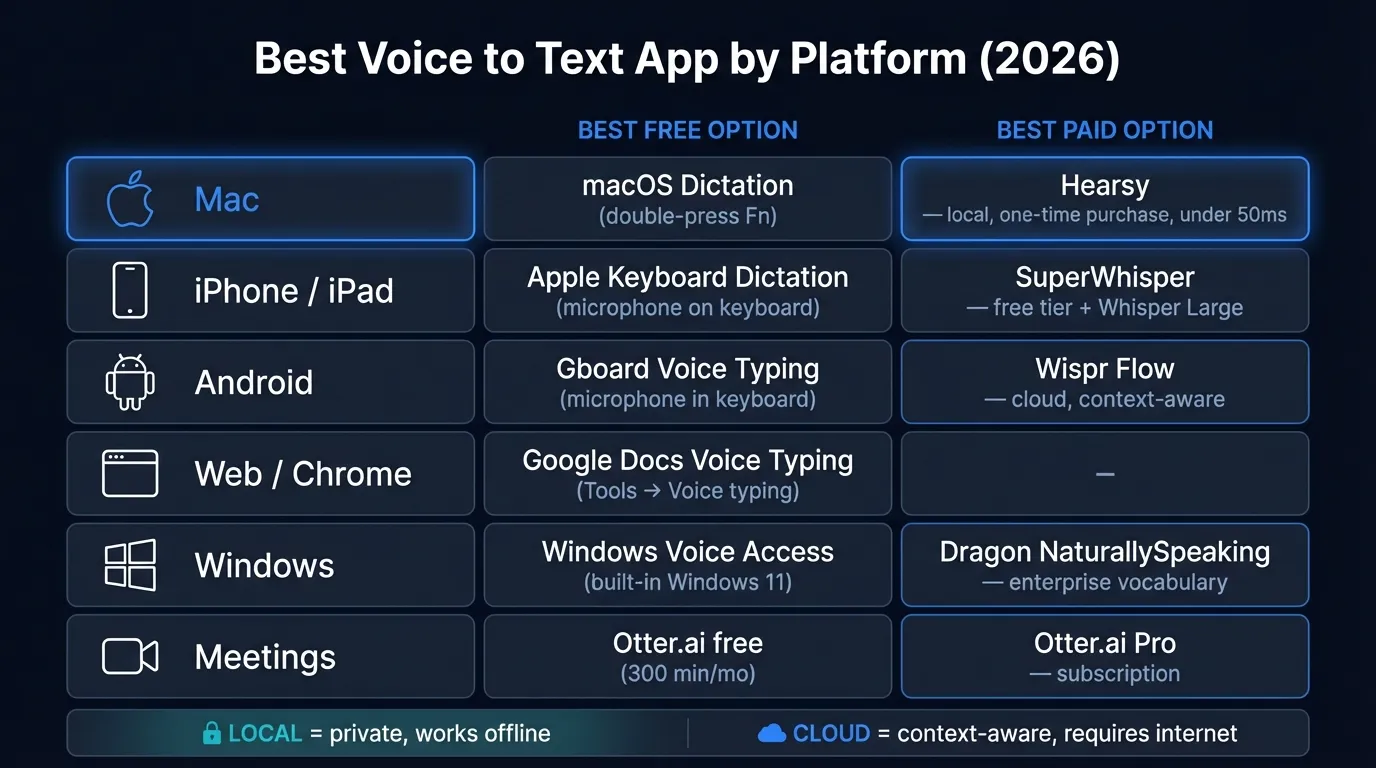
Here's a quick look at the best voice-to-text options by platform:
What to look for#
Before comparing specific apps, four criteria separate good options from mediocre ones:
Accuracy matters most. A transcription app that gets 85% of words right sounds fine until you realize you're correcting one in seven words. For English dictation in clean audio environments, modern apps based on Whisper Large V3 achieve 4–5% word error rates on standard benchmarks. Real-world accuracy varies with accent, background noise, and vocabulary domain.
Latency — the delay between speaking and seeing text — varies from under 50ms for local models to several seconds for cloud services. For real-time dictation where you're watching text appear as you speak, anything over 1–2 seconds feels sluggish. For batch transcription of long recordings, latency matters less.
Privacy is structural, not just a policy setting. Cloud-based apps send audio to third-party servers. Local apps process audio on your device. The difference isn't about whether you trust a vendor — it's about whether audio leaves your device at all. For anyone dictating sensitive content, this is a non-negotiable consideration.
Offline capability: cloud-based dictation apps stop working without internet. This affects anyone who dictates on planes, in facilities with restricted networks, or in areas with poor connectivity.
Quick picks by platform#
| Platform | Best free option | Best paid option |
|---|---|---|
| Mac | macOS built-in dictation | Hearsy (local, one-time) |
| iPhone / iPad | Apple Keyboard Dictation | SuperWhisper (free tier available) |
| Android | Gboard voice typing | Wispr Flow |
| Web / Chrome | Google Docs Voice Typing | — |
| Windows | Windows Voice Access | Dragon NaturallySpeaking |
| Meetings (any platform) | Otter.ai (free tier) | Otter.ai Pro |
Mac#
Mac has the most competitive voice-to-text market of any platform, with four distinct options ranging from free and built-in to local AI models and cloud services.
Hearsy — best for privacy and speed#
Hearsy is a menu bar dictation app for macOS. Press a global hotkey from any app, speak, and text is pasted at your cursor. Two transcription engines:
- Parakeet TDT — English only, under 50ms latency on Apple Silicon
- Whisper Large V3 — 99 languages, 4.2% word error rate on the LibriSpeech clean test set
Both run entirely locally. Nothing leaves your Mac during transcription. You can verify this with any network monitor: no outbound connections occur while Hearsy is transcribing. The app also includes AI cleanup templates — email, code comment, clean prose, summary — running on a local Qwen 2.5 model by default. If you configure Claude or OpenAI for cleanup, that single text-formatting request goes to their API; the original audio never does.
One-time purchase, no subscription, works offline. macOS only.
Best for: Anyone dictating sensitive content, needing offline functionality, or wanting the fastest English dictation on Apple Silicon.
Not ideal for: Users who want automatic context detection without selecting templates manually, or anyone who needs cross-platform coverage beyond Mac.
Wispr Flow — best cloud-based Mac dictation#
Wispr Flow is cloud-based: press a hotkey, speak, and audio is processed on Wispr's servers via OpenAI and Meta's infrastructure before appearing at your cursor. As of early 2026, it pulls around 12,100 monthly brand searches — more than any other Mac dictation app.
The distinctive feature is automatic context awareness. Wispr Flow captures screenshots of your active window every few seconds alongside audio. The AI infers what you're typing — Gmail email, Slack message, code comment — and formats output accordingly. For users who move between many apps, this automatic detection removes the step of selecting a context template manually.
Pricing (as of March 2026): Free tier limited to 2,000 words per week — roughly 10–15 minutes of speech for an average speaker. Paid plans run $15/month billed monthly, or approximately $12/month billed annually.
Wispr Flow holds SOC 2 Type II certification and offers HIPAA compliance with a Business Associate Agreement. Standard plans retain audio and transcripts for 30 days; Privacy Mode on paid plans offers zero data retention. The cloud architecture is structural: audio and screen captures leave your device on every dictation session.
Best for: Users who want hands-off context formatting, dictate non-sensitive content, and are comfortable with a monthly subscription.
Not ideal for: Offline use (requires internet), sensitive or confidential dictation, anyone who wants to avoid recurring costs.
SuperWhisper — best local alternative with a free tier#
SuperWhisper runs locally on your Mac — same Whisper-based architecture as Hearsy, same privacy properties. Nothing leaves your device during transcription. The clearest differentiator from Hearsy: SuperWhisper has a free tier (unlimited use of smaller Whisper models), and it runs on macOS, iOS, and Windows.
Pricing (as of March 2026): Free tier available. Pro plans at $8.49/month, $84.99/year, or a $249 one-time lifetime license. Paid tiers unlock Whisper Large V3 and Custom Modes — user-defined prompts assigned to shortcuts for per-context output formatting.
If you need the same local dictation app on your Mac, iPhone, and Windows machine, SuperWhisper is the practical cross-platform choice. For Mac-only users who prioritize the fastest English processing, Hearsy's Parakeet engine is faster than Whisper-based implementations.
For a head-to-head comparison of all three major Mac apps, see the Wispr Flow vs SuperWhisper vs Hearsy comparison.
Best for: Local, private dictation with a free entry point; cross-platform users who want the same app on Mac, iOS, and Windows.
macOS built-in dictation — best free option for Mac#
macOS includes dictation in every version, and it improved notably in Sonoma. On M1 and later chips, Sonoma processes dictation locally — no audio sent to Apple's servers. On Intel Macs, audio is sent to Apple for processing.
Activate it: double-press the Fn key, or set a custom shortcut in System Settings → Keyboard → Dictation. It works in any text field system-wide.
Sonoma's dictation supports longer continuous sessions than earlier versions and includes basic punctuation commands. You can type corrections while dictation is active without stopping the session. Limitations: special characters and numerals can behave unpredictably, technical vocabulary is weaker than Whisper-based apps, and there's no AI cleanup or formatting.
Best for: Short to medium everyday dictation at no cost on an M1+ Mac.
Not ideal for: Long-form technical dictation, specialized vocabulary, formatting cleanup, or Intel Mac users with privacy concerns.
The Privacy-First Alternative
100% local processing. No subscription. One-time purchase. Works in every app on your Mac.
iPhone and iPad#
Apple Keyboard Dictation — best free for iPhone#
The fastest voice-to-text on iPhone is built into the keyboard. Tap the microphone icon from any app — Messages, Notes, Mail, any third-party app — and dictation starts immediately. On iPhone 12 and later with on-device speech recognition enabled (Settings → General → Keyboard → Enable Dictation), it processes locally — no audio leaves the device.
For everyday use — texts, Slack messages, quick emails — this is the right tool. It handles basic punctuation commands and multiple languages. The constraint is session length and the absence of AI post-processing: what you speak is what you get, with no cleanup step.
Best for: Casual dictation in any iPhone app, short messages and notes.
SuperWhisper (iOS) — best for longer iOS dictation#
SuperWhisper's iOS app brings the same local Whisper-based processing to iPhone. It records audio in the app, transcribes using on-device Whisper models, and lets you copy or share the result. The free tier gives access to smaller models; paid tiers unlock Whisper Large and Custom Modes.
If you dictate longer documents — journal entries, voice memos you want as text, notes from calls — SuperWhisper's iOS app handles sessions that Apple's built-in tool is not designed for.
Android#
Gboard voice typing — best for Android#
Gboard is Google's keyboard for Android, and its voice typing feature is the default go-to for most Android users. Tap the microphone icon in Gboard from any app to start. As of 2026, it runs on Gemini-enhanced voice recognition and supports over 120 languages.
Gboard adds punctuation automatically as you speak and handles emoji by voice. It performs well for conversational-length dictation — messages, emails, short notes — on fast connections.
One limitation: Gboard voice typing requires an internet connection for full accuracy. Google's privacy documentation states that Gboard uses federated learning: it sends model updates (not raw audio) to Google's servers to improve predictions. Voice input data handling varies by device configuration and Google account settings.
Best for: Short to medium dictation in any Android app at no cost.
Wispr Flow (Android) — best paid option for Android#
Wispr Flow launched on Android in late 2025, bringing the same cloud-based context-aware formatting as its Mac version. Audio is processed on Wispr's cloud servers, and the AI formats output based on the app context.
For Android users who dictate regularly and already use Wispr Flow on Mac or iOS, the Android app provides a consistent cross-device experience under the same subscription.
Pricing (as of March 2026): Same plan as Mac — 2,000 words per week on the free tier, $15/month paid.
Web#
Google Docs Voice Typing — best for the browser#
Google Docs includes voice typing under Tools → Voice typing (Ctrl+Shift+S in Chrome). Free, no installation. It uses Google's speech recognition and covers most major languages.
Accuracy in ideal conditions runs around 85–95%. Non-native accents, background noise, and technical vocabulary reduce this. Punctuation requires voice commands — you say "period," "comma," "new paragraph" explicitly.
It's limited to Chrome and Chromium-based browsers. Firefox and Safari users cannot use it.
For occasional dictation directly into a Google Doc, it works. For daily dictation across any app, a native app with system-wide hotkey access is more practical.
Windows#
Windows Voice Access — best free for Windows#
Windows 11 includes Voice Access, a full system-wide voice control and dictation feature. Enable it in Settings → Accessibility → Speech → Voice Access. It handles system navigation, text dictation, punctuation commands, and basic editing commands. It works offline.
Microsoft has actively updated Voice Access in recent Windows 11 releases. For basic dictation on Windows 11 without third-party software, it's the right starting point.
Dragon NaturallySpeaking — best professional option for Windows#
Dragon NaturallySpeaking (now Dragon Professional v16) is the standard for professional Windows dictation. Nuance, acquired by Microsoft in 2022 for $19.7 billion, has not shipped a significant Dragon update since v16 launched in 2021, but the product remains in active use across medical, legal, and enterprise environments.
Dragon's strengths: deep custom vocabulary support, strong performance on domain-specific terminology, tight Word and Outlook integration, and the ability to train on your voice over time. It works offline.
The Mac version was discontinued in October 2018. Dragon is Windows-only.
Best for: Windows users with professional dictation needs where domain vocabulary matters — medical, legal, technical fields.
Meetings: a different category#
Most apps above are real-time dictation tools — they paste text at your cursor as you speak. Meeting transcription is a distinct use case: recording a multi-speaker conversation and producing a transcript after the fact. Several popular services are designed for the latter, not the former.
Otter.ai#
Otter.ai is the most widely used meeting transcription app. It integrates with Zoom, Google Meet, and Microsoft Teams to automatically record and transcribe. The free tier includes 300 minutes of transcription per month (30 minutes maximum per conversation). Older conversations beyond the 25 most recent are archived.
Paid plans (as of March 2026): Pro at $8.33/month billed annually ($16.99/month billed monthly). Business at $20/month billed annually. Audio is processed on Otter's cloud servers.
Best for: Meeting transcription and summaries in standard video conferencing workflows.
Not suitable for: Real-time dictation into apps. Otter transcribes recordings; it does not paste text at your cursor while you speak.
How to choose#
For Mac: Start with macOS built-in dictation (free, already installed). If you need better accuracy on technical vocabulary, AI cleanup, or a dedicated hotkey workflow, evaluate Hearsy or SuperWhisper for local processing — or Wispr Flow if you prefer automatic context detection and a cloud subscription. See the best dictation software for Mac guide for a deeper comparison.
For iPhone: Apple's built-in keyboard dictation is already installed and handles everyday use well. Only consider SuperWhisper or Wispr Flow if you need longer sessions, AI post-processing, or consistent cross-platform workflow.
For Android: Gboard voice typing is the right default. Wispr Flow is the upgrade if you want context-aware formatting and already use it elsewhere.
For web: Google Docs Voice Typing is the only in-browser option that works without installation. For daily or professional dictation, a native app with system-wide access is more practical.
For Windows: Windows Voice Access covers basic dictation at no cost. Dragon NaturallySpeaking covers professional use with specialized vocabulary.
For meetings: Otter.ai is purpose-built for multi-speaker recording and transcription. Real-time dictation apps are designed for something different.
The privacy question: Any cloud-based app sends audio to third-party servers. On Mac, both Hearsy and SuperWhisper process audio locally — nothing is transmitted during transcription. On iPhone with on-device recognition enabled, Apple's built-in dictation processes locally on recent hardware. For anyone dictating sensitive content — medical, legal, financial, personal — the local-only apps are the structurally safer choice. For more on what cloud dictation actually transmits, see the voice data privacy guide.
Frequently asked questions#
What is the best free voice to text app?#
Platform-dependent. On iPhone: tap the microphone on the keyboard (Apple Dictation, built-in). On Android: Gboard voice typing. On Mac: macOS built-in dictation (double-press Fn). On web in Chrome: Google Docs Voice Typing under Tools → Voice typing. All are free and adequate for everyday short dictation.
What is the best voice to text app for iPhone?#
Apple's built-in keyboard dictation is the right answer for short messages and everyday use. For longer dictation with offline support and Whisper-quality accuracy, SuperWhisper has a free tier on iOS and runs entirely on-device on recent iPhones.
What is the best voice to text app for Android?#
Gboard voice typing is the best free option — tap the microphone in Gboard from any Android app. For professional use with cloud AI formatting, Wispr Flow has an Android app (as of late 2025) that mirrors its Mac experience.
What is the best voice to text app for Mac?#
For local processing with no cloud uploads: Hearsy (Parakeet engine under 50ms for English, one-time purchase) or SuperWhisper (free tier, cross-platform). For cloud-based context-aware dictation: Wispr Flow ($12–15/month). For free casual use: macOS built-in dictation.
Is there a voice to text app that works offline?#
Yes. On Mac, Hearsy and SuperWhisper run entirely on-device — no internet required for transcription. macOS built-in dictation processes locally on M1+ Macs (Intel Macs send audio to Apple). On iPhone, enable on-device speech recognition in Settings → General → Keyboard → Enable Dictation. Dragon NaturallySpeaking works offline on Windows. Gboard, Wispr Flow, and Otter.ai all require internet connections.
Ready to Try Voice Dictation?
Hearsy is free to download. No signup, no credit card. Just install and start dictating.
Download Hearsy for MacmacOS 14+ · Apple Silicon · Free tier available
Related Articles
Otter AI Alternative: 5 Better Options for 2026
11 min read
Wispr Flow vs SuperWhisper vs Hearsy: 3-Way Mac Dictation Comparison
14 min read
Wispr Flow vs Hearsy: Privacy, Speed & Features Compared
8 min read
Willow Voice vs Hearsy: Cloud Subscription vs Local One-Time
8 min read
VoiceInk vs Hearsy: Mac Dictation Apps Compared
6 min read