
Notta AI Alternative: 5 Better Options for Mac in 2026
Looking for a Notta AI alternative? These 5 tools offer local processing, no subscription, or better meeting features — for Mac users who need more than cloud transcription.
Notta AI is a cloud-based meeting transcription service with around 4,400 monthly brand searches — a popular option for teams that need to transcribe Zoom, Google Meet, and Teams calls. But users switch for consistent reasons: the free plan limits each transcription to 3 minutes, all audio goes to Notta's cloud servers, and if you need to type by voice anywhere outside a meeting, Notta doesn't do that at all.
This guide covers five alternatives, organized by what you're actually trying to accomplish.
One disclosure upfront: Hearsy is our product. I've tried to write this comparison honestly — including cases where a different tool is clearly the better fit.
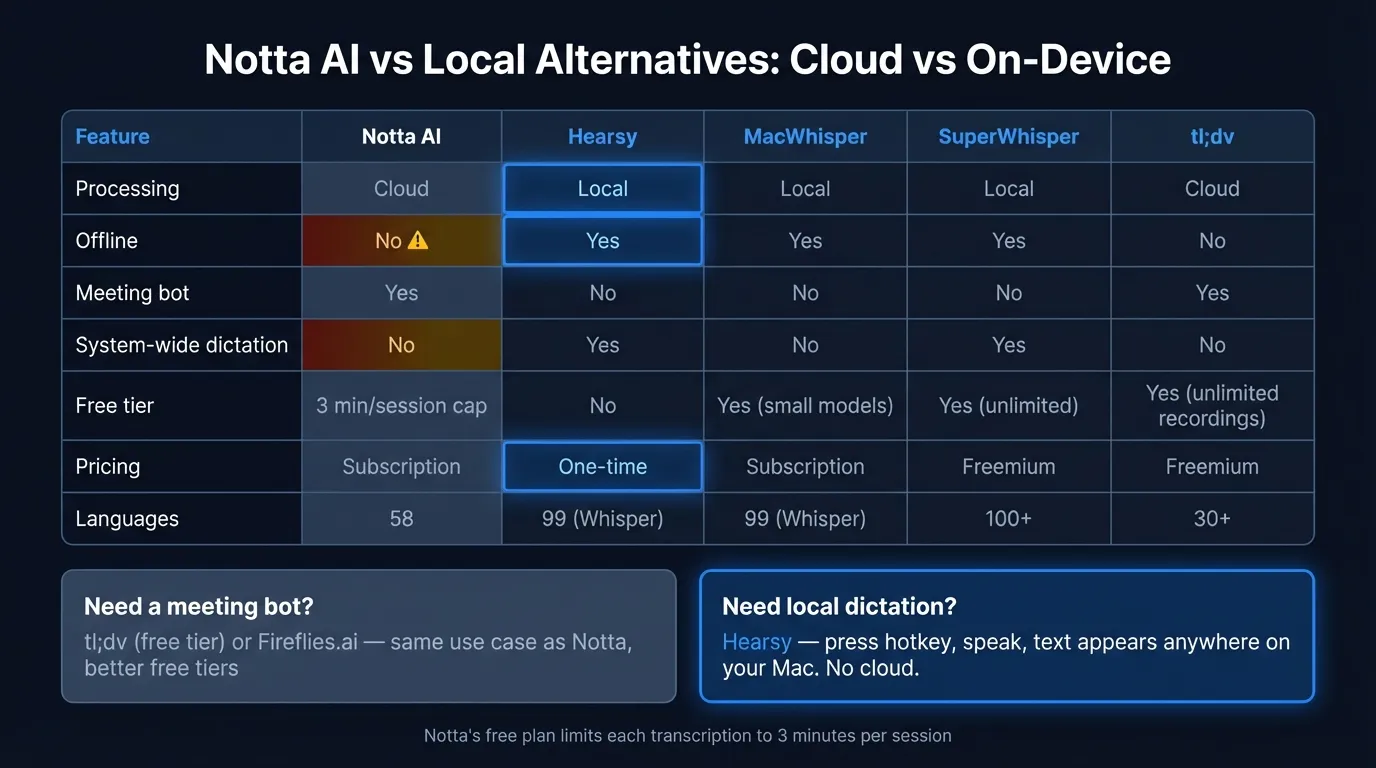
Here's how the top Notta AI alternatives compare at a glance:
What Notta AI does (and where it falls short)#
Notta is a cloud-based meeting transcription service. You invite a Notta bot to your Zoom, Google Meet, or Teams call, or you can upload an audio file directly. It transcribes in real time, labels speakers, and generates summaries and action items. Transcripts sync to Notta's web interface and can be shared with your team.
Notta supports 58 languages for transcription and translation, integrates with Slack, Salesforce, and Zapier, and claims 98.86% accuracy in clean audio conditions. In noisier environments, multiple reviews place real-world accuracy closer to 80–85%, and performance degrades further with heavy accents, overlapping speakers, or technical vocabulary.
The free plan is restrictive. Each transcription is capped at 3 minutes — not 3 minutes per day or per month, but per transcription session. A standard 30-minute team meeting would require you to manually restart the transcription 10 times. For practical use, the paid Pro plan ($8.25/month billed annually, or $13.99/month billed monthly) is essentially required.
It's cloud-only. Every meeting you record with Notta is sent to their servers for processing and storage. If you're transcribing anything sensitive — legal discussions, medical consultations, business strategy, confidential client calls — that audio exists on Notta's infrastructure, subject to their data retention policies.
You must select the language manually. Notta doesn't detect your language automatically. If colleagues switch languages mid-meeting, that requires a manual setting change.
It's not a dictation tool. Notta doesn't let you press a hotkey and type by voice into Gmail, Slack, a code editor, or any other Mac app. It records meetings. If your primary use case is reducing keyboard use or composing text by voice anywhere on your Mac, Notta is the wrong category of tool.
The 5 best Notta AI alternatives for 2026#
1. Hearsy — Best for local real-time dictation on Mac#
Best for: Mac users who want to type by voice anywhere, with local processing and one-time pricing.
If you've been using Notta for recording your own voice notes or narrating content rather than meeting bot transcription, Hearsy is built for that use case. Press a global hotkey from any app — Gmail, Slack, VS Code, Apple Notes, Terminal — speak, and text appears at your cursor. Works in every app on your Mac.
Everything runs on your Mac. Hearsy uses two AI engines: NVIDIA Parakeet TDT for English (under 50ms latency on Apple Silicon) and OpenAI Whisper Large V3 for 99 languages. Neither sends audio anywhere. You can verify this with a network monitor like Little Snitch: during transcription, Hearsy makes no outbound connections.
AI cleanup: Hearsy includes post-processing templates — Clean & Format, Email, Code Comment, Summary — powered by a local language model (Qwen 2.5 via MLX). Raw dictation gets cleaned up without touching a cloud server.
Pricing (as of March 2026): One-time purchase. No subscription, no usage limits.
What it doesn't replace: Notta's meeting bot, which automatically joins calls you may not be present at. Hearsy doesn't have a meeting bot. If automated call transcription with speaker labeling and team sharing is what you need, see options 4 and 5 below.
2. MacWhisper — Best for transcribing recordings locally#
Best for: Transcribing recorded meetings, interviews, and uploaded audio files without sending audio to the cloud.
MacWhisper is a local file transcription app built on whisper.cpp. Drop in an audio or video file — a Zoom recording you downloaded, a voice memo, a podcast episode, an uploaded meeting recording — and MacWhisper transcribes it entirely on your Mac.
This covers one of Notta's core use cases: transcribing recordings. The difference is privacy and cost. With MacWhisper, recordings never leave your device. Notta's free plan also supports file uploads, but every upload goes to their servers. MacWhisper handles the same task entirely locally.
MacWhisper supports 50-plus export formats (SRT, VTT, CSV, JSON, plain text), uses Metal GPU acceleration on Apple Silicon, and can transcribe a 60-minute recording in roughly 30–60 seconds on M2 hardware.
Pricing (as of March 2026): Free tier with smaller Whisper models; Pro approximately $30/year or around $80 lifetime. Verify current pricing at point of purchase.
What it doesn't do: There's no bot that joins live calls automatically, no speaker labeling, and no AI summary generation. For file transcription without cloud dependencies, MacWhisper is the best option on this list.
3. SuperWhisper — Best local Whisper dictation with a free tier#
Best for: Users who want a polished, local Whisper-based dictation experience with a free tier to start.
SuperWhisper is a Mac dictation app with a substantial following among developers and content creators. It runs Whisper locally (up to Large V3), supports 100-plus languages, and processes audio entirely on-device. Unlike Notta, it works system-wide — press a hotkey in any Mac app, speak, and text is inserted at your cursor.
The free tier includes unlimited use of smaller Whisper models, which is genuinely useful for light dictation without spending anything. For Pro-level accuracy on Large V3 or technical vocabulary, paid plans are $8.49/month or $84.99/year.
Compared to Notta: SuperWhisper is system-wide Mac dictation, not meeting transcription. It doesn't join your calls or generate AI meeting summaries. If you need a meeting bot, look at options 4 and 5. If you need daily voice typing that works in any app without cloud dependencies, SuperWhisper or Hearsy are the right tools.
Compared to Hearsy: SuperWhisper uses Whisper only — there's no Parakeet engine, so you don't get the sub-50ms English latency Parakeet provides. Lifetime pricing ($249.99) is higher than Hearsy for equivalent local functionality.
4. Fireflies.ai — Best cloud meeting transcription with team features#
Best for: Teams that need meeting transcription, speaker identification, CRM integrations, and searchable transcript libraries.
Fireflies.ai is a direct Notta competitor in the meeting transcription category. Its AI meeting assistant (Fred) joins your Zoom, Google Meet, Teams, and Webex calls automatically, transcribes and labels speakers, and generates summaries with action items.
Where Fireflies has an edge over Notta: the free tier allows unlimited transcription minutes (with storage limits), the search experience across your transcript library is more capable, and CRM integrations — Salesforce, HubSpot, Pipedrive — are better developed on paid plans.
Trade-off: Like Notta, Fireflies is entirely cloud-based. Your meeting audio is sent to Fireflies' servers for processing. If the reason you're leaving Notta is privacy — you want audio to stay off external servers — Fireflies doesn't solve that. It's a lateral move in the cloud meeting tool category.
Pricing (as of March 2026): Free tier available; Pro plans start at $10/user/month billed annually. Verify current pricing at their website.
5. tl;dv — Best free meeting transcription alternative#
Best for: Users who need Notta's meeting bot functionality but want a more usable free tier.
Notta's free tier limits each transcription to 3 minutes — impractical for real meetings. tl;dv's free tier allows unlimited meeting recordings, which is the most accessible starting point for meeting transcription without a subscription.
tl;dv supports Zoom, Google Meet, and Teams calls, transcribes in 30-plus languages, generates AI summaries, and integrates with Slack, Notion, HubSpot, and other tools. For individual contributors who want to stop taking notes during calls, the free tier is genuinely usable rather than a stripped trial.
Trade-off: Like Notta and Fireflies, tl;dv is cloud-based. Your meeting audio goes to tl;dv's servers. If you're leaving Notta because audio privacy is the concern, this doesn't address it.
What it doesn't do: tl;dv is meeting transcription only. It doesn't give you system-wide Mac dictation for composing emails, messages, or documents by voice.
The Privacy-First Alternative
100% local processing. No subscription. One-time purchase. Works in every app on your Mac.
At a glance#
| App | Primary use | Processing | Offline | Meeting bot | Price |
|---|---|---|---|---|---|
| Notta AI | Meeting transcription | Cloud | No | Yes | $8.25–$13.99/mo |
| Hearsy | Real-time dictation | Local | Yes | No | One-time |
| MacWhisper | File transcription | Local | Yes | No | ~$30/yr |
| SuperWhisper | Real-time dictation | Local | Yes | No | Free tier; $8.49/mo Pro |
| Fireflies.ai | Meeting transcription | Cloud | No | Yes | Free tier; $10/mo Pro |
| tl;dv | Meeting transcription | Cloud | No | Yes | Free tier; paid plans available |
Privacy: what actually happens to your audio#
Notta is cloud-only by design. Every meeting you transcribe, every audio file you upload, is transmitted to Notta's servers for processing. That audio exists on third-party infrastructure, subject to Notta's data retention and use policies.
The local alternatives — Hearsy, MacWhisper, SuperWhisper — handle this structurally differently. They run speech recognition models on your Mac. Audio is processed in local RAM and never sent to any server. You can verify this behavior with Little Snitch or a similar network monitor: these apps make no outbound connections during transcription.
For most general business use, cloud processing is probably fine. If you transcribe anything sensitive — medical appointments, legal discussions, confidential negotiations, personal financial matters — local processing changes the equation. Audio that stays on your device doesn't appear on someone else's infrastructure, regardless of their privacy policy.
The cloud alternatives — Fireflies and tl;dv — are in the same category as Notta on this dimension. They process audio on their servers. If privacy is the primary reason you're evaluating Notta alternatives, none of the cloud meeting tools solve it.
Cost over time#
Notta Pro billed annually is $8.25/user/month ($99/year). Billed monthly it's $13.99/month ($167.88/year). Business plans are $44/user/month billed annually.
Two years at annual billing:
| App | 2-year cost |
|---|---|
| Notta Pro (annual) | ~$198 |
| Hearsy | One-time |
| MacWhisper | ~$60 |
| SuperWhisper | ~$170 |
| Fireflies Pro | ~$240 |
| tl;dv | Free tier available |
The subscription cost is justified if you need the meeting bot — automatic call joining, speaker labeling, and team-shared transcript libraries are features local apps don't provide. For daily voice typing into your Mac rather than meeting transcription, paying ~$100/year for a cloud meeting tool is the wrong category.
Which to choose#
You need automatic meeting transcription with a bot that joins calls: tl;dv (start free) or Fireflies.ai. Either is a lateral move from Notta that addresses the free tier restriction.
You want to type by voice in any Mac app — emails, Slack, documents, code: Hearsy. Local processing, one-time price, AI cleanup templates, Parakeet engine for English speed.
You need to transcribe existing recordings privately: MacWhisper. Drag audio files in, get transcripts out, nothing leaves your device.
You want local Whisper dictation at no cost: SuperWhisper's free tier with smaller models is real and unlimited.
You want to move away from subscriptions entirely: Hearsy (one-time) or MacWhisper (~$80 lifetime).
For more on local Mac dictation options, see the best dictation software for Mac guide. For privacy implications of cloud voice services, see the voice data privacy guide. For a broader comparison of transcription tools, see the AI transcription: local vs cloud guide.
Frequently asked questions#
What is the best free alternative to Notta AI?#
For meeting transcription: tl;dv has a usable free tier that allows unlimited recordings for Zoom, Google Meet, and Teams calls — a meaningful contrast to Notta's 3-minute-per-session limit on their free plan. For real-time Mac dictation: SuperWhisper's free tier runs Whisper locally at no cost. For basic occasional dictation without installing anything: macOS built-in dictation is free but limited to 30–60 seconds per session.
Is there a private alternative to Notta AI?#
Yes. Hearsy, SuperWhisper, MacWhisper, and VoiceInk all process audio entirely on your Mac — nothing is sent to any server. Unlike Notta, which requires cloud processing for every transcription, these apps run AI speech models on-device using Apple Silicon's Neural Engine and GPU. You can verify local behavior with a network monitor: no outbound connections occur during transcription.
Does Notta AI work on Mac without internet?#
No. Notta requires an internet connection for all transcription — it's entirely cloud-based. For offline voice dictation on Mac, local apps like Hearsy, SuperWhisper, and VoiceInk work without any internet connection.
Can I use Notta AI for real-time system-wide dictation on Mac?#
Notta is designed for meeting transcription. Its main feature is a bot that joins calls and records them automatically. It's not a system-wide dictation tool that lets you press a hotkey and type by voice into any Mac application. For that use case, Hearsy, SuperWhisper, and VoiceInk are purpose-built.
What replaced Notta AI for daily dictation in 2026?#
The market has split clearly. For cloud-based meeting transcription: Fireflies.ai, tl;dv, and Fathom serve the same use case at competitive or lower prices. For users who want audio to stay off cloud servers: local Mac apps cover both real-time dictation (Hearsy, SuperWhisper) and file transcription (MacWhisper) without any server involvement.
Ready to Try Voice Dictation?
Hearsy is free to download. No signup, no credit card. Just install and start dictating.
Download Hearsy for MacmacOS 14+ · Apple Silicon · Free tier available
Related Articles
Otter AI Alternative: 5 Better Options for 2026
11 min read
Wispr Flow vs SuperWhisper vs Hearsy: 3-Way Mac Dictation Comparison
14 min read
Wispr Flow vs Hearsy: Privacy, Speed & Features Compared
8 min read
Willow Voice vs Hearsy: Cloud Subscription vs Local One-Time
8 min read
VoiceInk vs Hearsy: Mac Dictation Apps Compared
6 min read