
Speechify Alternative: Voice-to-Text vs Text-to-Speech Explained
Looking for a Speechify alternative? It depends on whether you want text-to-speech or voice-to-text. This guide covers both — including the tools most people actually need.
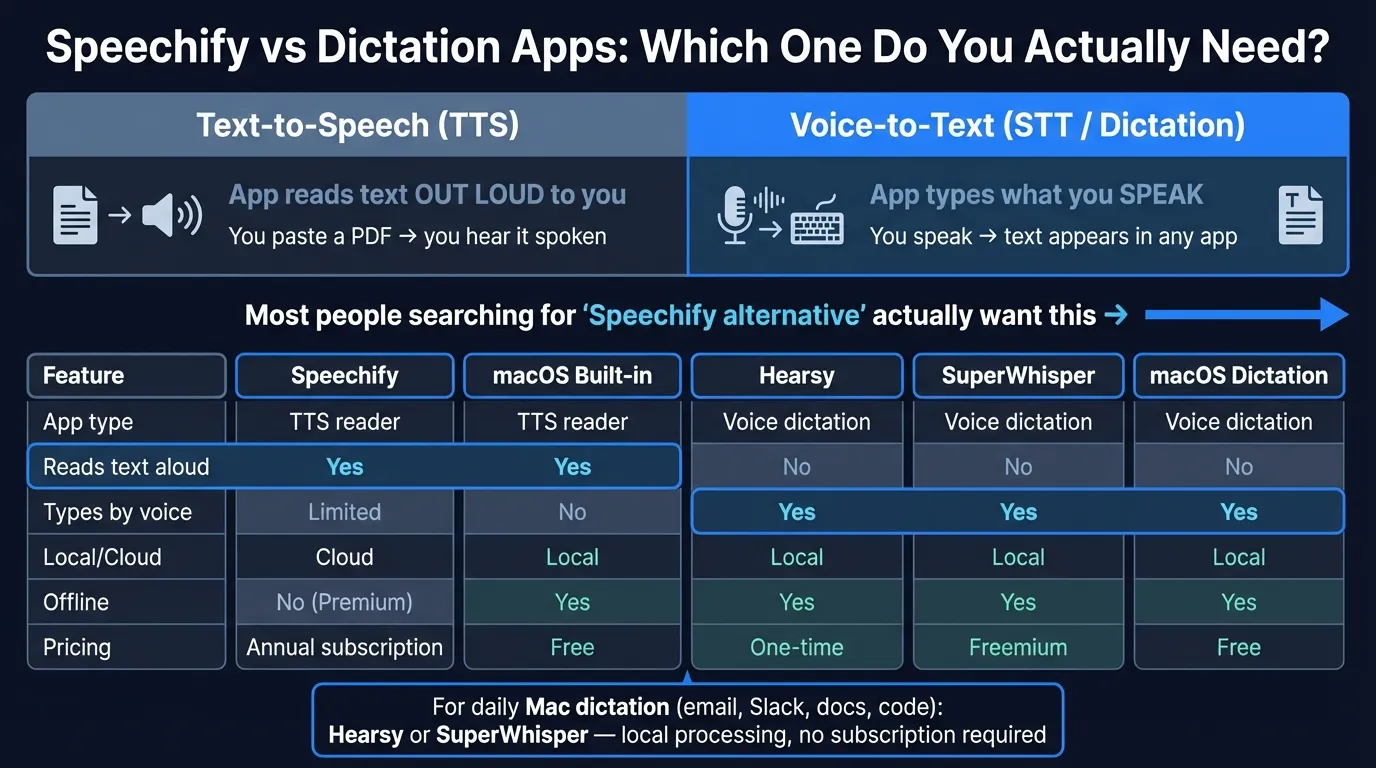
Speechify and voice dictation apps do opposite things. Speechify reads text aloud to you using AI voices. Dictation apps transcribe your voice from speech into text. If you've been searching for a "Speechify alternative" and you're not sure which category you actually need, you're not alone — this is the most common source of confusion in this space.
This guide covers both. First, what Speechify does and where it falls short. Then: alternatives for people who want better text-to-speech, and alternatives for people who actually want to type by voice.
One disclosure: Hearsy is our product. It's in this post because it's a strong fit for users who want voice dictation — which turns out to be what a lot of "Speechify alternative" searches are really about. I've tried to write this honestly.
Here's how the text-to-speech and voice dictation alternatives compare:
What Speechify does (and what it doesn't)#
Speechify is a text-to-speech app. You give it text — a PDF, a webpage, a document, a block of copied text — and it reads that text aloud using AI-generated voices. Premium subscribers get 200-plus natural-sounding voices, speed controls up to 5x, 60-plus languages, and offline downloads. The free tier covers basic voices and 1.5x speed.
Speechify Premium costs $139/year or $29/month (as of March 2026). It works on iOS, Android, Mac, and as a Chrome extension.
Where Speechify falls short:
The free plan is restrictive. Basic voices on the free tier sound noticeably synthetic compared to the premium AI voices. If voice quality matters to you, the free plan isn't a useful trial.
It's expensive for a single-use tool. At $139/year, Speechify costs more annually than some pro productivity suites. If you only need to listen to text occasionally, macOS has built-in text-to-speech that's already on your Mac for free.
It doesn't transcribe your voice. Speechify Voice Typing exists as a secondary feature, but Speechify's core product is listening, not speaking. If you want to reduce typing by speaking your words, Speechify is not designed for that workflow.
Two types of Speechify searches#
Search data and user behavior suggest "speechify alternative" searches split roughly into two groups:
Group A — Actual TTS users: People using Speechify as designed (listening to documents, books, articles) who want a cheaper or better TTS option.
Group B — Confused searchers: People who saw "Speechify" mentioned somewhere, thought it was a voice/speech app, and actually want voice dictation — the ability to speak and have text appear in any app on their Mac.
If you're in Group B, skip to the voice dictation alternatives section. That's what most people landing on this post actually need.
Voice dictation alternatives for Mac#
These apps let you press a hotkey, speak, and have your words typed into Gmail, Slack, VS Code, Apple Notes, Word, or any other app on your Mac. This is the opposite of what Speechify does.
1. Hearsy — local processing, one-time purchase#
Best for: Mac users who want to type by voice system-wide, with audio processed entirely on their Mac.
Hearsy runs on your Mac using two AI speech engines: NVIDIA's Parakeet TDT for English (under 50ms latency on Apple Silicon) and OpenAI Whisper Large V3 for 99 languages. Neither sends audio to any server. Press a global hotkey from any Mac app, speak, and text appears at your cursor.
Beyond transcription, Hearsy includes AI post-processing templates — Clean & Format, Email, Code Comment, Summary — powered by a local language model (Qwen 2.5 via MLX). Raw dictation gets polished without touching the cloud.
Pricing (as of March 2026): One-time purchase. No subscription, no per-minute usage fees.
Where it fits: System-wide Mac dictation for email, documents, code, Slack messages, and everything else. Not a TTS app — doesn't read text aloud to you.
2. SuperWhisper — local Whisper dictation with a free tier#
Best for: Users who want a Whisper-based dictation experience with a free tier to start.
SuperWhisper is a Mac dictation app with strong adoption among developers and writers. It runs Whisper locally — up to Whisper Large V3, depending on your plan — supports 100-plus languages, and processes everything on-device. System-wide dictation works the same way as Hearsy: press a hotkey in any app, speak, get text.
The free tier includes unlimited use of smaller Whisper models. For Whisper Large V3 accuracy, the paid plan is $8.49/month or $84.99/year.
Compared to Hearsy: SuperWhisper uses Whisper only — there's no Parakeet engine, so English latency is longer. Lifetime pricing ($249.99) is higher than Hearsy's one-time cost for equivalent local functionality.
3. VoiceInk — lightweight local dictation#
Best for: Users who want local dictation without a lot of configuration overhead.
VoiceInk is a Mac-native dictation app that processes audio entirely on-device using Whisper. It has a simple interface focused on getting text into your active app quickly. It doesn't include AI post-processing templates but covers the core use case — hotkey-triggered dictation in any Mac application.
With around 1,300 monthly brand searches and low competition, VoiceInk has a smaller community than SuperWhisper but a more streamlined interface for users who don't want to configure model sizes.
Pricing (as of March 2026): Paid app with a one-time purchase model. Verify current pricing at their website.
4. macOS built-in dictation — free, already on your Mac#
Best for: Occasional dictation without installing anything.
macOS has built-in dictation under System Settings > Keyboard > Dictation. Enable it, set a shortcut, and you can dictate into most Mac apps. Apple has improved this feature significantly over the past two years, and it now handles continuous dictation without the old 30–60 second timeout.
The limitation: punctuation requires voice commands ("period", "new line"), it's less accurate than Whisper or Parakeet on technical vocabulary, and there's no AI cleanup layer.
For light occasional dictation, built-in macOS dictation is genuinely good. For daily professional use, the third-party apps provide meaningfully better accuracy and workflow integration.
The Privacy-First Alternative
100% local processing. No subscription. One-time purchase. Works in every app on your Mac.
Text-to-speech alternatives (if Speechify is the right category)#
If you genuinely want Speechify's core use case — having text read aloud to you — here are the alternatives worth considering.
macOS Spoken Content — already on your Mac, free#
Before paying for any TTS app, check what's already on your Mac. System Settings > Accessibility > Spoken Content gives you text-to-speech with adjustable voices and speed. Set a keyboard shortcut and macOS reads selected text aloud using built-in neural voices that have improved substantially in recent macOS releases.
For basic document listening, this costs nothing and works across the system without installing additional software.
NaturalReader — established TTS software with Mac app#
NaturalReader has been in the TTS space longer than Speechify and offers a downloadable Mac app alongside web and mobile versions. It handles PDFs, Word docs, ePub files, and plain text. The free tier provides access to basic voices; paid plans unlock higher-quality AI voices.
For users who spend significant time listening to long documents on a Mac, NaturalReader's desktop app can be more convenient than Speechify's browser extension approach.
ElevenLabs — highest-quality AI voice generation#
ElevenLabs is primarily known for its AI voice generation API, but it also offers a text-to-speech reader. The voice quality is among the best available — the synthetic speech is nearly indistinguishable from human recording. If you produce content and want to convert written drafts to listenable audio, ElevenLabs is worth evaluating.
The trade-off: ElevenLabs is more expensive than Speechify for casual TTS use and overkill if you just want to listen to documents while commuting. It's better suited to content production than personal reading.
At a glance#
| App | Primary use | Local/cloud | Mac app | Price |
|---|---|---|---|---|
| Speechify | Text-to-speech (listen to documents) | Cloud | Yes | $139/yr or $29/mo |
| macOS Spoken Content | Text-to-speech (basic) | Local | Built-in | Free |
| NaturalReader | Text-to-speech | Cloud | Yes | Free tier; paid plans available |
| ElevenLabs | AI voice generation + TTS | Cloud | Web | Pay-as-you-go |
| Hearsy | Voice dictation (speak to type) | Local | Yes | One-time |
| SuperWhisper | Voice dictation | Local | Yes | Free tier; $8.49/mo Pro |
| VoiceInk | Voice dictation | Local | Yes | One-time |
| macOS Dictation | Voice dictation (basic) | Local | Built-in | Free |
Privacy across categories#
Both TTS and STT apps make different privacy trade-offs.
Speechify is cloud-based — text you send it for reading goes to their servers, and in some configurations, audio you generate is processed remotely. If you're listening to sensitive documents (legal drafts, confidential business content, personal medical records), that content passes through Speechify's infrastructure.
macOS Spoken Content processes text entirely on-device using Apple's neural voices. No text leaves your Mac.
For dictation: Hearsy, SuperWhisper, VoiceInk, and macOS built-in dictation all process audio locally. Cloud dictation services send audio to external servers for processing. If you dictate sensitive material — client conversations, personal notes, confidential memos — local processing keeps that audio off third-party infrastructure.
Which to use#
You want to listen to documents, PDFs, or articles while you work: Start with macOS Spoken Content (free, already on your Mac). If voice quality or mobile sync matters, evaluate Speechify or NaturalReader.
You want to type by voice in any Mac app — emails, Slack, documents, code: Hearsy (one-time price, Parakeet engine for English speed) or SuperWhisper (free tier to start, Whisper-based).
You want basic system-wide dictation for free: macOS built-in dictation handles this without additional apps.
You produce audio content and need premium voice quality: ElevenLabs for high-end voice generation, or Speechify Voice Studio for article narration.
You want no ongoing subscription for dictation: Hearsy and VoiceInk both offer one-time pricing for local Mac dictation.
For a broader comparison of Mac dictation apps, see the best dictation software for Mac guide. For privacy implications of cloud voice apps, see the voice data privacy guide. For Whisper-specific accuracy and speed comparisons, see the Whisper vs Parakeet guide.
Frequently asked questions#
What does Speechify actually do?#
Speechify converts text into spoken audio using AI voices — it's a text-to-speech reader. You feed it a document, PDF, webpage, or block of text, and it reads that content aloud. It does not transcribe your voice. If you want to speak and have your words converted to text (dictation), Speechify is not the right category of tool. For that, look at Hearsy, SuperWhisper, or macOS built-in dictation.
What is the best free Speechify alternative?#
For text-to-speech: macOS Spoken Content (System Settings > Accessibility > Spoken Content) is free, already on your Mac, and has improved substantially in recent macOS versions. For voice dictation (typing by speaking): macOS built-in dictation is free, and SuperWhisper's free tier offers local Whisper-based dictation at no cost.
Can Speechify do voice dictation?#
Speechify has a Voice Typing feature, but it's a secondary addition to a product primarily designed for listening. If dictation is your main use case — reducing keyboard use, composing emails by voice, narrating code comments — purpose-built apps like Hearsy, SuperWhisper, and VoiceInk are better suited and offer local processing that keeps your audio on your device.
Is Speechify worth the price?#
At $139/year, Speechify makes sense if you regularly listen to documents, ebooks, or articles for significant time each day — commuting, exercising, or working with large volumes of reading material. The AI voice quality on Premium is noticeably better than basic TTS. For occasional listening, macOS Spoken Content is free and sufficient. For voice dictation rather than TTS, Speechify is the wrong tool regardless of price.
What is the best Speechify alternative for Mac voice dictation?#
For local Mac dictation: Hearsy processes audio on-device using Parakeet (under 50ms for English) and Whisper Large V3 (99 languages), with a one-time purchase price. SuperWhisper offers a free tier using smaller Whisper models, useful for light dictation without spending anything. Both work in any Mac app — Gmail, Slack, VS Code, Apple Notes, Terminal — via a global hotkey.
Ready to Try Voice Dictation?
Hearsy is free to download. No signup, no credit card. Just install and start dictating.
Download Hearsy for MacmacOS 14+ · Apple Silicon · Free tier available
Related Articles
Otter AI Alternative: 5 Better Options for 2026
11 min read
Wispr Flow vs SuperWhisper vs Hearsy: 3-Way Mac Dictation Comparison
14 min read
Wispr Flow vs Hearsy: Privacy, Speed & Features Compared
8 min read
Willow Voice vs Hearsy: Cloud Subscription vs Local One-Time
8 min read
VoiceInk vs Hearsy: Mac Dictation Apps Compared
6 min read