
Voice Dictation for Writers: Write Faster, Edit Less
How writers use voice dictation to produce faster first drafts. Covers the workflow, tips for dictating fiction and non-fiction, and AI cleanup for spoken text.
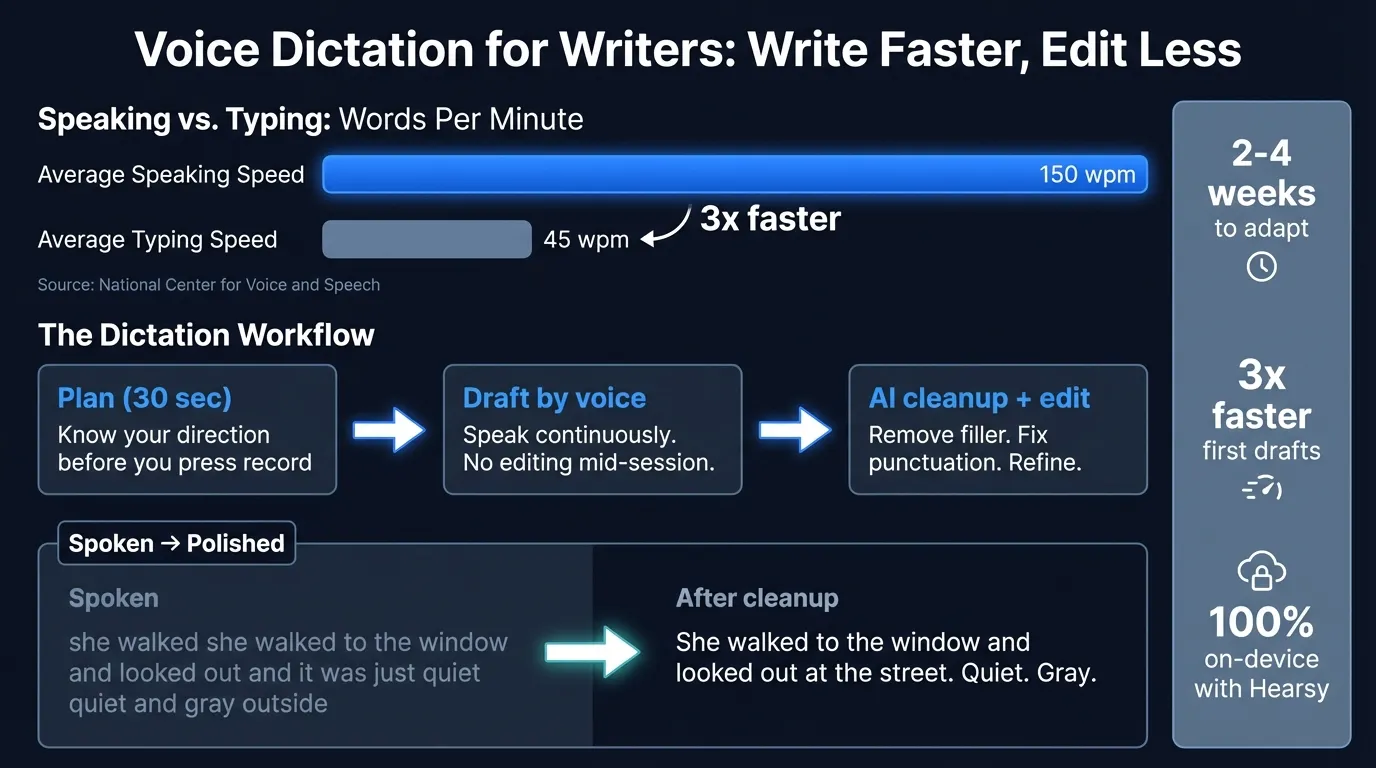
The average adult types at 40-50 words per minute. The average adult speaks at about 150 words per minute, according to the National Center for Voice and Speech. That three-to-one gap is why writers who dictate can produce first drafts significantly faster than writers who type.
The catch: dictation requires a different workflow, not just a different input method. You have to restructure how you draft, separate drafting from editing more aggressively, and build habits around thinking out loud rather than thinking through your fingers. Once those habits are in place, the speed advantage is real — and for many writers, the spoken register produces better dialogue and more natural sentence rhythm than typing does.
This guide covers the transition, the workflow, the prose-specific techniques, and what to do with the raw spoken text at the end.
Here's an overview of the dictation workflow for writers, from setup to finished prose:
The case for writing by voice#
Voice dictation is the practice of speaking text aloud and having it transcribed automatically by speech recognition software. For writers, it's primarily a drafting tool — a way to produce raw material faster, then edit that material into finished prose.
The speed math is straightforward. At 40 wpm typing and 150 wpm speaking, a writer can produce 3x more words per hour during drafting. In practice the effective advantage is lower, because spoken first drafts need more editing than typed ones. But even accounting for a longer cleanup pass, writers who dictate consistently report higher net output per hour than they achieved when typing.
The less obvious benefit is what dictation does to the drafting process itself. When you type, you can see every word as you produce it. Most writers revise in real time — rereading the previous sentence before continuing, deleting and rewriting mid-paragraph. This produces cleaner drafts but slow output. Dictation removes that visual feedback loop. Without the ability to easily see and correct what you just said, you keep moving forward. The result is messier raw material and faster throughput.
Kevin J. Anderson, who has written more than 160 books, describes dictating most of his work into a handheld recorder while hiking. In On Being a Dictator (co-written with Martin L. Shoemaker), he documents how dictation lets writers use time they would otherwise waste — walks, commutes, household tasks — to produce first-draft material. The method works for fiction and non-fiction alike.
What to expect the first week#
Expect the first week to feel wrong.
Most writers have years of muscle memory for drafting at a keyboard. The rhythm of thinking and typing is so ingrained it's invisible. Switching to voice removes that rhythm entirely. The silences between phrases feel like failure. Spoken sentences come out loose and long. You hear yourself say "basically" and "you know" and see it verbatim in the transcript. Transcription errors appear on character names, unusual words, and anything you say quietly.
None of this means dictation doesn't suit you. It means you're using a new motor skill.
Common first-week experiences:
- Filler words appear constantly: "um," "so," "basically," "I mean"
- Sentences run long and contain multiple thoughts
- Paragraph structure disappears — you get one long block
- Transcription errors on proper nouns, technical terms, and dialect
These issues normalize after two to four weeks. The filler words drop as you learn to pause rather than fill silence. Sentences tighten as your spoken register adapts. Paragraph breaks become second nature once you start saying "new paragraph" explicitly.
Start low-stakes. Journal entries, rough scene notes, blog post outlines. Not the chapter due next week. Give yourself permission to produce genuinely ugly first drafts while you build the habit. Writers who start dictating under deadline pressure almost always give up — not because dictation doesn't work, but because they can't tolerate the early friction when something important is on the line.
Setup#
Microphone#
Transcription accuracy is more sensitive to audio quality than to model choice. The built-in Mac microphone produces usable results for short sessions in quiet rooms. For longer writing sessions, any USB condenser microphone positioned 6-8 inches from your mouth will produce cleaner audio and fewer word errors.
For writers who want to dictate away from a desk — walking, in the car, between locations — a Bluetooth headset with a close-talking microphone works well. Record audio files and transcribe them later with a local model.
Software on Mac#
Three realistic options exist for Mac writers:
macOS built-in dictation is free and already on your Mac. Press Control twice, speak, pause. It requires no additional apps and works in any text field. The hard constraint is 30-60 seconds of continuous speech before the system stops automatically. For dictating a sentence at a time, this is manageable. For dictating a paragraph or scene at a stretch, the constant manual restart breaks the flow that makes dictation productive.
Hearsy runs a local Whisper or Parakeet speech model on your Mac and pastes transcription directly into whatever app is in focus — Scrivener, Word, Pages, iA Writer, Obsidian, any writing app — with no time limit. One hotkey everywhere. Nothing sent to a server. The Parakeet engine runs in under 50ms on Apple Silicon; Whisper Large V3 adds 1-2 seconds but handles 99 languages and performs better on uncommon vocabulary.
Dragon NaturallySpeaking was historically the preferred tool for writers who needed training-based accuracy improvements and voice commands. The Mac version was discontinued years ago; the current release (Dragon Professional v16, released 2023) is Windows-only.
Environment#
Quiet rooms produce more accurate transcriptions. This matters more than most writers expect at first. Background noise — traffic, TV, other people talking — increases error rates on every speech model. Hard-surfaced rooms (kitchens, tiled bathrooms) create echo that compounds the problem.
Find a quiet space. Close the windows if you're near street noise. A rug and soft furnishings help with echo in hard rooms. The goal is simply to reduce variables while you're building the habit.
Continue reading
Dictate into Any App on Mac
Gmail, Slack, Word, Notion — Hearsy works everywhere. Just press a key and speak.
The core rule: separate drafting from editing#
The most common mistake writers make when starting dictation is trying to edit mid-session. They say a sentence, hear something wrong, stop, try again, stop, rephrase it. This produces messy transcripts and eliminates the speed advantage entirely.
Draft in dedicated sessions. Edit in dedicated sessions. Never both at once.
This rule is more aggressive than the "draft fast, edit later" advice given to keyboard writers. With dictation, it's not a productivity tip — it's the fundamental constraint that makes the method work.
A drafting session:
- Before you press record, spend 30 seconds on direction. Not a detailed outline — just: what scene or section, what needs to happen, where you'll stop. This reduces rambling significantly.
- Press record and speak. Don't stop for errors. If you misstate something, correct it by continuing: "She walked to the window — no, she ran to the window."
- End at a natural stopping point. Say where to pick up next time before you stop.
- Don't read the transcript until the editing session.
An editing session: Read the transcript, clean it, and revise. This pass takes longer than editing typed prose — the raw material is rougher. That's expected. You're trading drafting time for editing time, and ending up ahead on net.
For a 1,000-word spoken transcript, expect 20-30 minutes of editing to reach a clean first draft. The equivalent typed draft might need 10-15 minutes of editing. Total time to publishable prose is still lower because the dictation session was three times faster than typing.
Tips for dictating prose#
Dialogue#
Dialogue is the easiest prose type to dictate. Speaking character voices out loud reveals unnatural phrasing and flat dialogue rhythms that typed prose hides. If a line doesn't sound right when you say it, it's wrong — and you know it immediately, without waiting for a read-through.
For attribution and punctuation, be explicit: "She said comma open-quote I don't know what you're talking about close-quote period new paragraph He stepped back." Or skip spoken punctuation entirely and add it in editing. Both approaches work — just be consistent within a session so the transcript is readable.
One technique: use a slight tonal shift to mark character transitions. Not a performance, just enough distinction that the transcript makes sense without attribution tags.
Description and scene-setting#
Description is harder to dictate than dialogue. It requires more precise word choice, and writers tend to slow down and lose momentum when they can't find the right phrase immediately.
A useful approach: describe the scene as if you're telling someone what's in it, not writing it yet. "The kitchen is dark. There's a lamp over the sink. Rain on the window." Then shape this raw material into prose during editing. Dictation doesn't need to produce finished description — it needs to produce raw material fast, which you then refine.
For sensory detail, list what you see, hear, smell, and feel without worrying about sequence. The transcript gives you the material; editing gives you the order.
Non-fiction and essays#
Non-fiction tends to produce more conversational first drafts when dictated, which can work in your favor — a conversational tone often makes for easier reading. The editing pass tightens structure and removes verbal connectors.
The main risk is structure drift. When typing, you can see the previous paragraph and maintain logical progression. When dictating, it's easy to make the same point twice or skip a step in an argument. Saying a brief verbal outline before the session ("Three problems with cloud transcription: privacy, latency, and subscription cost. Cover each in turn.") keeps the logic on track without over-scripting the session.
Proper nouns and unusual vocabulary#
Speech models handle common vocabulary well but make errors on character names, place names, technical terms, and invented words. Two approaches:
Use a placeholder while dictating — "she looked at [REDACTED] — spell it out in editing." Or say unusual words slowly and clearly, then verify them in the transcript immediately after the session while context is fresh.
For fiction writers with a large cast, a quick custom dictionary pass before starting a new project is worth the setup time if your app supports it.
AI cleanup: from spoken transcript to publishable prose#
Voice dictation produces a phonetically accurate transcript of what you said — not edited prose. The spoken register and the written register are different. Spoken transcripts contain more repetition, longer run-on sentences, verbal connectors ("so," "basically," "I mean"), missing paragraph breaks, and incomplete punctuation. Turning a spoken transcript into publishable writing is a real editing step.
Hearsy's optional AI enhancement runs the transcription through a language model before pasting into your writing app. For writers, two templates are useful:
General cleanup removes filler words, adds punctuation, and breaks run-on sentences. It doesn't change word choice or restructure sentences.
Prose goes further: it tightens sentence structure, removes verbal connectors, and converts the spoken register toward written prose while preserving your original meaning and voice.
The difference in practice:
Spoken: "She walked — she walked across the room to the window, you know, and she looked out at the street below, and it was, it was just quiet, just quiet and gray outside, no one out there."
After prose cleanup: "She walked to the window and looked out at the street. Quiet. Gray. Nobody out there."
The cleanup handles repetition and the register shift. What remains is an editing decision about word choice and rhythm, not a mechanical chore of removing filler.
In practical terms, the AI cleanup pass reduces the mechanical portion of editing by roughly 30-40% for a first-pass dictated draft. You still edit. The cleanup just removes the least interesting part of the work.
The enhancement adds 1-2 seconds per session and can be disabled if you want the raw transcript.
Comparing your options on Mac#
| macOS built-in | Hearsy | |
|---|---|---|
| Time limit | 30-60 seconds | None |
| Works in Scrivener, Word, Pages | Yes | Yes |
| Audio stays on device | M-series: yes | Yes |
| AI cleanup | No | Optional |
| Cost | Free | One-time purchase |
For writers dictating a sentence or phrase, macOS built-in dictation is free, zero-setup, and good enough. For writers drafting paragraphs, scenes, or sections in one take, the time limit requires constant manual restart that interrupts the flow that makes dictation productive.
Common mistakes to avoid#
Reading the transcript mid-session. The transcript is for the editing session. Looking at it while you're still drafting pulls you back into the revision loop you're trying to escape.
Starting with your main project. The first two weeks of dictating produce rougher material than you're used to. Starting on your most important work means you'll judge the method by its learning curve output, not its mature output.
Trying to speak in final prose. First drafts are for getting material down. The editing session is for making it good. Trying to dictate perfect sentences in real time is slower than typing.
Ignoring punctuation entirely. Some writers dictate with no punctuation and add it all in editing. This works, but it produces transcripts that are harder to read and edit. A light habit of saying "new paragraph" at section breaks makes editing significantly faster.
Giving up after the first week. The first-week experience is not representative of what dictation feels like at month two. Almost every writer who sticks with it past the initial friction period keeps using it.
For more on dictation tools for Mac, see the best dictation software for Mac guide and the Mac dictation guide.
For using dictation in specific apps, see the voice to text in Word guide and the dictate emails in Gmail guide.
Frequently asked questions#
Is dictation faster than typing for writers?#
The average adult speaks at about 150 words per minute (National Center for Voice and Speech) and types at 40-50 wpm — roughly a 3-to-1 ratio. After accounting for a longer editing pass, the effective advantage narrows, but most writers who stick with dictation past the learning curve produce more publishable words per hour than they did by typing.
How long does it take to adapt to writing by dictation?#
Most writers report that spoken prose starts to feel natural after two to four weeks. The first week typically produces loose, filler-heavy transcripts — this is normal. Filler words drop out, sentences tighten, and paragraph habits develop as the spoken register adapts to writing mode.
What dictation tools do writers use on Mac?#
The most common options are macOS built-in dictation (free, 30-60 second limit) and system-wide apps like Hearsy (local processing, no time limit, works in any writing app). Dragon NaturallySpeaking, historically popular with writers for its training-based accuracy, is Windows-only — the Mac version was discontinued.
Can you dictate fiction and creative writing?#
Yes. Dialogue is particularly well-suited to dictation: speaking character voices out loud reveals unnatural phrasing and rhythm problems that typed prose hides. Description, scene-setting, and non-fiction all work too, though they require more editing cleanup than dialogue.
How do you clean up dictated text before publishing?#
Keep drafting and editing as separate sessions — never read the transcript mid-session. After the drafting session, edit the transcript in a dedicated pass. AI cleanup tools like Hearsy's prose template can remove filler words, add punctuation, and tighten sentence structure automatically, reducing the mechanical portion of the cleanup pass so the editing session focuses on word choice and rhythm.
Ready to Try Voice Dictation?
Hearsy is free to download. No signup, no credit card. Just install and start dictating.
Download Hearsy for MacmacOS 14+ · Apple Silicon · Free tier available
Related Articles
Dictate Emails in Gmail on Mac: Step-by-Step Guide
11 min read
Voice to Text in Microsoft Word on Mac: 3 Ways That Actually Work
11 min read
Best Voice Recorder Apps for Mac (with Transcription)
8 min read
Best Voice Note-Taking Apps for Mac in 2026
10 min read
Voice Journaling on Mac: Best Apps and Workflows
10 min read