
Descript Alternative: 5 Better Options for Mac Transcription in 2026
Looking for a Descript alternative? Most users only need the transcription piece, not the video editor. These 5 tools do it better — and cheaper.
Descript costs $16–$55/month and is built primarily for video and podcast editing. If you're searching for an alternative, you're probably in one of two situations: you only need the transcription features and don't want to pay for a full video editor, or you need real-time dictation that Descript doesn't provide at all.
This post covers five alternatives organized around what you're actually trying to do.
One disclosure upfront: Hearsy is our product. It's included here because it covers one of the most common use cases people come to Descript for — but I've tried to write this comparison honestly, including cases where another tool is the better fit.
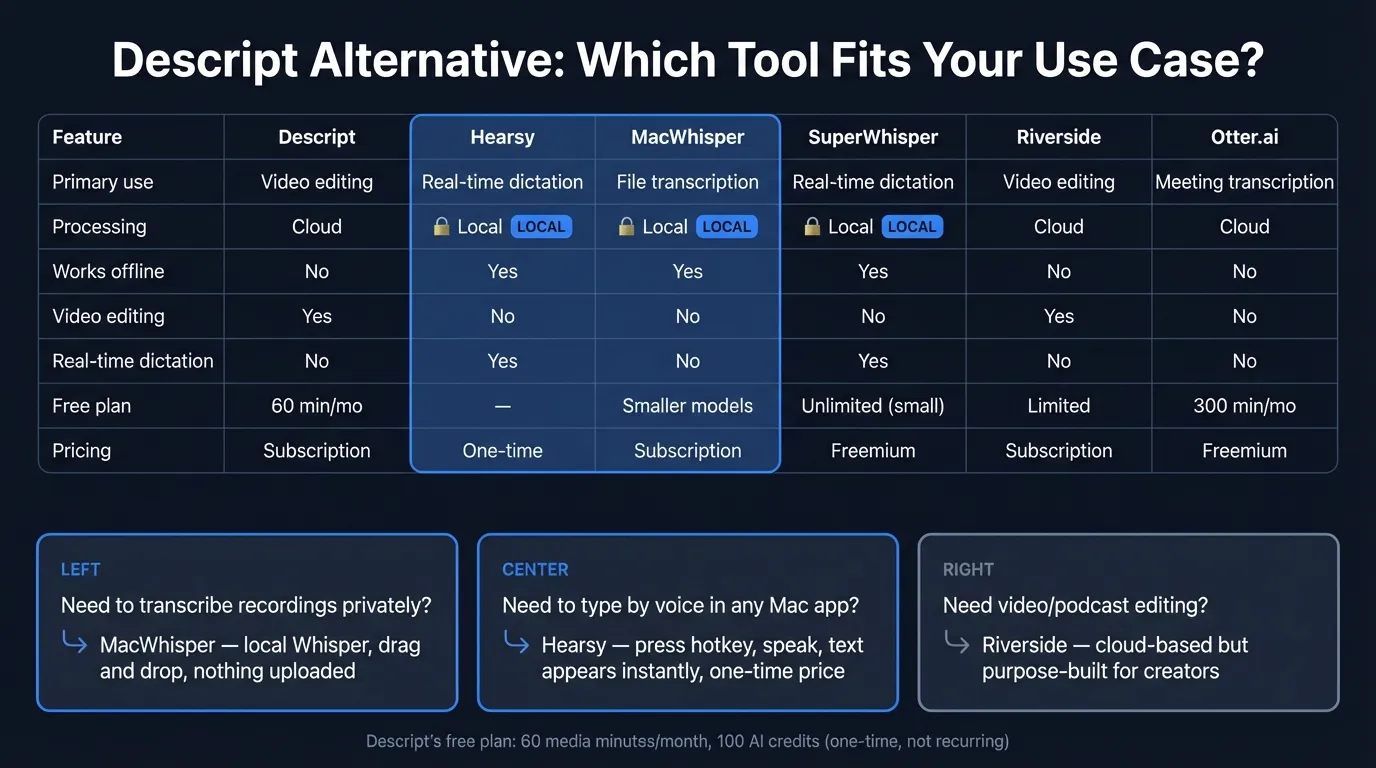
Here's how the five alternatives stack up against Descript at a glance:
What Descript does (and where it falls short)#
Descript is a text-based audio and video editor. You record or upload a file, Descript transcribes it, and you can then edit the audio or video by editing the transcript text — delete a sentence from the transcript, the corresponding audio is removed from the recording. This approach works well for podcast editing, removing filler words at scale, and creating video clips from a long recording.
Descript also added AI features including filler word removal, Studio Sound (audio cleanup), AI-generated eye contact correction, and translation and dubbing across 30-plus languages.
Current pricing (as of March 2026): Descript updated its pricing model in September 2025, moving from transcription-minute plans to media minutes and AI credits.
- Free: $0 — 60 minutes of media per month, 100 AI credits (one-time total, not recurring)
- Hobbyist: $16/month (billed annually) — 10 media hours/month, 400 AI credits/month
- Creator: $24/month (billed annually) — 30 media hours/month, 800 AI credits/month
- Business: approximately $50–55/month (billed annually) — 40 media hours/month, 1,500 AI credits/month
Where Descript falls short:
The free plan isn't practically useful. 60 minutes of media per month means a single hour-long podcast recording exhausts your monthly allowance. And the 100 AI credits on the free plan are one-time — they don't refresh monthly. After using them, AI features stop working.
It's cloud-only. Every recording and file you upload is transmitted to Descript's servers for processing and storage. If you work with sensitive audio — confidential interviews, legal discussions, medical consultations — that audio exists on Descript's infrastructure.
It doesn't do real-time dictation. Descript records and transcribes files. It's not a tool where you press a hotkey and type by voice into Gmail, Slack, or a code editor. If that's what you're looking for, Descript is the wrong category entirely.
The interface is built for video editing. If you need simple file transcription — drop in an audio file, get a text export — Descript's full timeline and editing interface adds complexity you don't need.
The 5 best Descript alternatives for 2026#
1. Hearsy — best for real-time Mac dictation#
Best for: Mac users who want to type by voice in any app, with audio processed entirely on their Mac.
If your use case is dictating into Gmail, Slack, VS Code, Apple Notes, Word, or any other Mac app in real time — rather than transcribing existing recordings — Descript doesn't do this at all. Hearsy does.
Press a global hotkey from any application on your Mac, speak, and text appears at your cursor. Hearsy runs two AI engines on-device: NVIDIA Parakeet TDT for English (under 50ms latency on Apple Silicon) and OpenAI Whisper Large V3 for 99 languages. Nothing leaves your Mac.
Hearsy also includes post-processing templates — Clean & Format, Email, Code Comment, Summary — powered by a local language model (Qwen 2.5 via MLX). Raw dictation gets cleaned up without sending it to a cloud API.
Pricing (as of March 2026): One-time purchase. No subscription, no media-minute budgets.
What it doesn't replace: Descript's text-based video editing, filler word removal across an existing recording, or podcast clip generation. If you need to edit a recorded file by editing its transcript, MacWhisper or Riverside are better fits.
2. MacWhisper — best for local file transcription#
Best for: Transcribing recorded files — Zoom recordings, interviews, voice memos, podcast episodes — without uploading them to a cloud service.
MacWhisper is a local file transcription app built on whisper.cpp. Drag in an audio or video file; MacWhisper transcribes it entirely on your Mac using Whisper models (Small through Large V3 Turbo). Nothing is uploaded. Transcription of a 60-minute recording takes roughly 30–60 seconds on M2 hardware.
This covers the most common Descript transcription use case: you recorded a meeting, interview, or podcast and want a text export. MacWhisper does this for less money and without sending your audio anywhere.
MacWhisper supports over 50 export formats including SRT, VTT, CSV, JSON, and plain text. Speaker identification (diarization) is supported on Pro plans. It uses Metal GPU acceleration on Apple Silicon.
Pricing (as of March 2026): Free tier available with smaller Whisper models. Pro is approximately $30/year or around $80 lifetime. Verify current pricing at point of purchase.
What it doesn't do: Text-based video editing (cutting video by editing transcript), filler word removal from video, or real-time dictation. For visual editing of recordings, see Riverside below.
3. SuperWhisper — best local Whisper dictation with a free tier#
Best for: Users who want real-time Mac dictation with a free tier to start.
SuperWhisper is a Mac dictation app with a strong following among developers and writers. It runs Whisper locally (up to Large V3), supports 100-plus languages, and processes audio on-device. System-wide dictation works the same way as Hearsy: press a hotkey in any Mac app, speak, and text is inserted at your cursor.
The free tier includes unlimited use of smaller Whisper models — genuinely useful for light dictation at no cost. Paid plans unlock Whisper Large V3 accuracy for $8.49/month or $84.99/year.
Compared to Hearsy: SuperWhisper uses Whisper only — there's no Parakeet engine, so English latency is longer. Lifetime pricing ($249.99) is higher than Hearsy's one-time cost for equivalent local functionality.
Compared to Descript: Like Hearsy, SuperWhisper is real-time dictation, not file transcription or video editing. It replaces the use case of "I want to speak into any app" rather than "I want to transcribe a recording."
4. Riverside.fm — best for video creators who still need editing#
Best for: Podcasters and video creators who want Descript's text-based editing in a platform that also handles remote recording.
Riverside is a direct Descript competitor for the content creation workflow — high-quality remote recording plus transcript-based editing. It captures local recordings from each participant (up to 4K video), keeps them in sync, and provides clip generation and text-based editing in the same platform.
Where Riverside differs from Descript: its core strength is the recording experience. Descript lets you import any file; Riverside is designed around sessions recorded inside Riverside itself. If you're a podcaster doing remote interviews, Riverside's recording quality is strong. If you mainly import existing recordings, Descript's import flexibility is more useful.
Pricing (as of March 2026): Free tier available; paid plans typically start around $15–29/month billed annually. Verify current pricing at their website.
Trade-off: Like Descript, Riverside is cloud-based — recordings are uploaded to their servers for processing. If audio privacy is the reason you're switching, Riverside doesn't change that.
5. Otter.ai — best cloud meeting transcription#
Best for: Teams that need automatic meeting transcription without the video editing overhead.
Otter.ai joins your Zoom, Google Meet, and Teams calls via a bot, transcribes in real time, labels speakers, and generates AI summaries and action items. If the main thing you used Descript for was transcribing meeting recordings, Otter is a purpose-built alternative at lower cost.
Otter's free plan allows unlimited short transcriptions and up to 300 minutes of meeting bot recording per month — significantly more useful than Descript's 60-minute free tier for this specific use case. Paid plans are $8.33–$20/user/month billed annually.
Trade-off: Like Descript, Otter is entirely cloud-based. Meeting audio is transmitted to Otter's servers for processing. For sensitive business discussions, this is the same trade-off as Descript.
What it doesn't do: Video editing, filler word removal from recordings, real-time system-wide dictation, or local processing.
The Privacy-First Alternative
100% local processing. No subscription. One-time purchase. Works in every app on your Mac.
At a glance#
| App | Primary use | Processing | Offline | Video editing | Price |
|---|---|---|---|---|---|
| Descript | Video/audio editing + transcription | Cloud | No | Yes | $16–55/mo |
| Hearsy | Real-time dictation | Local | Yes | No | One-time |
| MacWhisper | File transcription | Local | Yes | No | ~$30/yr |
| SuperWhisper | Real-time dictation | Local | Yes | No | Free tier; $8.49/mo Pro |
| Riverside.fm | Recording + video editing | Cloud | No | Yes | ~$15–29/mo |
| Otter.ai | Meeting transcription | Cloud | No | No | Free tier; from $8.33/mo |
Privacy: what happens to your audio in Descript#
Descript is cloud-only. Every file you import — audio recordings, video files, podcast episodes, meeting recordings — is transmitted to Descript's servers for transcription and storage. Descript's infrastructure processes the audio using its own AI pipeline.
For most use cases, this is a reasonable trade-off. Descript needs the files to edit them collaboratively and sync changes across devices.
The problem is for sensitive material. If you work in legal, healthcare, finance, or simply record conversations that involve personal or confidential information, audio uploaded to Descript exists on third-party servers. Descript's privacy policy governs what can happen to that data.
The local alternatives change this structurally. MacWhisper and Hearsy run speech recognition on your Mac's hardware — the Neural Engine, GPU, and CPU. Audio never leaves the device. You can verify this with a network monitor like Little Snitch: during transcription, these apps make no outbound connections.
If privacy is the primary reason you're switching away from Descript, the cloud alternatives — Riverside and Otter.ai — don't solve the underlying issue. They process audio on their servers too.
Cost comparison over two years#
Descript Creator (the most popular paid tier) is $24/month billed annually, or $576 over two years.
| App | 2-year cost |
|---|---|
| Descript Creator (annual) | ~$576 |
| Riverside Creator | ~$360+ |
| Otter.ai Pro (annual) | ~$200 |
| Hearsy | One-time |
| MacWhisper | ~$60 |
| SuperWhisper | ~$170 |
Local apps with one-time pricing cost less over two years than most cloud subscriptions. The subscription cost is justified when you need real-time collaborative editing, cloud sync, or features that require server-side AI (translation and dubbing in 30+ languages, for example). For simple transcription or daily dictation, subscription costs compound quickly.
Which to choose#
You use Descript mainly to transcribe recordings and want something cheaper and private: MacWhisper. Local Whisper transcription, no subscription, files never leave your Mac.
You want to type by voice into any Mac app — email, Slack, code, documents: Hearsy. Local processing, one-time price, Parakeet engine for English speed under 50ms.
You want local Whisper dictation with a free tier: SuperWhisper. Free tier with smaller models is real and unlimited.
You're a podcast or video creator who needs text-based editing: Riverside covers the recording-to-edit workflow, though it's cloud-based like Descript.
You mainly used Descript to transcribe meeting recordings: Otter.ai handles this more cheaply, with a more usable free plan and a meeting bot designed for this purpose.
You want no subscription and no cloud dependency: Hearsy (one-time purchase, real-time dictation) and MacWhisper (one-time, file transcription) together cover most of Descript's transcription use cases at lower long-term cost.
For a broader comparison of transcription tools on Mac, see the AI transcription: local vs cloud guide. For more on local file transcription, see the best Whisper apps for Mac. For privacy implications of cloud voice services, see the voice data privacy guide.
Frequently asked questions#
What is the best free alternative to Descript?#
For file transcription: MacWhisper's free tier runs smaller Whisper models entirely on your Mac at no cost. The free tier handles audio files up to a reasonable duration and exports as plain text, SRT, or VTT. For real-time dictation: SuperWhisper's free tier offers unlimited Whisper-based dictation. macOS built-in dictation (System Settings > Keyboard > Dictation) is also free and requires nothing to install. Descript's free plan allows 60 minutes of media per month and 100 AI credits (one-time, not recurring).
Is Descript good for just transcription?#
Descript can transcribe audio and video files accurately. The issue is that the pricing and interface are optimized for video and podcast editing — transcription is one feature of a larger editing platform. For pure transcription, you're paying for tools you don't need. MacWhisper handles the same file transcription use case locally, with no subscription and no cloud upload. Otter.ai handles the meeting transcription use case with a more usable free plan.
Does Descript work offline?#
No. Descript requires an internet connection for all operations — transcription, AI features, and file editing all happen on Descript's servers. For offline transcription on Mac, MacWhisper processes files using Whisper models running on your Mac's GPU and Neural Engine, with no internet connection required. Hearsy also works offline for real-time dictation.
What is the best Descript alternative for Mac dictation?#
Descript doesn't provide real-time dictation. For typing by voice into any Mac application, Hearsy uses the Parakeet engine for English (under 50ms latency on Apple Silicon) and Whisper Large V3 for 99 other languages — all on-device. SuperWhisper offers a free tier with smaller Whisper models for the same use case. Both work system-wide: press a hotkey in Gmail, Slack, VS Code, or any other Mac app and text appears at your cursor.
Why did Descript change its pricing in 2025?#
Descript moved from transcription-minute plans to media minutes and AI credits in September 2025. The previous model tracked how many minutes of audio you transcribed; the new model tracks total media minutes processed (for any operation, including editing and export) plus a separate AI credit budget. This change particularly affected light users on the free plan, where the 60-minute monthly media limit and one-time 100 AI credits are depleted quickly with regular use.
Ready to Try Voice Dictation?
Hearsy is free to download. No signup, no credit card. Just install and start dictating.
Download Hearsy for MacmacOS 14+ · Apple Silicon · Free tier available
Related Articles
Otter AI Alternative: 5 Better Options for 2026
11 min read
Wispr Flow vs SuperWhisper vs Hearsy: 3-Way Mac Dictation Comparison
14 min read
Wispr Flow vs Hearsy: Privacy, Speed & Features Compared
8 min read
Willow Voice vs Hearsy: Cloud Subscription vs Local One-Time
8 min read
VoiceInk vs Hearsy: Mac Dictation Apps Compared
6 min read