
Notta AI vs Hearsy: Meeting Transcription vs Real-Time Dictation
Notta AI is a cloud meeting transcription tool starting at $8.17/month. Hearsy is a local macOS dictation app with a one-time price. This comparison covers use cases, privacy, AI training data policy, and pricing.
Notta AI and Hearsy serve different primary purposes. Notta is a meeting transcription tool — it records your Zoom, Google Meet, and Teams calls, labels speakers, and generates summaries. Hearsy is a real-time dictation tool — you press a hotkey in any app, speak, and text appears at your cursor in under 50 milliseconds.
Understanding that distinction upfront saves you from evaluating these apps side by side on the wrong criteria. They're not competing for the same job.
One disclosure upfront: Hearsy is my product. I've tried to write this comparison honestly — including where Notta is clearly the right choice.
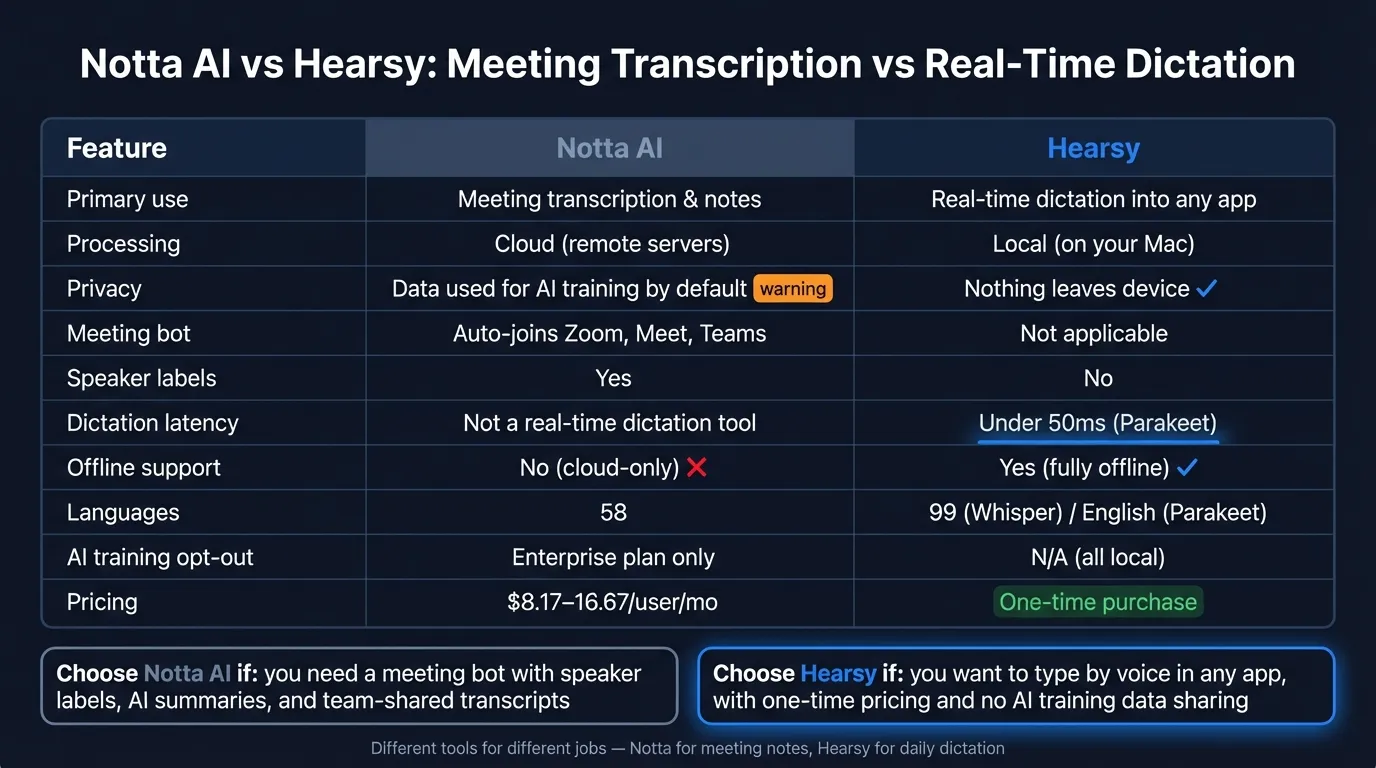
Quick side-by-side: For a feature table, pricing breakdown, and FAQ, see the Notta AI vs Hearsy comparison page.
What Notta AI is#
Notta AI is a cloud-based meeting transcription and note-taking service. A bot joins your Zoom, Google Meet, or Microsoft Teams call — or you record in-person audio on mobile — and Notta produces a transcript with speaker identification, AI-generated summaries, action items, and shareable notes. Transcripts sync to a web interface and can be exported or shared with teammates.
Notta supports 58 languages with bilingual transcription, integrates with Slack, Salesforce, Notion, and Zapier, and is available as a web app, desktop app (Mac and Windows), mobile app (iOS and Android), and Chrome extension. The company also sells a dedicated hardware device called Notta Memo for recording in-person conversations.
Notta holds SOC 2 Type II, ISO 27001, GDPR, and CCPA certifications — a strong compliance posture for a cloud service.
The free plan is severely limited. Notta's free tier offers 120 minutes of transcription per month, but caps each individual transcription at 3 minutes. A standard 30-minute team meeting requires restarting transcription 10 times. For practical use, you need the paid Pro plan at $8.17/month billed annually ($98/year) or $15/month billed monthly.
What Notta AI is: A cloud meeting transcription service that records calls, identifies speakers, generates AI summaries and action items, and syncs transcripts across your team.
What Hearsy is#
Hearsy is a macOS menu-bar dictation app. Press a global hotkey from any application — Gmail, Slack, VS Code, Apple Notes, Terminal — speak, and transcribed text is pasted at your cursor. No browser tab, no meeting bot, no uploaded file. You speak; text appears.
Everything runs on your Mac. Hearsy uses two AI engines:
- Parakeet TDT (English) — under 50ms latency on Apple Silicon
- Whisper Large V3 (99 languages) — local, no internet connection required
AI cleanup runs locally via Qwen 2.5 3B through MLX. Select a template — Clean & Format, Email, Code Comment, Summary — and the local language model processes your dictation on-device. No API key needed for the default configuration. You can optionally route cleanup through Claude or OpenAI if you prefer cloud model quality, but that's opt-in.
Hearsy is a one-time purchase. macOS only.
What Hearsy is: A local Mac dictation app with Parakeet and Whisper engines, on-device AI cleanup via Qwen 2.5 3B, and formatting templates. One-time price. Nothing leaves your Mac during transcription.
The use case difference#
This is the most important section of this comparison, so it's worth being explicit.
Notta's job: Record a meeting that involves multiple speakers, label who said what, and produce a structured document you can search and share after the meeting ends. You may not even be present — the bot attends on your behalf. This is an asynchronous workflow. The output is a document.
Hearsy's job: Let you type by voice, right now, into whatever app you're in. You're composing an email and you want to dictate a paragraph instead of typing it. You're in a code editor and you want to dictate a comment. You're in Slack and you want to speak a reply. This is a synchronous workflow. The output is text, immediately, at your cursor.
These jobs don't overlap much. Someone using Notta to transcribe their weekly team standup isn't necessarily going to find Hearsy useful as an alternative — Notta does things Hearsy doesn't (automatic call joining, speaker labels, meeting summaries). Someone using Hearsy to dictate emails all day isn't going to find Notta useful as an alternative — Notta doesn't let you press a hotkey and type by voice into Gmail.
Where the overlap exists: users who have been using Notta to record their own voice notes or narrate content solo rather than using it for multi-speaker meeting transcription. If you're recording your own thoughts to Notta and not using the meeting bot, speaker labeling, or team-sharing features, you're using a meeting tool for a dictation workflow. Hearsy is designed for that workflow specifically.
The Privacy-First Alternative
100% local processing. No subscription. One-time purchase. Works in every app on your Mac.
Privacy: the AI training data policy#
Notta holds enterprise-grade security certifications (SOC 2 Type II, ISO 27001, GDPR, CCPA). Data is encrypted in transit and at rest. For teams evaluating Notta purely on compliance documentation, the certifications are real and substantial.
The part worth understanding more carefully: by default, Notta uses Japanese-language user conversations to train its AI models. There is no opt-out from AI training data usage unless you are on the Enterprise plan — a custom-priced tier requiring direct sales contact. Business plan customers at $16.67/user/month billed annually do not get an opt-out.
This means that if you're on a Pro or Business plan and your meetings include sensitive information — business strategy, competitive discussions, confidential client calls, legal matters — those conversations may contribute to Notta's AI training data without a way to exclude them short of upgrading to Enterprise.
For general business use where conversations don't contain material competitive or confidential information, this may be acceptable risk. It's worth being aware of before you start routing your meetings through any cloud transcription service.
Hearsy's data handling:
There is no data handling policy to evaluate because no data is transmitted. Transcription runs in local RAM. You can verify this with Little Snitch or any network monitor: during transcription, Hearsy makes zero outbound connections. Audio that never leaves your device cannot appear on a third-party server or in a training dataset.
Speed and latency#
This comparison isn't entirely fair because the tools are doing different things, but it's worth addressing directly because some users search for Notta as a general "voice to text" tool.
Notta AI: Designed for post-session transcription, not real-time keystroke-level dictation. The experience is: start recording, speak for an extended period, stop recording, receive a complete transcript. Cloud processing adds latency that's acceptable for meeting-length recordings but fundamentally different from typing by voice in real time.
Hearsy: Parakeet TDT processes English audio in under 50ms on Apple Silicon. You speak a sentence, it appears at your cursor before you've finished the next breath. Whisper Large V3 takes 1–2 seconds for a typical paragraph, still entirely local.
If you've been frustrated with any cloud transcription service's real-time feel — the slight lag, the processing delay — that's a structural feature of cloud processing, not a specific product failure. Audio has to travel to a server and return. Local processing eliminates that round-trip entirely.
Pricing#
Notta AI:
- Free: 120 minutes/month, 3-minute per-conversation cap
- Pro: $8.17/month billed annually ($98/year), or $15/month billed monthly
- Business: $16.67/user/month billed annually (includes video recording, unlimited transcription, CRM integrations)
- Enterprise: Custom pricing (includes AI training data opt-out, SAML SSO, priority support)
Over two years at the Pro annual rate: $196. Over five years: $490.
Hearsy: One-time purchase. No subscription, no usage limits, no word cap, no conversation time limit.
The subscription math matters more when Notta is being evaluated as a daily dictation replacement rather than a meeting transcription tool. For a team running weekly standups, $8/month per person is a reasonable operational cost for a purpose-built meeting tool. For an individual trying to reduce daily keyboard use by dictating emails and messages, paying a recurring subscription to a meeting transcription service for a workflow it wasn't designed for is a harder sell.
Platform support#
Notta AI: Web, macOS, Windows, iOS, Android, Chrome extension. The cross-platform coverage is a genuine advantage — if your team includes Windows users, Notta serves everyone with the same tool.
Hearsy: macOS only. If you need cross-platform dictation, Hearsy doesn't solve that.
Who should choose Notta AI#
- You need automated meeting recording with a bot that joins Zoom, Google Meet, or Teams on your behalf
- Speaker identification and labeled transcripts matter for multi-person meetings
- You want AI-generated summaries, action items, and searchable meeting notes shared across your team
- Your team includes Windows or mobile users who need the same tool
- You need bilingual transcription for multilingual meetings
Who should choose Hearsy#
- You want to type by voice into any Mac app — emails, Slack, VS Code, Apple Notes, Terminal — not record meetings
- You dictate sensitive content and need audio processed locally, not on a third-party cloud server that may use it for AI training
- You prefer one-time pricing over a recurring subscription
- You need dictation that works offline — on planes, in secure facilities, without Wi-Fi
- You want the fastest possible English dictation: Parakeet processes text in under 50ms without a network round-trip
Can you use both?#
Yes, and some users do. Notta for recording team meetings and getting structured summaries. Hearsy for composing emails, writing documents, and dictating messages throughout the day. These aren't competing tools for the same job — they're different tools for different workflows that happen to both involve voice and text.
If the question is "which one replaces which," the honest answer is: neither replaces the other. If you need meeting transcription with speaker labels and team sharing, Hearsy doesn't do that. If you need to dictate into any Mac app in real time, Notta doesn't do that.
For more on how local and cloud transcription differ technically, see AI transcription: local vs cloud. For a broader look at Notta AI alternatives, see Notta AI alternative: 5 better options for Mac. For local Mac dictation options generally, see best dictation software for Mac. For voice data privacy considerations, see the voice data privacy guide.
Ready to Try Voice Dictation?
Hearsy is free to download. No signup, no credit card. Just install and start dictating.
Download Hearsy for MacmacOS 14+ · Apple Silicon · Free tier available
Related Articles
Otter AI Alternative: 5 Better Options for 2026
11 min read
Wispr Flow vs SuperWhisper vs Hearsy: 3-Way Mac Dictation Comparison
14 min read
Wispr Flow vs Hearsy: Privacy, Speed & Features Compared
8 min read
Willow Voice vs Hearsy: Cloud Subscription vs Local One-Time
8 min read
VoiceInk vs Hearsy: Mac Dictation Apps Compared
6 min read