
7 Best Privacy-First Dictation Apps for Mac in 2026
Roundup of the best local dictation apps for Mac that process audio on-device: Hearsy, Sotto, Spokenly, VoiceInk, Voibe, BetterDictation, SuperWhisper, and open-source options.
Most Mac dictation apps send your voice to a cloud server. Audio leaves your device, gets processed on someone else's infrastructure, and sits in a data center you don't control — sometimes for 30 days, sometimes longer.
Local dictation software is different. It runs the speech recognition AI model directly on your Mac, in RAM, using your CPU, GPU, or Apple Neural Engine. Audio is captured, converted to text, and discarded. Nothing is transmitted.
This isn't a policy guarantee that can change next quarter. It's how the architecture works. You can verify it with a network monitor: when using a genuinely local app, there are zero outbound connections during transcription.
As of 2026, there are seven solid paid options and two open-source alternatives for private dictation on Mac. Here's what each one does and how to choose.
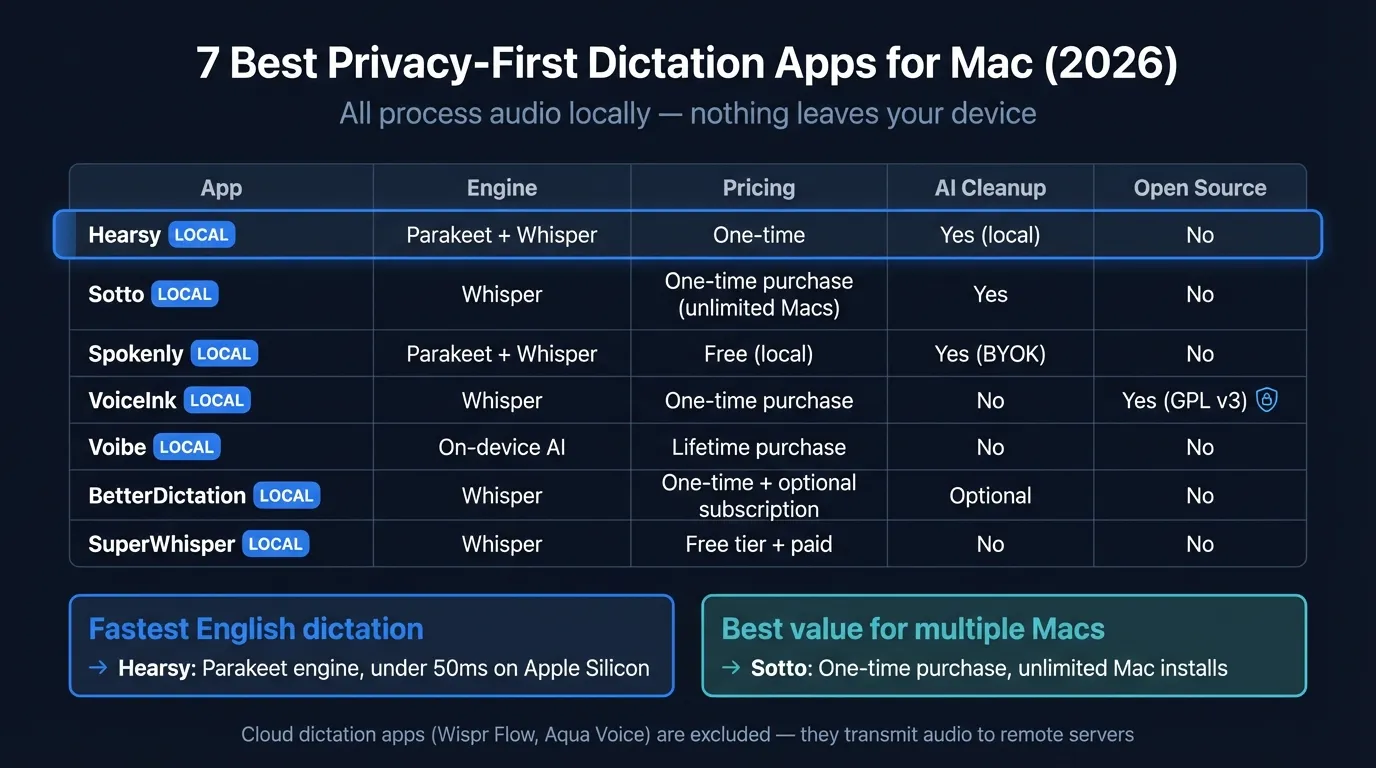
Here's how the top privacy-first dictation apps compare on engine, pricing, and features:
What "privacy-first" actually means#
Not every app that uses "private" in its marketing processes audio locally. Some cloud apps offer zero-retention policies — they delete your audio immediately after transcription. That's better than storing it, but audio still travels over a network to their servers.
A genuinely private dictation app has one defining characteristic: the speech recognition AI model runs on your device. No network request is made during transcription. This is verifiable; policy commitments are not.
A few more things worth distinguishing:
AI post-processing is separate from transcription. Some local apps offer optional grammar cleanup or formatting via cloud LLMs (Claude, OpenAI). That cleanup request goes to an API, but it sends text — not your original audio. You can turn it off entirely and use a local language model instead.
"Offline" doesn't always mean local. Some apps cache data and sync later. For dictation, offline typically means the speech recognition itself doesn't require a connection, which is the behavior covered in this roundup.
The apps#
1. Hearsy#
Processing: Local (Parakeet or Whisper) — no audio transmitted Engine: NVIDIA Parakeet TDT (English, under 50ms) or OpenAI Whisper Large V3 (99 languages) Pricing: One-time purchase Platform: macOS only
One disclosure: Hearsy is my app. I've tried to write this roundup honestly, including cases where other apps are a better fit.
Hearsy runs either NVIDIA Parakeet TDT 0.6B v2 — a model that achieves under 50ms transcription latency on Apple Silicon — or Whisper Large V3 for non-English languages. Both engines run entirely in RAM. Audio is captured, transcribed, and discarded without any network activity.
The AI post-processing step (grammar cleanup, formatting templates like Email, Code Comment, or Summary) uses a local Qwen 2.5 language model by default. If you configure Claude or OpenAI for cleanup, that text-only request goes to their API — but you can run the whole pipeline offline with local AI.
You can verify Hearsy's network behavior: run it while monitoring connections with Little Snitch. During transcription, there's nothing to report.
Where Hearsy is the best fit: Fastest English dictation on Mac, privacy combined with AI post-processing, one-time pricing.
Where it's not: Hearsy is macOS-only and doesn't have natural-language voice editing ("change that last phrase to...").
2. Sotto#
Processing: Local (Whisper) — no audio transmitted Engine: OpenAI Whisper (multiple model sizes) Pricing: $29 one-time, unlimited Macs Platform: macOS only
Sotto processes audio entirely on-device using Whisper. It covers all Whisper model sizes, supports 99 languages, and includes push-to-talk with auto-paste — the same interaction model as Hearsy. AI post-processing is included in the base price.
The pricing structure is notable: $29 covers unlimited Mac installations. For teams or anyone running multiple machines, that's the best per-device cost in this category.
Sotto also appears consistently in 2025–2026 dictation app comparisons as a top recommendation for most users who want local dictation without complexity.
Where Sotto is the best fit: Best value per device, especially on multiple Macs.
Where it's not: Sotto uses Whisper only — no Parakeet engine, so English latency is higher than Hearsy's (typically 1–2 seconds vs. under 50ms).
3. Spokenly#
Processing: Local (Parakeet + Whisper) or cloud — user's choice Engine: NVIDIA Parakeet or OpenAI Whisper (local), GPT-4/Claude (cloud, BYOK or subscription) Pricing: Free for local-only use; $7.99/month for cloud without own API keys Platform: macOS, iOS
Spokenly gives users an explicit choice: use local Whisper or Parakeet models with no data leaving the device, or connect cloud models via your own API keys (BYOK) or a Spokenly subscription. Local mode is completely free with no usage limits.
In local-only mode, Spokenly is as private as any app in this list — audio doesn't leave your device and there are no word count caps. The free model is unusual: most apps charge for the core transcription feature.
Spokenly also includes Agent Mode for hands-free Mac control and smart AI templates for formatting. It's available on the Mac App Store.
Where Spokenly is the best fit: Users who want local privacy by default but the option to use cloud AI occasionally via BYOK, and anyone who wants to try before paying.
Where it's not: The free-plus-subscription model means ongoing costs if you use cloud features without your own API keys.
4. VoiceInk#
Processing: Local (Whisper via whisper.cpp) — no audio transmitted Engine: OpenAI Whisper (whisper.cpp), 100+ languages Pricing: $39 one-time (2 devices); open-source under GPL v3.0 Platform: macOS 14 (Sonoma) or newer
VoiceInk is local-only and open-source. Source code is available on GitHub under the GPL v3.0 license — you can build it yourself for free or pay $39 for a pre-built binary with automatic updates and priority support.
The app adds screen context awareness: it reads surrounding text in your active app to help disambiguate similar-sounding words and technical terms. Smart dictionaries let you add custom vocabulary. "Power Mode" applies pre-configured settings based on your active app or URL — so behavior in a code editor differs from behavior in an email client.
VoiceInk requires macOS 14 or newer (no macOS 13 support) and works on Apple Silicon only.
Where VoiceInk is the best fit: Users who want open-source auditability, screen context awareness, or the ability to verify the code directly.
Where it's not: Requires macOS 14, so it won't run on older systems. The Whisper-based engine means English latency is 1–2 seconds, not under 50ms.
5. Voibe#
Processing: Local — no audio transmitted Engine: On-device AI, Apple Silicon optimized Pricing: $4.90/month, $44.10/year, $99 lifetime; 7-day free trial Platform: macOS
Voibe targets professionals who dictate confidential content — lawyers, consultants, anyone in NDA-sensitive work. It positions itself on privacy and speed, with a sub-300ms latency target on Apple Silicon.
A Developer Mode resolves workspace file and folder names for tools like Cursor and Windsurf — an unusual feature for coding workflows. Voibe integrates system-wide via the Accessibility API and supports custom vocabulary for technical jargon.
The $99 lifetime option makes it competitive with one-time-purchase alternatives. The 7-day free trial lets you verify performance before committing.
Where Voibe is the best fit: Professionals who need confidential dictation and want a polished, professionally supported app with a free trial.
Where it's not: At $4.90/month recurring, it costs more than one-time-purchase alternatives over time unless you opt for the lifetime plan.
6. BetterDictation#
Processing: Local (Whisper) — no audio transmitted Engine: OpenAI Whisper, 100+ languages Pricing: $39 one-time; optional Pro at $2/month for AI cleanup Platform: macOS, Apple Silicon only
BetterDictation offers a clean split: the base $39 purchase gives you unlimited offline dictation with no subscription component. The optional $2/month Pro tier adds AI filler-word removal, grammar cleanup, and list formatting. You can ignore the Pro tier entirely and get a fully functional local dictation app for a one-time fee.
It requires Apple Silicon — no Intel Mac support. The app is lightweight and focused: push-to-talk, auto-paste, 100+ language support via Whisper. No complex configuration.
BetterDictation claims enterprise users including teams at Disney and Amazon, which speaks to the use case: organizations that need local processing for compliance and confidentiality, without cloud dependency.
Where BetterDictation is the best fit: Users who want the lowest possible ongoing cost for AI cleanup, or organizations with strict offline requirements.
Where it's not: Brand searches for BetterDictation have declined over the past 12 months (from roughly 210 to 90/month), which may indicate reduced development activity. Worth checking recent release notes before committing.
7. SuperWhisper#
Processing: Local (Whisper) — no audio transmitted Engine: OpenAI Whisper (multiple model sizes) Pricing: Free tier available; paid tiers Platform: macOS only
SuperWhisper has a strong developer following and significant brand recognition — around 8,100 monthly brand searches. It runs Whisper locally on Apple Silicon, includes a free tier, and supports Whisper model selection for accuracy vs. speed trade-offs.
The app doesn't include Parakeet (English latency is Whisper-speed, typically 1–2 seconds) and doesn't include AI post-processing templates in the base product. It's a solid, well-established local dictation app that does what it says.
SuperWhisper was one of the first apps to make local Whisper dictation accessible to non-technical Mac users, and its documentation and community resources reflect that maturity.
Where SuperWhisper is the best fit: Users who want an established, well-documented local dictation app with a free tier to try before buying.
Where it's not: No Parakeet engine for sub-100ms English latency. No built-in AI cleanup for formatting or grammar.
The Privacy-First Alternative
100% local processing. No subscription. One-time purchase. Works in every app on your Mac.
Open-source options#
Two free, open-source apps are worth mentioning for users who want maximum auditability.
open-wispr is free, MIT-licensed, and macOS-only (Apple Silicon required). It went viral on Medium in early 2026 as a "free alternative to everything else." Hold a key, speak, release — text appears, processed entirely on-device. No subscription, no word limits, no telemetry. The project is available via GitHub and installs via Homebrew. It's minimal: transcription only, no AI cleanup or templates.
OpenWhispr is also MIT-licensed and cross-platform (macOS, Windows, Linux). It supports both Parakeet and Whisper local models, with a free cloud tier (2,000 words/week) for users who want the option. Local processing has no limits. Being cross-platform makes it unusual in this category — most local Mac dictation apps are macOS-only.
If you're comfortable with a terminal install and don't need AI post-processing, either open-source option works.
Comparison table#
| App | Processing | Engine | Pricing (March 2026) | AI cleanup | Offline |
|---|---|---|---|---|---|
| Hearsy | Local only | Parakeet + Whisper | One-time | Yes (local or cloud) | Yes |
| Sotto | Local only | Whisper | $29 one-time (unlimited Macs) | Yes | Yes |
| Spokenly | Local or cloud | Parakeet + Whisper | Free (local); $7.99/mo (cloud) | Yes (BYOK free) | Yes (local mode) |
| VoiceInk | Local only | Whisper | $39 one-time (2 devices) | No | Yes |
| Voibe | Local only | On-device AI | $4.90/mo or $99 lifetime | No | Yes |
| BetterDictation | Local only | Whisper | $39 one-time + $2/mo Pro | Optional ($2/mo) | Yes |
| SuperWhisper | Local only | Whisper | Free tier + paid tiers | No | Yes |
| open-wispr | Local only | Whisper | Free, open-source | No | Yes |
| OpenWhispr | Local or cloud | Parakeet + Whisper | Free (local), 2k words/wk cloud | No | Yes (local) |
Which to choose#
For fastest English dictation: Hearsy (Parakeet, under 50ms) or Voibe (sub-300ms target, Apple Silicon optimized). If you dictate in bursts throughout the day, latency compounds.
For best value across multiple Macs: Sotto at $29 covers unlimited machines. No other paid app in this category matches that pricing for multi-device use.
For open-source auditability: VoiceInk (GPL v3.0) or open-wispr / OpenWhispr (MIT). You can inspect the code, build it yourself, and verify the behavior independently.
For free local dictation: Spokenly's local mode (Parakeet + Whisper, unlimited) or open-wispr (Whisper, MIT-licensed). Both are genuinely free for local processing.
For AI cleanup without cloud dependency: Hearsy includes local AI post-processing (Qwen 2.5 via MLX). BetterDictation's $2/month Pro tier adds cleanup at the lowest recurring cost of any paid option.
For professional or regulated environments: Any app in this list works by design — audio stays on-device in all of them. The additional factor is support and documentation. VoiceInk and SuperWhisper have the most active communities and documentation.
For non-English languages: Whisper Large V3 covers 99 languages, and it runs in every app on this list except Voibe (which uses an undisclosed on-device model). Spokenly and OpenWhispr also support Parakeet for English plus Whisper for everything else.
Avoid cloud-based apps entirely if: you dictate medical notes, legal content, confidential business information, or anything regulated under HIPAA or GDPR. Local processing removes the compliance complexity of audio-in-transit and third-party data handling. See the voice data privacy guide and HIPAA and GDPR voice dictation guide for a detailed breakdown.
Why local dictation has become practical#
In 2022, local speech recognition was a compromise. Whisper's first release was slow on consumer hardware and memory-intensive. Cloud services had a meaningful accuracy edge.
That's no longer the case on Apple Silicon. The M-series Neural Engine was designed for exactly this workload — running transformer models in real-time with low power draw.
NVIDIA Parakeet TDT 0.6B v2, used in Hearsy and Spokenly, achieves 1.69% word error rate on the LibriSpeech clean benchmark with under 50ms latency on M-series chips (NVIDIA, 2025). Whisper Large V3 achieves approximately 2.7% WER on the same benchmark while supporting 99 languages.
The cloud accuracy edge now shows up only in difficult conditions: heavy accents, significant background noise, specialized medical or legal vocabulary. For standard dictation of clear speech — emails, notes, documents — local models match cloud performance. And they respond faster, because there's no network round-trip.
This is why there are now seven credible paid apps in this category. Twelve months ago there were three. The hardware has caught up to the privacy requirement.
For a deeper look at how local and cloud transcription differ technically, see the AI transcription: local vs cloud breakdown. For what actually happens to your audio when you use a cloud dictation app, see where does your voice data go. For how local AI models like Whisper and Parakeet work, see the on-device AI speech recognition guide.
Frequently asked questions#
What is private dictation software?#
Private dictation software runs the speech recognition AI model entirely on your device — no audio is transmitted to external servers. Apps like Hearsy, Sotto, VoiceInk, and others in this list process audio in local RAM using models like OpenAI Whisper or NVIDIA Parakeet. When you dictate, audio is captured, converted to text, and discarded without leaving your Mac. This is a technical guarantee, not a policy: there's nothing to transmit because the processing happens locally.
Which dictation app is most private?#
All apps that process audio on-device are structurally equivalent in terms of privacy: Hearsy, Sotto, BetterDictation, Spokenly (local mode), VoiceInk, Voibe, and SuperWhisper. None of them transmit audio during transcription. The open-source options (VoiceInk, open-wispr, OpenWhispr) add auditability — you can read the code and verify the behavior independently. For maximum verification, run any of these apps while monitoring network traffic with Little Snitch.
Does local dictation work offline?#
Yes. Every app in this roundup runs speech recognition on-device and works without an internet connection. The AI model loads into RAM from a local file. Planes, hospitals, secure facilities, areas with unreliable connectivity — local dictation works in all of them. AI post-processing (grammar cleanup, formatting) may require an internet connection if you configure cloud APIs for that step, but transcription itself is always offline.
Is local dictation as accurate as cloud dictation?#
For clear speech in a quiet environment: yes, effectively. NVIDIA Parakeet TDT 0.6B v2 achieves 1.69% word error rate on LibriSpeech benchmarks (NVIDIA, 2025). Whisper Large V3 achieves approximately 2.7% WER on the same benchmark. Cloud services have an accuracy advantage on difficult audio — heavy accents, specialized vocabulary, significant background noise. For typical dictation conditions, local models match cloud performance and respond faster because there's no network round-trip.
What is the cheapest privacy-first dictation app for Mac?#
open-wispr and OpenWhispr are free and open-source (MIT license). Among paid apps, Spokenly offers unlimited local dictation for free — you only pay ($7.99/month) if you want cloud features without your own API keys. Sotto at $29 one-time is the cheapest paid option for users who want a full-featured app with updates and support. BetterDictation at $39 is comparable and adds an optional $2/month Pro tier for AI cleanup.
Ready to Try Voice Dictation?
Hearsy is free to download. No signup, no credit card. Just install and start dictating.
Download Hearsy for MacmacOS 14+ · Apple Silicon · Free tier available
Related Articles
Otter AI Alternative: 5 Better Options for 2026
11 min read
Wispr Flow vs SuperWhisper vs Hearsy: 3-Way Mac Dictation Comparison
14 min read
Wispr Flow vs Hearsy: Privacy, Speed & Features Compared
8 min read
Willow Voice vs Hearsy: Cloud Subscription vs Local One-Time
8 min read
VoiceInk vs Hearsy: Mac Dictation Apps Compared
6 min read